


Pay your team through Hospitable with the Hospitable Tasks app

  • March 5, 2026
  • 34 replies
  • 542 views
Show first post

34 replies

Jake Shepherd
Hospitable Team Member
Forum|alt.badge.img
  • Author
  • Hospitable Team Member
  • March 12, 2026

Can more than one cleaner be added, so if one does not accept the task, the other cleaner is notified?

@tonya Also great feedback, thank you! Fallback assignments are something we’d like to get into soon so we’ll keep you informed about that! Another great one to add to our feedback site: https://feedback.hospitable.com/


Andrew Schorr
Hospitable Team Member
  • Hospitable Team Member
  • March 12, 2026

We auto-schedule cleaning transactions so they populate on owner statements. The issue is Hospitable timestamps the transaction at the beginning of the stay, not at checkout when the cleaning actually occurs.

Has this been fixed in this latest update?

Hi ​@Kyle Lancaster we haven’t touched the scheduled/repeat transactions functionality for this. However if you pay your cleaners through Hospitable, we create a transaction for the property in Hospitable’s accounting that would be dated correctly. So it solves your problem if you are paying for tasks in Hospitable, but not for scheduled transactions generally.

I found a feature request for what you are asking about and added an upvote for you: https://feedback.hospitable.com/p/ability-to-set-the-recurring-cleaning-transaction-during-check-out


Andrew Schorr
Hospitable Team Member
  • Hospitable Team Member
  • March 12, 2026

If we pay our cleaners via the Task App, will it end up generating a 1099-NEC for the cleaner payments i make for my properties?

Hi ​@aimee We will have a solution for W-9s and 1099s soon. We’re currently waiting on a professional opinion from our lawyers on whether Hospitable can issue the documents on host’s behalf and whose name should be on them (ie. Hospitable or the host). There’s a question since Hospitable is really only the payment processor in this scenario and not a party to the transaction.

If we’re able to issue them ourselves, we’ll happily do that. If we aren’t able to issue them directly, we’ll make sure we have all of the correct information and accounting for hosts to issue them.


Andrew Schorr
Hospitable Team Member
  • Hospitable Team Member
  • March 12, 2026

Will this issue 1099s

See my above reply. We’ll have a solution for 1099s soon, we’re just not sure what precisely that looks like today.


and will there be an option to pay by credit card instead of bank account?

Yes. We’re working on that now.


Anthonybox
New Participant
Forum|alt.badge.img
  • New Participant
  • March 13, 2026

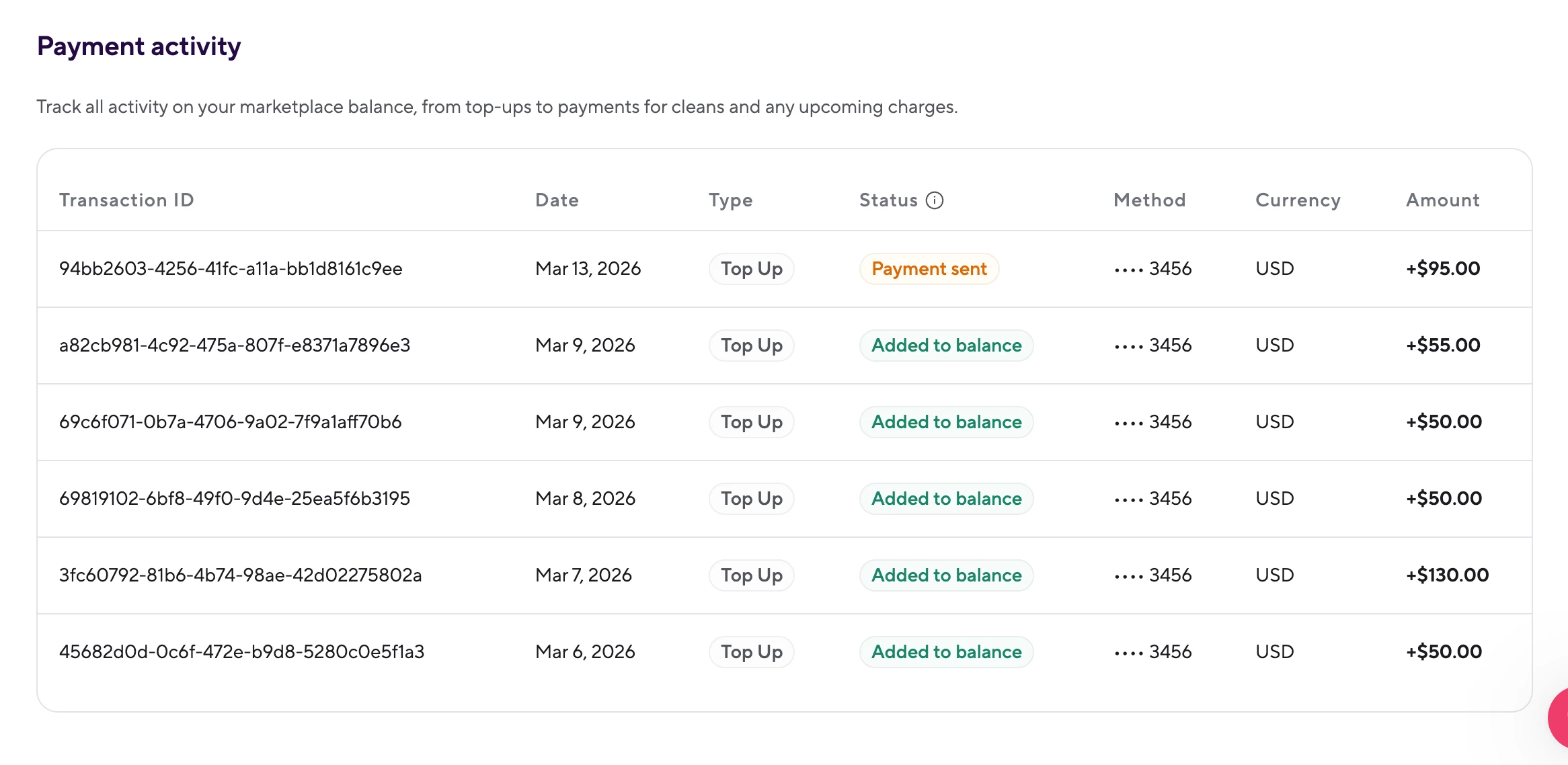
I am very frustrated with the way these “Top Up’s” for the Task are displayed in the “Payment activity” section.  These exact same amounts appear as debits in my bank account but my bookkeeper and I are losing track of which amount debited goes to which property/owner (some of our smaller units are $50 to clean, some of the larger units are $130 to clean, etc. So it’s COMPLETELY confusing which Top Up was used for which property).  This is TERRIBLE for trust accounting as again, we can no longer track which amount debited goes to which property.  This needs to be fixed ASAP please!! Please display the property and/or owner this “Top Up” is being debited against so we can reflect that during bookkeeping balancing to the correct owner.  


Anthonybox
New Participant
Forum|alt.badge.img
  • New Participant
  • March 13, 2026

Also from what I can tell, there’s a nasty little “feature” that initially when you create a automated task, by default, no amount is assigned to it. If you then add an amount for a task but then decide you want to delete that amount (so that you can pay your Teammates manually outside of the Hospitable system), an error is given that the amount MUST be at least $.01

Unless I’m mistaken, now you are stuck with that Task always trying to debit from your account the $.01 whenever it’s assigned to a Teammate. 

(Please let me know if I am incorrect and how to fix what I am seeing.)


Andrew Schorr
Hospitable Team Member
  • Hospitable Team Member
  • March 18, 2026

Thanks for the feedback and suggested improvements ​@Anthonybox 

Please display the property and/or owner this “Top Up” is being debited against so we can reflect that during bookkeeping balancing to the correct owner.  

Great suggestion. I’m creating a task now for us to show more context here. That should be a light lift for us. We may also be able to get similar details added to the transaction itself so your bookkeeper could reference that in your banking app.

If you then add an amount for a task but then decide you want to delete that amount (so that you can pay your Teammates manually outside of the Hospitable system), an error is given that the amount MUST be at least $.01

This was not the intended behavior. Thanks for flagging it for us. We’ll fix this ASAP.


Stan_Jansen
New Participant
  • New Participant
  • March 22, 2026

Hi everyone (and Hospitable team 👋),

I've been loving the new Hospitable Tasks feature and the teammate portal/app since the March 6, 2026 launch — the real-time updates, photo uploads, checklists, and payout integration are game-changers for coordinating teams.

That said, as someone who often has "working managers" (people who are both Secondary Users with dashboard access and Teammates with operational roles like Cleaning), I've run into a few usability frustrations. Sharing here in case others feel the same — would love your thoughts or workarounds, and hoping the product team sees this for future improvements!

  1. Friction for the same person being both Secondary User and Teammate When a person has a Secondary User login (e.g., manage the Tasks) and a Teammates profile (with roles like Cleaning and Manager), they get assigned cleaning/maintenance tasks — which is great. But with "Tasks" permission set to "Update their tasks", they can only edit details and mark as complete on those tasks directly from the main Hospitable Calendar (Task view). They cannot accept, reject, or mark progress ("In progress", "Needs attention") from there. Instead, they have to log into the separate tasks.hospitable.com portal (as the Teammate) to handle acceptance/rejection/progress updates for their own tasks. This creates unnecessary switching between two logins/interfaces for the exact same person — it feels disjointed when the main dashboard already shows the tasks/dots. The separation makes total sense for external cleaners without dashboard access, but it's awkward for hybrid users. Suggestion: Allow Secondary Users (with "Update their tasks" or higher) to fully interact with their own assigned tasks (accept/reject/progress/complete) directly in the main Calendar/Task view. 
     
  2. Tasks.hospitable.com - Dashboard/Jobs view could be much more comprehensive The current dashboard only highlights one "Next scheduled day" task, and users have to hunt for additional jobs via tiny calendar dots or the "Go to next job" button in Jobs — not ideal when juggling multiple properties/tasks. Additional thought: It would be much better to mirror more of the familiar main Hospitable layouts. For example:
    • A scrollable chronological list of all upcoming/accepted tasks right on the dashboard (like a card or table view for the next 7–14 days).
    • In the Jobs section, replace the limited mini-calendar with a fuller calendar view similar to the main Hospitable Tasks Calendar — showing reservation lines (check-in/check-out indicators) across all properties the teammate is assigned to. This would give quick context for planning and overview. Right now, the Jobs page feels like a single-task stepper rather than a daily planner, which makes it harder for busy teammates to see the full picture at a glance.
       
  3. Payouts visibility in the Tasks portal The Payouts section shows up for every Teammate in tasks.hospitable.com, even in countries/regions where payouts aren't yet available (outside the US, and not everywhere even with Direct Premium). This can confuse teammates who see banking setup options but can't actually use them. Suggestion: Hide/disable the Payouts area entirely (or show a "Coming soon to your region" message) based on the account/property country to avoid misleading anyone.

These tweaks would make the Tasks portal/app feel even more seamless — especially for teams where managers also jump in on operational work. 

What do others think? Anyone else running into similar hybrid-role pain points or found clever ways around them? @Hospitable team — love to hear if any of this is already on the roadmap!

Thanks for an awesome platform overall — keep up the great work! 🚀


Petra Podobnik
Hospitable Team Member
Forum|alt.badge.img
  • Hospitable Team Member
  • March 23, 2026

Thanks ​@Stan_Jansen for your feedback.

P.S. I’ve moved the comment from another conversation here, as Jake and Andrew are keeping an eye on this thread, collecting feedback, and prioritizing next steps. Just so you know. 💜