

Show visual confirmation that guest has used Lock Code in the thread

  • November 10, 2025
  • 13 replies
  • 217 views
Kristijan Laco
Hospitable Team Member
Forum|alt.badge.img+3

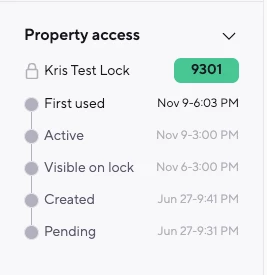
We’ve just made a handy improvement to the smart lock widget in your Inbox!

You’ll now see a new “First used” status, showing the exact time a smart lock code was first used, the same timestamp you’d normally find in the device dashboard.

This update was inspired by feedback from our community (special shout-out to ​@anthonyrallo 👏). Many of you told us how useful it would be to have that first used info right in the Inbox and now, you’ve got it!

It’s a small change that makes it even easier to stay on top of guest arrivals without switching views.

We’re always listening, and this is another great example of a community idea making its way into the product. Keep the feedback coming. You never know which idea will be next to make the jump from “feature request” to “feature shipped.” 😉 💪

 

13 replies

anthonyrallo
Inspiring
Forum|alt.badge.img+2
  • Inspiring
  • November 10, 2025

Well hot damn! That’s pretty amazing! Saving time one feature at a time. Thank you Team HSPTB & ​@Kristijan Laco! Feature Friday = Success!


admin-mihael
New Participant
  • New Participant
  • November 11, 2025

Multilevel listings


yanchab
New Participant
Forum|alt.badge.img
  • New Participant
  • December 27, 2025

Would it be possible to further improve the visibility of smartcode usage?
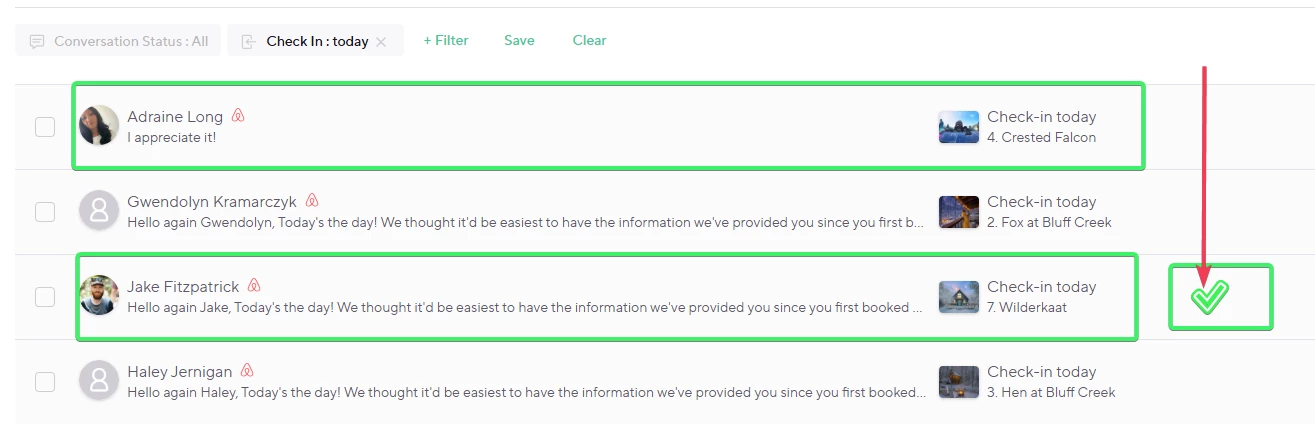
I would like to be able to see it directly from the home dashboard, as shown in my modified screenshot.
The waiting clock turns into a green check mark to indicate that the traveler has arrived (first use of the code).
We could even imagine a hover that displays the code or the time of use.
I want to be able to see at a glance whether people have arrived or not.


Filip
New Participant
Forum|alt.badge.img
  • New Participant
  • December 29, 2025

This is a great improvement, thank you.

One thing I would strongly suggest adding:

If Message Rules are configured in Guest Experience to be sent for reservations with status “Staying”, it would make much more sense if the message were triggered after the guest actually uses the lock code (e.g. 1 hour after first entry), not automatically a fixed time after the official check-in time.


In real life, guests often arrive earlier or later than the check-in time.

Tying the message to real usage of the lock code would make the communication far more relevant and accurate.


Petra Podobnik
Hospitable Team Member
Forum|alt.badge.img
  • Hospitable Team Member
  • December 30, 2025

P.S. Kristijan is taking some time off over the holidays, so he’ll reply once he’s back. 💜


Kristijan Laco
Hospitable Team Member
Forum|alt.badge.img+3
  • Author
  • Hospitable Team Member
  • January 2, 2026

Would it be possible to further improve the visibility of smartcode usage?
I would like to be able to see it directly from the home dashboard, as shown in my modified screenshot.
The waiting clock turns into a green check mark to indicate that the traveler has arrived (first use of the code).
We could even imagine a hover that displays the code or the time of use.
I want to be able to see at a glance whether people have arrived or not.


@yanchab 

That’s a thoughtful idea, seeing first code use as a clear “arrival” signal would definitely be valuable.

We actually explored something similar early on, but ultimately decided not to move forward with it at the time. The main challenge is that surfacing this on the home dashboard would require additional engineering work to reliably track and surface lock activity for every reservation. If not handled very carefully, that kind of real-time checking can have serious performance and loading-time implications.

It’s not something we’re ruling out long term, but it’s a bigger lift than it might appear on the surface. If this is important to you (or others), opening a Featurebase request would be the best way for us to track demand and prioritize it appropriately.


anthonyrallo
Inspiring
Forum|alt.badge.img+2
  • Inspiring
  • January 9, 2026

This is a great improvement, thank you.

One thing I would strongly suggest adding:

If Message Rules are configured in Guest Experience to be sent for reservations with status “Staying”, it would make much more sense if the message were triggered after the guest actually uses the lock code (e.g. 1 hour after first entry), not automatically a fixed time after the official check-in time.


In real life, guests often arrive earlier or later than the check-in time.

Tying the message to real usage of the lock code would make the communication far more relevant and accurate.

@Filip - I absolutely LOVE this as a trigger capability. This could apply in many instances. 

@yanchab  - I had initially requested for an indicator in the FULL messaging thread that would show the guest had arrived/was “in-house” as they say. This would be visible in the full inbox - not just when clicking on the INDIVIDUAL guest thread. 

Don’t get me wrong ​@Kristijan Laco - I am SO pleased that you pushed a cool update to have the lock code visible in their individual guest thread, but a view while just in the inbox would be amazing. 

Think of this scenario - It’s 8PM so you use the filter “checkin today” to see if all your guests made it in safely. How cool would something like this be? 

Option 1: A green border around the guest thread indicating they’ve arrived
Option 2: (less in your face) A green checkmark on the far right shows they’ve arrived and used their code? 

Anyone else like this? 


CoHost Oklahoma
Known Participant
Forum|alt.badge.img+1

Brilliant!!! 


ssd
Participating Frequently
Forum|alt.badge.img
  • Participating Frequently
  • January 14, 2026

YES!
It would be really awesome to have “after lock code used first time” as a trigger for Messaging Rule


yanchab
New Participant
Forum|alt.badge.img
  • New Participant
  • January 14, 2026

In truth, it would need to be paired with several things.

If the traveler code is used on the key box, it has arrived

If there is a problem with the internet connection to the key box or smart lock, we will not be notified.

I use a French app (Passpass) that included a button in the digital booklet (guest portal) to “notify the host that I have arrived.” Travelers used it 90% of the time. Those who forget could be compensated by the smart key box.


anthonyrallo
Inspiring
Forum|alt.badge.img+2
  • Inspiring
  • January 15, 2026

YES!
It would be really awesome to have “after lock code used first time” as a trigger for Messaging Rule

Thank you ​@ssd - I’ll put together an updated feature request so you can support that way too. 


anthonyrallo
Inspiring
Forum|alt.badge.img+2
  • Inspiring
  • January 15, 2026

@CoHost Oklahoma - Thanks for that. HSPTB is all about saving time for us, so this fits quite well into that mission. 


anthonyrallo
Inspiring
Forum|alt.badge.img+2
  • Inspiring
  • January 15, 2026

@yanchab - Thank you for sharing your use case scenario. I know of only a small amount of wifi enable lockboxes so that would need to be supported first. If I’m going to take your view further, there could be multiple/redundant devices that could indicate an arrival. We all know that IoT devices aren’t as reliable as we want them to be.