


Static Guest Portal & Upsell Links

  • October 28, 2025
  • 47 replies
  • 1427 views
Show first post

47 replies

andrew_bca
Participating Frequently
Forum|alt.badge.img
  • Participating Frequently
  • November 5, 2025

Hi ​@Aryeh Raber 

You mentioned an inbox filter for upsells. Is that live? I’m not seeing it but it could just be me!


Aryeh Raber
Hospitable Team Member
Forum|alt.badge.img+2
  • Author
  • Hospitable Team Member
  • November 5, 2025

@andrew_bca Not yet, I was merely asking for feedback for a new filter for just purchased upsells. From previous comments on this post, and the fact that you’re asking about it specifically, it seems pretty clear that this would be a welcome addition. I’m going to see what I can do!


Aryeh Raber
Hospitable Team Member
Forum|alt.badge.img+2
  • Author
  • Hospitable Team Member
  • November 5, 2025

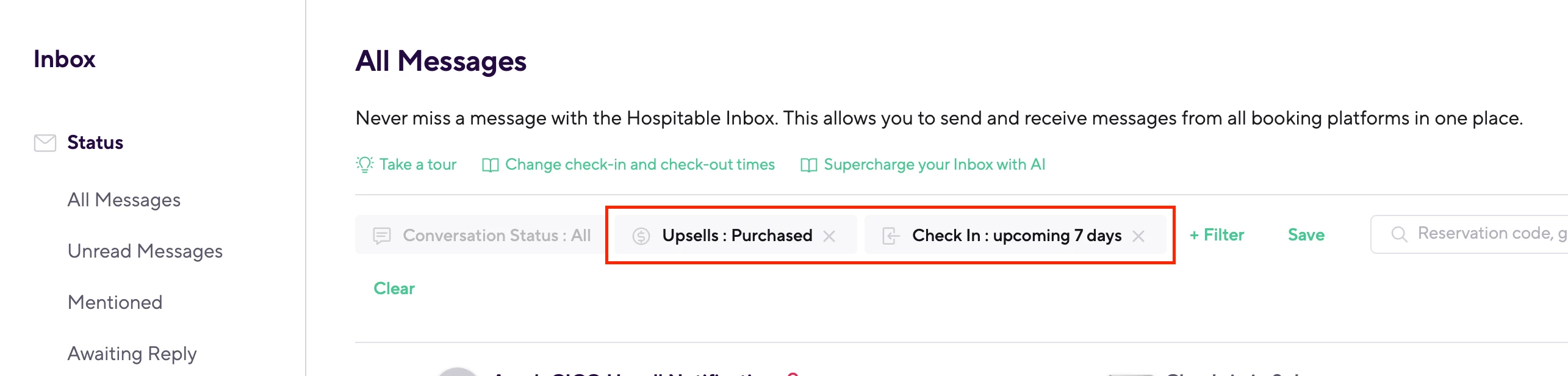
@Shawn-luxanto ​@mrotman ​@andrew_bca We've just rolled out an additional Upsell filter option for "Purchased" upsells! The "Pending Requests" filter from last week and now the new "Purchased" filter live under a general “Upsells” filter group.

In combination with the existing "Check-in: upcoming X days" filter, you should now have a much better overview of guests that purchased upsells for upcoming bookings.

Thanks again for the consistent feedback!


mrotman
Known Participant
Forum|alt.badge.img+2
  • Known Participant
  • November 5, 2025

Great! Any word when the upsells will automatically send a notification to our cleaners of time change? I know you guys are looking at the building that.


Aryeh Raber
Hospitable Team Member
Forum|alt.badge.img+2
  • Author
  • Hospitable Team Member
  • November 5, 2025

@mrotman It’s close to ready 🤏 Just awaiting some final internal testing and discussion. You’ll literally be the first person I tag when it’s released!


mrotman
Known Participant
Forum|alt.badge.img+2
  • Known Participant
  • November 5, 2025

Thank you! I think the only other thing is being able to see upsells sold/money made page. And then you can list by cabin or date- and it lists out all the upsells you had for that time period with a money total. Currently I am not sure where to even find that.


anthonyrallo
Inspiring
Forum|alt.badge.img+2
  • Inspiring
  • November 6, 2025

@mrotman It’s close to ready 🤏 Just awaiting some final internal testing and discussion. You’ll literally be the first person I tag when it’s released!

This is super exciting ​@Aryeh Raber  - Did my last comment help?

If we were to make it even EASIER on the guest, it would only require their NAME and would prepopulate their available upsells. That’s where doing this in HSPTB (vs HostCo) has another significant advantage - you have the guest details! Now let’s use the power you are afforded by that to make the upsell a no-brainer :-)

@mrotman - Do you use HostCo the same way?


Aryeh Raber
Hospitable Team Member
Forum|alt.badge.img+2
  • Author
  • Hospitable Team Member
  • November 6, 2025

@anthonyrallo Yes, thanks again for your feedback! We’re taking note of all the responses here (and on https://feedback.hospitable.com), and will do our best to come up with something great over the coming weeks/months.


mrotman
Known Participant
Forum|alt.badge.img+2
  • Known Participant
  • November 6, 2025

For hostco I simply send them the link to the store 24 hours before I allow the purchase. Say that and fill out whatever information hostco makes them fill out. I then receive a text that they have purchased which then allows me to contact any of my providers I need to contact.. again I will switch over to hospitable once that becomes automated so I don't have to contact my providers. That would save me a lot of time


anthonyrallo
Inspiring
Forum|alt.badge.img+2
  • Inspiring
  • November 7, 2025

@mrotman - static links would make this possible not only in automated messages, but also a guidebook or QR code at the property. Excited for what the team comes up with ( that can still be EASY for the guest)… ahem, cough, not having to enter an obscure rental code, cough ​@PC Hamana 


anthonyrallo
Inspiring
Forum|alt.badge.img+2
  • Inspiring
  • November 7, 2025

@anthonyrallo Yes, thanks again for your feedback! We’re taking note of all the responses here (and on https://feedback.hospitable.com), and will do our best to come up with something great over the coming weeks/months.

For those coming to this thread and looking for the most relevant Feature Request for Upsells I’m linking it. 


Aryeh Raber
Hospitable Team Member
Forum|alt.badge.img+2
  • Author
  • Hospitable Team Member
  • November 13, 2025

@mrotman Wanted to let you (and anyone else following along) know that we just released CICO time change team notifications to our Beta audience 🎉  (might take a few minutes to show up as it was just merged into production).

If you haven’t turned on Beta features, head over to Settings > General (https://my.hospitable.com/settings/general) to turn it on. After that you should see a new notification type listed in Operations > Notification rules (https://my.hospitable.com/operations/notifications) when you click Add new, then select “Check-in / checkout time change”.

This notification will be triggered by CICO upsell purchases, as well as manual CICO time changes in the Inbox. Let me know if you notice any issues! Assuming there’s no major bugs reported during the Beta phase, this will be released to all in the next few weeks.


mrotman
Known Participant
Forum|alt.badge.img+2
  • Known Participant
  • November 13, 2025

This is huge! Thank you for all your amazing work.  


mrotman
Known Participant
Forum|alt.badge.img+2
  • Known Participant
  • November 13, 2025

@Aryeh Raber So it doesn’t differentiate if it’s a check in change or check out change for the notification?


Just trying to figure out the best way to then let the cleaner know in the notification what changed. 

I’d like to say “Attention: New Check in time and then %checkin_in_hour%” but it could be a check out change…


Any thoughts on best way to phrase the notification since it doesn’t differentiate between a check in change or a check out change?


Aryeh Raber
Hospitable Team Member
Forum|alt.badge.img+2
  • Author
  • Hospitable Team Member
  • November 13, 2025

@mrotman At the moment, the notification doesn’t differentiate between a check-in or a checkout change. Any update to either part of the CICO window will trigger the same notification, and there isn’t currently a shortcode that shows the “before vs. after” values.

Given this limitation, the best approach is to include both the updated check-in and checkout times in your message so the cleaner can quickly see the full, current timeline. Hope that works for you, let me know if you run into anything!


mrotman
Known Participant
Forum|alt.badge.img+2
  • Known Participant
  • November 13, 2025

Perfect thanks! 


Next, how can we see how much each home has made in upsells per month? Does that exist yet?


mrotman
Known Participant
Forum|alt.badge.img+2
  • Known Participant
  • November 13, 2025

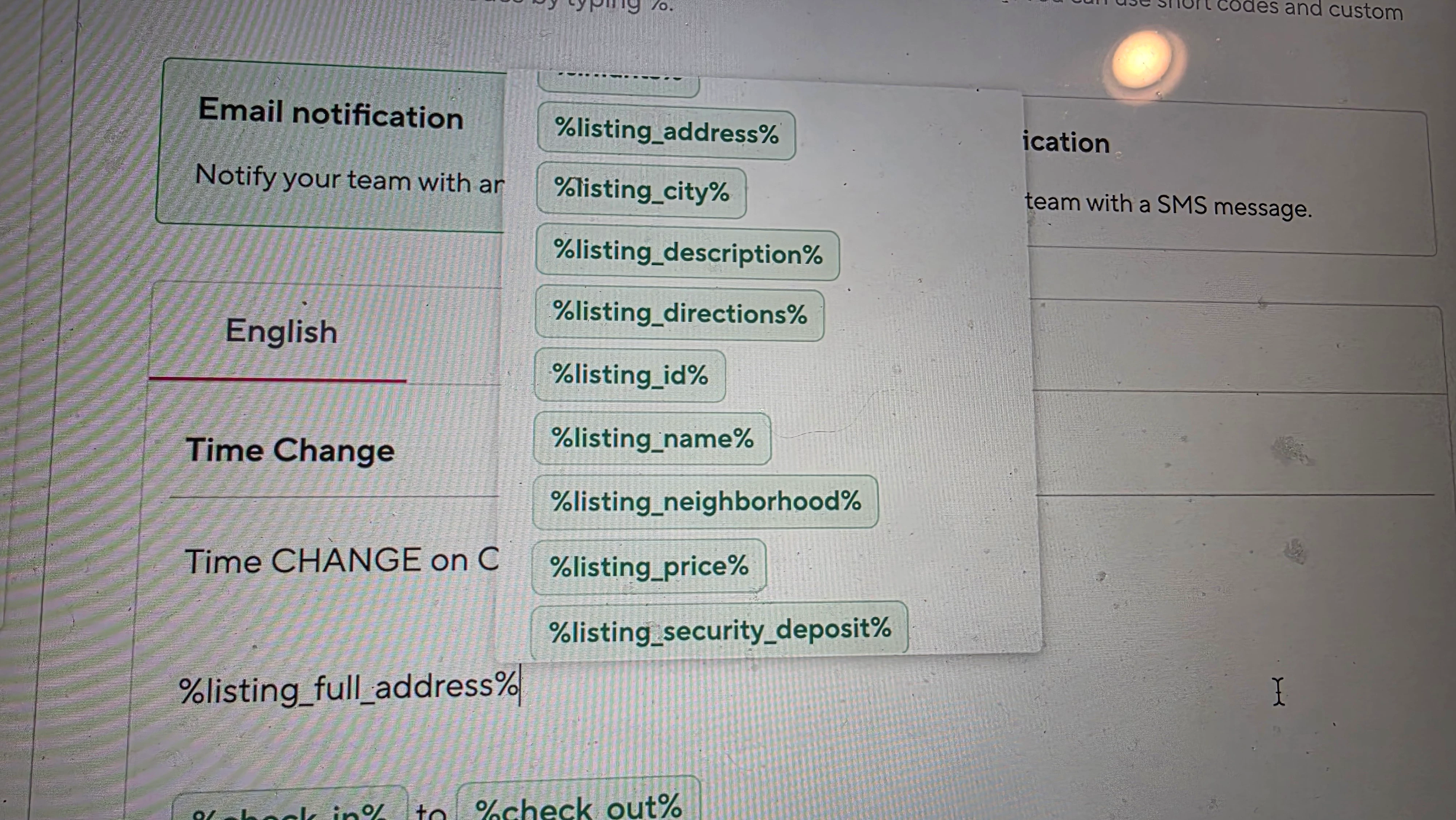
Also found an issue. For some reason I can't use the listing full address code. It's not showing up.


I use this in my other notifications for change of date. So I think there's just a bug that needs to be fixed. If I do just listing address it's only the city so it has to be the full address of the home and for some reason it doesn't show up in the menu choices


Aryeh Raber
Hospitable Team Member
Forum|alt.badge.img+2
  • Author
  • Hospitable Team Member
  • November 14, 2025

@mrotman 

Next, how can we see how much each home has made in upsells per month? Does that exist yet?

This is coming very soon! You should see it within the next couple of weeks — and we’ll be sharing more details during the Town Hall on Nov. 26th, so definitely tune in. 😉


Also found an issue. For some reason I can't use the listing full address code. It's not showing up.

Thanks for the heads-up! I’ll dig into why listing full address isn’t appearing in the shortcode suggestion menu. In the meantime, you can safely type or copy-paste  %listing_full_address% directly into your template — it will still render the full address correctly. The issue is just with the suggestion list, not the shortcode itself.

Update: just pushed a fix for this, so it should start showing in the suggestion list from now on.


Aryeh Raber
Hospitable Team Member
Forum|alt.badge.img+2
  • Author
  • Hospitable Team Member
  • November 14, 2025

For anyone following along and interested in providing feedback for the new CICO time change team notification, here’s a dedicated Community post:


andrew_bca
Participating Frequently
Forum|alt.badge.img
  • Participating Frequently
  • November 15, 2025

@Aryeh Raber 

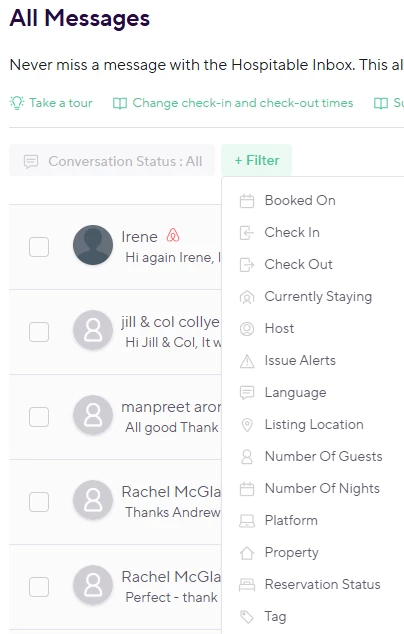
I am not seeing the General or Upselld filter option - am I looking in the wrong place?


Andrew


Aryeh Raber
Hospitable Team Member
Forum|alt.badge.img+2
  • Author
  • Hospitable Team Member
  • November 15, 2025

@andrew_bca That looks like the right place & correct filter menu... Could it be that you’ve not had any purchased upsells yet? The filter will only be listed for accounts with at least 1 purchase.


andrew_bca
Participating Frequently
Forum|alt.badge.img
  • Participating Frequently
  • November 15, 2025

@Aryeh Raber Ahhhh that makes sense - that’s for letting me know. 

Andrew