


Task reminder notifications are now live 🚀

  • November 27, 2025
  • 17 replies
  • 584 views
Jake Shepherd
Hospitable Team Member
Forum|alt.badge.img

Hello 👋 ! Jake here from the Engineering team 🙇

We’re rolling out Task Reminder Notifications, part of a bigger revamp of Operations notifications. 

Who is it available for?

This feature is live for Beta users starting today 🎉
If you’d like access, you can join our Beta program here: https://help.hospitable.com/en/articles/5388483-beta-features-overview

How does it work?

Task reminders will be sent 24 hours before the tasks start time and will only be sent to the assigned teammate.

If the task is created within 24 hours of it’s start time, no notification will be sent.

If the teammate has both an email address and a mobile number associated with their account, they will receive both notifications.

If they only have one contact method, we will send the reminder through whichever method is available.

How to set it up

Task reminder notifications can now be enabled on any tasks or task rules that you have set up. We’ll enable these notifications by default for all of your existing tasks and task rules as well as any new tasks or task rules that you create from now on.

If you want to disable the notifications then you can just head to the task or task rule, un-check the task reminders option and save!

What information is sent?

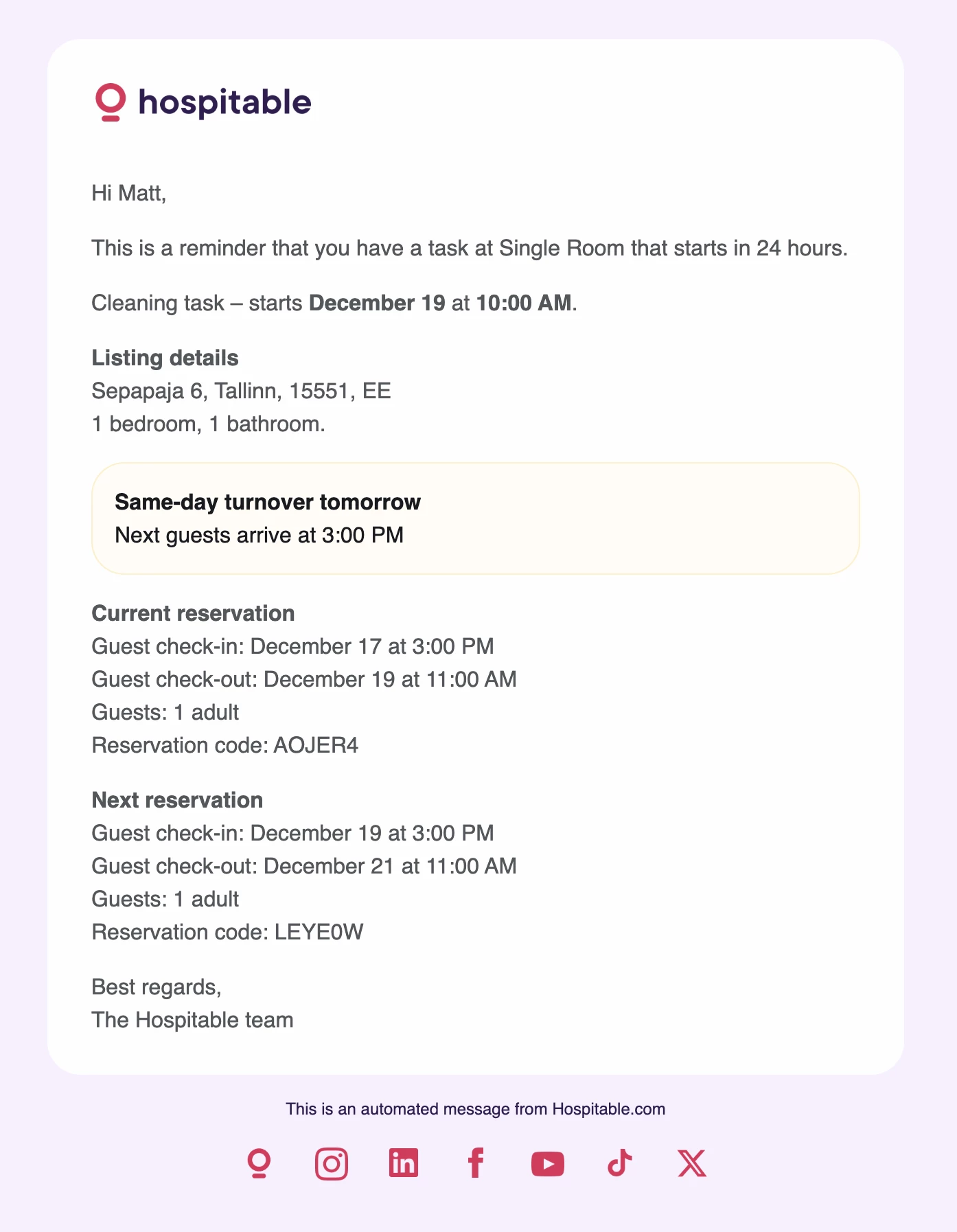
Messages aren’t customisable yet, but reminders will include (when relevant):
    •    Task type
    •    Task start time
    •    Property address
    •    Previous reservation details
    •    Next reservation details
    •    Same-day turnover details, including next check-in time

Reminders are also auto-translated into the language your teammate uses in Operations.

We’d love feedback, try it out on a task and let us know how it goes! 🙌
 

17 replies

Tom Beerley
Hospitable Hero
Forum|alt.badge.img+3
  • Hospitable Hero
  • November 27, 2025

Thanks for rolling this out! I’ll be toying around with it. Am I correct in thinking that the “Next Reservation” details would be provided in the reminder regardless of which cleaner is assigned to that next reservation? We have more than one cleaner and I need to be careful not to confuse them with “TMI” on turnovers that are not theirs to handle. It could be pretty easy for a cleaner to assume the “Next Reservation” is assigned to them even when it’s not.


Jake Shepherd
Hospitable Team Member
Forum|alt.badge.img
  • Author
  • Hospitable Team Member
  • November 27, 2025

Hey ​@Tom Beerley 👋 thanks for the response!

Am I correct in thinking that the “Next Reservation” details would be provided in the reminder regardless of which cleaner is assigned to that next reservation? 

You’re absolutely right on this. We’ve heard from other customers that including the next reservation is useful in case anything unusual unusual comes up like a same-day turnover, a long gap with no bookings or anything that might require a different actions during the task!

It’d be great to understand your scenario so we can refine the content in these notifications to benefit everyone 🙌

Can you share a bit more about how this creates confusion in your workflow? For example, would your cleaners assume every 'next reservation' applies to them automatically? Or is the concern more about clutter and noise?


cozystayswithkc_owner
New Participant
Forum|alt.badge.img+1

What is the point of a task reminder if it doesn’t include the task list?

I’m trying to figure out how to send the “task list” to my ops team WHENEVER I want. 1 hour before check-out, 2 hrs after check-out, literally on the same day as the task itself.

I can’t seem to be able to control WHEN the “task list” gets sent because the %task_list% shortcode cannot be used outside of new task, updated, or cancelled notifications.


Tom Beerley
Hospitable Hero
Forum|alt.badge.img+3
  • Hospitable Hero
  • November 27, 2025

@Jake Shepherd I alluded to the confusion in my earlier message... It's that If my cleaners receive a notification of tomorrow's cleaning, which makes reference to the subsequent cleaning after that, and if that subsequent cleaning isn't assigned to them, they might think that it IS assigned to them, when it's actually assigned to someone else, and it's obviously not good for two cleaners to show up at the same time to do the same cleaning. 

So using these reminders would actually create MORE work for me,  as it will require me to add extra communication to the cleaners to say, "Disregard the turnover that's referenced in that last reminder email, it doesn't apply to you." 

I know I've seen other hosts explicitly say they DO want their cleaners knowing when the next turnover is. In my case, I prefer not to, at least not by default, because I want our cleaners to treat our turnovers with urgency and not assume that they have a whole lot of slack for getting them done. 

So I think the takeaway here is that different hosts have different needs, that one size won't fit all, and thatnl giving us as much flexibility as possible will ultimately make everyone happy.

Hopefully it's in the pipeline to have the wording of these reminders be completely customizable, with short codes, etc., in which case we will each be free to include as much or as little information in the reminders as we wish.

Thanks!

--Tom


bupalo
New Participant
Forum|alt.badge.img+1
  • New Participant
  • November 28, 2025

Love this! Just noticed it today but couldn’t find any documentation and Smarty was unaware. Literally joined the Community to confirm that it was a new feature.


Edit to add: The next reservation details are such a big win. You guys rock!


Petra Podobnik
Hospitable Team Member
Forum|alt.badge.img+1
  • Hospitable Team Member
  • December 2, 2025

Love this! Just noticed it today but couldn’t find any documentation and Smarty was unaware. Literally joined the Community to confirm that it was a new feature.


Edit to add: The next reservation details are such a big win. You guys rock!

Hi ​@bupalo, thanks so much for your comment, and the kind words!

I’ve learned today (thanks to you) that there’s currently about a one-week delay between posting an update here in the Community and Smarty picking it up as a source. It’s just a limitation between the tools we’re using, but your feedback was really helpful, and we’re looking into ways to reduce that delay.

And welcome to the Community! 💜


Jake Shepherd
Hospitable Team Member
Forum|alt.badge.img
  • Author
  • Hospitable Team Member
  • January 7, 2026

For anyone who’s following along, task reminders are now out of Beta and this feature is now available to all Hospitable users 🎉

Thank you to everyone involved in the Beta. We’ve got your feedback and there’s more to come from operations so keep an eye out as we keep working on more improvements for you!


Knotty Retreats
Known Participant
Forum|alt.badge.img

@Jake Shepherd I currently pay a VA to monitor my locks and cameras for every turn to ensure the cleaner has arrived and the property is ready on time. You already have the lock integration, enabling a text to the cleaner and my team if she hasn’t used her door code by a specific time would be a game changer. 


Mahmodul
Hospitable Hero
Forum|alt.badge.img+2
  • Hospitable Hero
  • January 29, 2026

🤗 ​@Jake Shepherd  can we get the short code for next guest reservation details considering that some part of the work is already done. 


Tom Beerley
Hospitable Hero
Forum|alt.badge.img+3
  • Hospitable Hero
  • January 30, 2026

@Knotty Retreats until a better solution is available, I’ve solved this for myself by having an Operations notification rule that sends me a text a few hours before check-in, saying, “Hey Tom, it’s time to check the lock history and sound some alarms if the cleaners haven’t shown up yet.” (paraphrased LOL)


Knotty Retreats
Known Participant
Forum|alt.badge.img

Thanks ​@Tom Beerley I actually have those two but I’m currently stationed in Japan and I’m sleeping during the turn times. I’m just looking for a way to notify Marge owner of the cleaning company that way she can start reaching out to her team to figure out a solution if there’s going to be a delay on her end. Still doesn’t solve my issue on waking me up if there is a missed turn or no time the guest! 


Tom Beerley
Hospitable Hero
Forum|alt.badge.img+3
  • Hospitable Hero
  • January 30, 2026

@Knotty Retreats You can add Marge as a teammate and have the reminder messages sent to her directly. The downside is that it’s just a reminder to “check on things” and she will get it even if everything is okay.


Knotty Retreats
Known Participant
Forum|alt.badge.img

Thank you Tom! ​@Jake Shepherd I can be notified when my guest uses the lock code for the first time. Can you make it so that a notification is sent when a lock code is used for a maintenance or cleaning task? That would be a minimum first step if you can’t notify if it hasn’t been used.


Jake Shepherd
Hospitable Team Member
Forum|alt.badge.img
  • Author
  • Hospitable Team Member
  • February 5, 2026

@Knotty Retreats This is great feedback, thank you! I’d recommend posting feature requests over on https://feedback.hospitable.com/ as it gives us the best visibility on the appetite for upcoming features!


Jake Shepherd
Hospitable Team Member
Forum|alt.badge.img
  • Author
  • Hospitable Team Member
  • February 5, 2026

🤗 ​@Jake Shepherd  can we get the short code for next guest reservation details considering that some part of the work is already done. 

@Mahmodul do you have any more information on what’s happening for you here? Short codes for the teammate are part of the template for task reminders so they should be sending through if there’s a short code generated for the task


anthonyrallo
Top Contributor
Forum|alt.badge.img+3
  • Top Contributor
  • February 15, 2026

As someone who has been operating STRs for 8+ years and migrated across multiple PMS platforms, I don’t usually comment on small UI tweaks - but this one is worth it ​@Jake Shepherd 

The upgraded task reminder layout for teammates is genuinely well done.

It’s clean. It’s structured. And most importantly, it surfaces the right information:

  • Clear departing guest details

  • Clear incoming guest details

  • Same-day turnover visibility front and center

  • Reservation codes and exact timing

For operators managing tight turns - especially same-day flips - reducing friction and ambiguity is everything. This update eliminates unnecessary clicks and mental load for cleaners and maintenance teammates.

These are the kinds of operational refinements that separate good software from great software.

It may seem like a small thing, but in daily execution, small things compound.

Well done to the product team!


Knotty Retreats
Known Participant
Forum|alt.badge.img

I don’t understand how Reoccurring tasks Cannot be Tied to your reservation calendar. How can you have a rotating task every two weeks in an Airbnb when you don’t know when your check-in and checkout is gonna be. 99% of operators are not gonna just block a certain day of the week for a reoccurring task. I really need this feature, but I cannot use it unless I can set it for every two weeks on a turn. I realize if there’s not a turn at complicates things, but I could approve it or move the date if I was notified somehow or It could just be every two weeks plus or minus depending on when turn is.