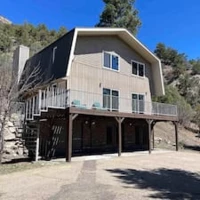


Listing not showing up on AIRBNB

  • November 26, 2025
  • 5 replies
  • 51 views

The Docs
New Participant
Forum|alt.badge.img

Hi, a strange thing is happening recently that is quite consequential. We have several properties in Durango Colorado. When I search in for Durango, Colorado, the homes are not showing up properly. They may even show up on the 15th or 16th page. When I search for Durango, CO 81301 which is the ZIP Code or other locations in Durango itself, the home show up on the first or second page. I have reached out to Airbnb several times and are not getting any help from them. They are saying things are normal and some listings show up later. However, there is some glitch that I'm not sure how to get rectified.


We went from having bookings quite often to almost no bookings. Also, I am using rank breeze and our home is not showing up on the first 17 pages. I spoke to somebody from rank breeze and they also told me that for whatever reason that Durango Colorado search is not producing our home in the search results.


Has anybody seen something like this occurred before? Any ideas on how to tackle this? Airbnb has been completely unhelpful.

5 replies

Mahmodul
Known Participant
Forum|alt.badge.img+1
  • Known Participant
  • November 27, 2025

From my experience, Airbnb support is rarely helpful when you ask why a listing isn’t performing — they almost always say things are “normal.”

If you can, please share a couple of your listings along with your recent ratings, pricing strategy, and cancellation policy so we can take a closer look and give more specific feedback.

A few things to keep in mind:

1. Searching “Durango, Colorado” vs. “Durango, CO 81301” will always show different results

A ZIP-code search moves the map pin away from the town center. If your listings are closer to the ZIP code’s center, they will naturally appear higher in that search — even if they rank lower in the general Durango search.

2. Check the search with zero filters

Even one filter (beds, price, pet-friendly, entire place, etc.) can completely remove your listings from early pages. Test in incognito mode too, Airbnb personalizes searches based on your past clicks.

3. Check your calendar availability

If your listing is blocked or has even 1–2 unavailable days during typical stay ranges, it can disappear for many searches.

4. Why your bookings may have dropped

Any of these can push you down in Airbnb’s algorithm:

  • A single rating under 5 stars in recent weeks. Considering the competative market. 

  • Pricing higher than nearby competitors

  • Stricter cancellation policy

  • Reduced demand or seasonal slowdown

5. What you can do right now

  • Loosen the cancellation policy temporarily

  • Add early-bird or last-minute discounts depending on your booking window

  • Update the description with what your recent guest’s feedback  about what they liked about the listings. 

Once performance improves, you can slowly revert your settings.

Hope this helps!


The Docs
New Participant
Forum|alt.badge.img
  • Author
  • New Participant
  • November 28, 2025

Hi Mahmodul,


Thanks so much for your response.  We had three listings at one location (one whole home (a) , and two subunits (b, c) separately) and another listing (d) a mile away. Both homes are 15 mins north of Durango. 


We had five 5-star reviews for listing A. For listing B, we had nineteen 5 star reviews and for C, we had 26 reviews with some not great due to noise from upper floors (4.8 stars). Listing D is doing very well. 


Something has changed with the algorithm b/c none of these properties on Rankbreeze even shows up on the first 17 pages when Durango, Co is used as the search. If of course you start zooming in there is a greater chance and sometime the houses flicker in and other times it doesnt show up.


Previously, these always showed up on pages 1-3 on Rankbreeze. 


When I search the zip code or search Durango recreation center (which is in middle of town), our properties easily are seen in first pages. When I do Durango, Co, even when i zoom into our area, our homes don’t show up easily and may be pages down. Just makes no intuitive sense.


We just 50,000 worth of renovation on the home this last month on listing A (which includes B and C) and have been side-swiped by this change. We can’t get an airbnb booking! They say that with filters you can get seen but what was booking so well has dwindled to a trickle. Notably, we have made B and C blocked except only within a month to limit sub-unit bookings and are trying to push Listing A. We prefer to avoid multiple guests in one location if possible


I did try to search what could be happening and have a conversation with ChatGPT (i know fraught with mistakes). I was told that perhaps our home has been taken out of Durango search b/c of it being north of city and then it gets “clustered.” Not sure what that means etc


We are doing the following.

  1. put our new renovation pictures
  2. delisted listing A and created a new listing A to maybe get a promotions bump (we only had 5 reviews on A to begin with)
  3. Listing D is up to 13 guests, so maybe it will end up showing up more b/c it is a more unique property
  4. Our cancellation policies are up to 5 days
  5. pricing strategy via hospitable. Mostly we do conservative on weekdays and recommended on weekends. 
  6. Listing A isn’t searchable yet b/c i just created it today


Here are our listings…


Listing A (new version)-->https://www.airbnb.com/rooms/1563764583778165674?source_impression_id=p3_1764302532_P3iBSJYN9ZRO9p3x


Listing B https://www.airbnb.com/rooms/1313311509443651448?source_impression_id=p3_1764302560_P3v20YIwKvWgqUU1


Listing C https://www.airbnb.com/rooms/1317357793845765337?source_impression_id=p3_1764302610_P34N8utqR2hel_Jx


Listing D https://www.airbnb.com/rooms/1453166284362037256?source_impression_id=p3_1764302595_P3X8PTLK48gAOiTM


The Docs
New Participant
Forum|alt.badge.img
  • Author
  • New Participant
  • November 28, 2025

update. The new listing A did not get any “new listing bump.” Still at the bottom of bottom when searching Durango, Co


As a result, went back to original listing A. 


https://www.airbnb.com/rooms/1294454714119334075?check_in=2025-12-07&check_out=2025-12-12&guests=7&adults=7&s=67&unique_share_id=22364869-0536-4b03-bc56-d324845a17e1


my STR business is going down down down! 


thanks for any insight you receive. 


David F
New Participant
Forum|alt.badge.img
  • New Participant
  • December 3, 2025

Hey The Docs,


We had the exact same thing happen with some of our properties.  We created a parent combined listing of two of our children listings that are in the same location.  We had to use the same address for the parent property as one of the children which is where the issues came in.  We could not find the new listing no matter what and confirmed with other searches from multiple friends using different IPs and ISP routings and were told the same thing from ABB that everything was fine as they could see it.  We could only see it if we zoomed in on the map almost to the street level if I remember correctly on searching.

After countless calls we finally found someone at ABB that we convinced to look up our property on a device not tied to their system and they confirmed the issue.  What we found out is because we had to choose the same address for the parent listing as one of the child listings it was causing an issue.


To Fix:  ABB support then sent us a link where we entered the address in a third party website to give us the Lat and Long coordinates of the property and they put that in to identity the new property location.  They entered in the new coordinates while on the phone with them and it instantly fixed the problem.  They can only do this on their back end and you may have to call a time of two to find the right person that will go far enough to ask someone internally how to do it as from what I gathered it is not common.  We have several properties all in the same location each with their own addresses and I’ve even had to update the Lat/Long on a single property with its own dedicated address since then because of the same issue.


I don’t know if this is the exact parameters causing your issue but try getting them to update the Lat/Long coordinates on the listing you are having the issue with to see if it helps.  I would not recommend adding coordinates to any listings that are working properly in search.


Hope this helps and glad I ran across it as I’m listing another parent/combined property in a few days and had forgot about this glitch until now.


David


Eli Stoughton
Participating Frequently
Forum|alt.badge.img+3
  • Participating Frequently
  • December 3, 2025

Hi, a strange thing is happening recently that is quite consequential. We have several properties in Durango Colorado.


I’m seeing one of your properties on the second page when I search the specific zip code. But when I search Durango, Colorado, I end up seeing a very zoomed out map that includes several properties in New Mexico. It seems like the algorithm wants to recommend places there too.