Answered

PM Marketplace

  • April 17, 2026
  • 8 replies
  • 94 views

mindi
Known Participant
Forum|alt.badge.img+2

I followed the instructions given on the Townhall to go to my Mogul business page to find the banner to take me to my profile to prepare to be matched to potential owners BUT my page doesn’t have a banner.  Can anyone else see a banner on their owner page?  I think this sounds like a great service and I am eager to be considered.  

Best answer by Petra Podobnik

Hi ​@mindi! I saw Emily’s response on another conversation, so sharing it here too. 💜

PM Marketplace is under Operations > Your business, and then there should be a banner that directs you there. A few customers with ad-blockers are having issues seeing it, which we’re fixing. In the meantime, you can access the link directly here: https://my.hospitable.com/mogul-marketplace

PS - We are bringing opportunities to all Mogul customers, regardless of whether or not they’ve enhanced their profile. Once you receive an opportunity that you express interest in, we’ll share your profile back to the owner seeking help. The benefit of enhancing your profile ahead of time is you can clarify your service offerings (and service areas), so that if you want to service a new area where you don’t already have properties, we’ll bring you opportunities from there as well. 

8 replies

Petra Podobnik
Hospitable Team Member
Forum|alt.badge.img+4
  • Hospitable Team Member
  • Answer
  • April 20, 2026

Hi ​@mindi! I saw Emily’s response on another conversation, so sharing it here too. 💜

PM Marketplace is under Operations > Your business, and then there should be a banner that directs you there. A few customers with ad-blockers are having issues seeing it, which we’re fixing. In the meantime, you can access the link directly here: https://my.hospitable.com/mogul-marketplace

PS - We are bringing opportunities to all Mogul customers, regardless of whether or not they’ve enhanced their profile. Once you receive an opportunity that you express interest in, we’ll share your profile back to the owner seeking help. The benefit of enhancing your profile ahead of time is you can clarify your service offerings (and service areas), so that if you want to service a new area where you don’t already have properties, we’ll bring you opportunities from there as well. 


mindi
Known Participant
Forum|alt.badge.img+2
  • Author
  • Known Participant
  • April 20, 2026

Thank you ​@Petra Podobnik .  I was able to update my profile at the link you shared!  Thank you!  I am still not seeing it under my Operation > My business.  There is no banner showing up for me.  


I am wanting to show that we are in more than one market though.  Do you know how I can show that on the profile?  It only asks for one 30 mile radius.  

Also, we are showing as “GOOD” for dynamic pricing usage.  But we do outsource our revenue management to a company who uses Pricelabs. So we don’t use Hospitable’s dynamic pricing but we do manage it with pricelabs and an expert team. 


Thank you!


Tom Beerley
Hospitable Hero
Forum|alt.badge.img+3
  • Hospitable Hero
  • April 21, 2026

I noticed I’m only rated as “good” for dynamic pricing as well, even though all of my properties are being priced by Beyond Pricing. Hospitable “knows” this because it’s one of my configured integrations. Is Hospitable only counting you as “good” on the dynamic pricing spectrum if you’re using their own dynamic pricing? That’s throwing some harsh shade at the industry-standard tools LOL


Emily Tunggala
Hospitable Team Member
Forum|alt.badge.img+2
  • Hospitable Team Member
  • April 21, 2026

@Tom Beerley & ​@mindi We should not be preferring our own dynamic pricing in the scoring, so I’ll check on that for you guys because the expectation at this point is that if you’re using any dynamic pricing you’re Great. Definitely not trying to throw shade; we love our partners and their solutions too! 🙈


Emily Tunggala
Hospitable Team Member
Forum|alt.badge.img+2
  • Hospitable Team Member
  • April 21, 2026

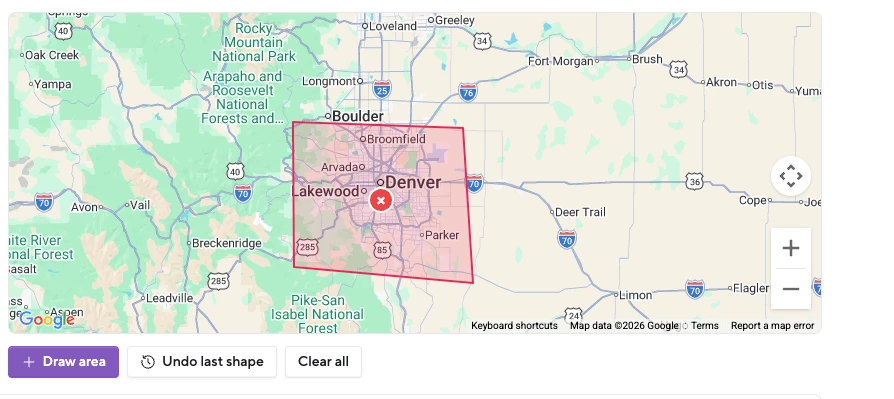
@mindi Here’s a video of how to add or remove service areas. By default, we add service areas for you; a 30 mile radius around each of your existing properties. You can remove those by clicking the `X` and/or draw your own service ares. 


Leroy
Hospitable Team Member
Forum|alt.badge.img+2
  • Hospitable Team Member
  • April 21, 2026

I am wanting to show that we are in more than one market though.  Do you know how I can show that on the profile?  It only asks for one 30 mile radius.  


Hi ​@mindi,

Using the “draw area” button you should be able to draw service area’s you wish to support.


Leroy
Hospitable Team Member
Forum|alt.badge.img+2
  • Hospitable Team Member
  • April 21, 2026

Hi ​@mindi ​@Tom Beerley,

Whoops, that was an oversight on our end. Like Emily said use of any dynamic pricing solution is great for a property manager.

We have adjusted the algorithm and it will now show you as a strong pm in that pillar when you have any dynamic pricing solution setup.


Tom Beerley
Hospitable Hero
Forum|alt.badge.img+3
  • Hospitable Hero
  • April 21, 2026

Awesome, thanks!