


Help shape Hospitable's new Home Dashboard

  • June 24, 2026
  • 25 replies
  • 1012 views
Tim Parry
Hospitable Team Member
Forum|alt.badge.img+2

We've been exploring a new Home Dashboard experience and would love your input

Over the past few weeks, we've been testing an initial design with a small group of hosts. Based on their feedback (and feedback from our team), we've started exploring multiple directions.

Now we'd like to hear from a broader group of hosts.

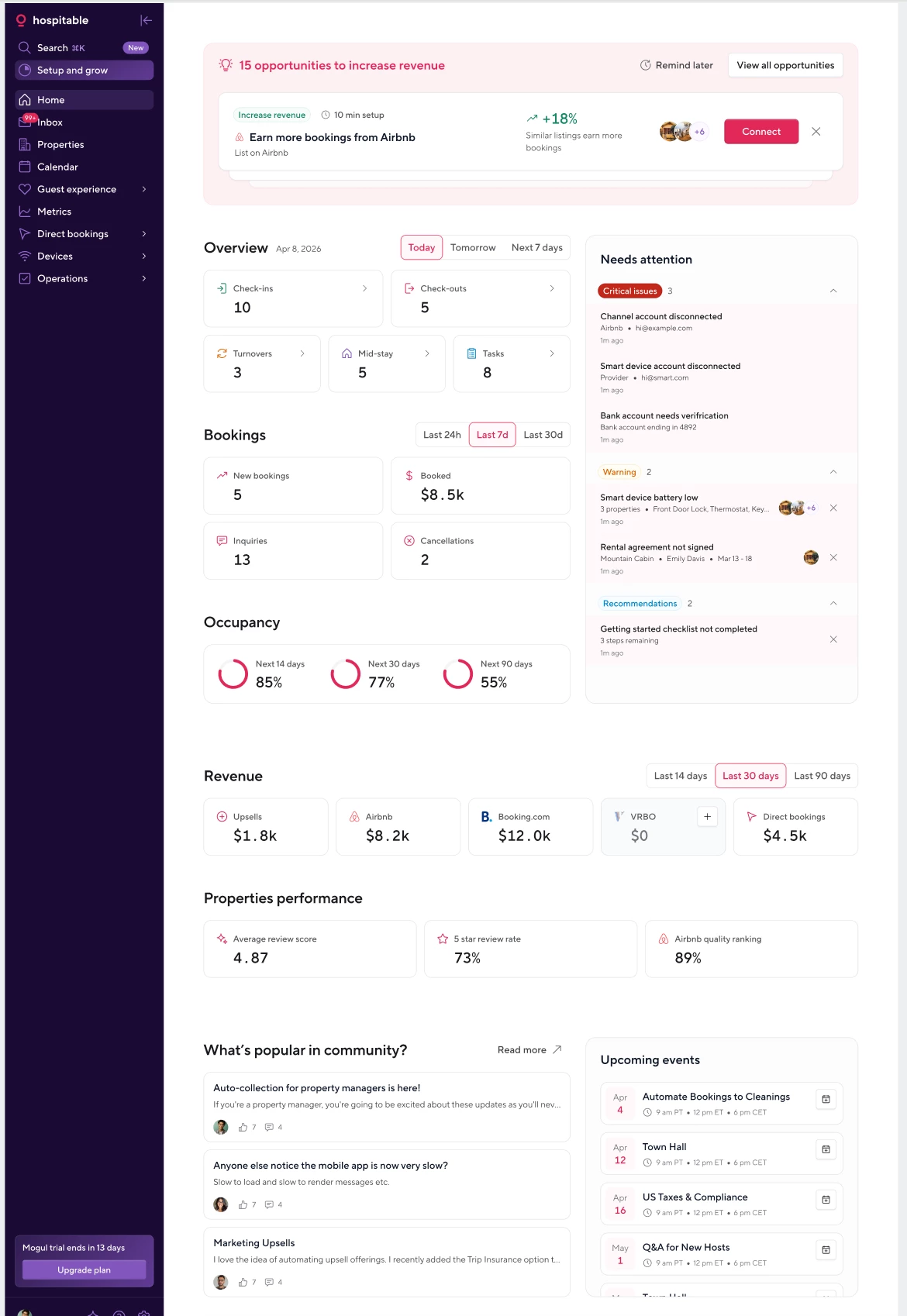
Option A
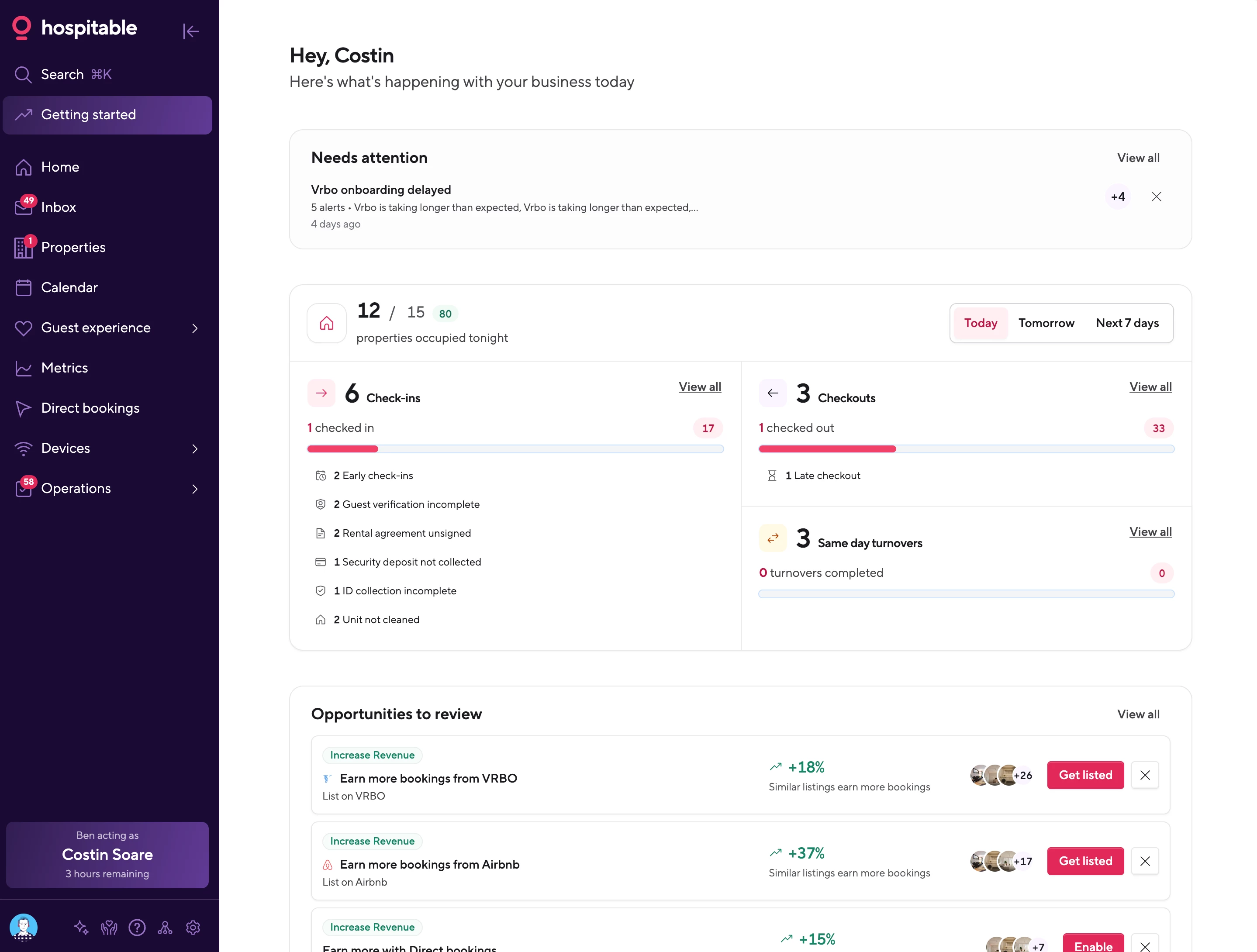
Option B
 

Which approach do you prefer, and why?

Some questions to consider:

  • Which dashboard would help you stay on top of your hosting business more effectively?
  • What stands out as particularly useful?
  • Is there anything confusing or missing?
  • If you prefer Option A, what would you keep from it?
  • If you prefer Option B, what specifically makes it better?

There are no right or wrong answers; we're looking for honest feedback from hosts with different workflows and priorities.

Vote in a poll below and drop your thoughts in the comments. We'd love to discuss your ideas and learn more about how you use Hospitable day to day.


What is your preferred option?

25 replies

CircleCityRetreats
Participating Frequently
Forum|alt.badge.img

I like elements from both, but if I had to choose just one I would choose B. The thing I like from A is the “Needs attention” section. 


In general, when I open up the app or website I want to see, right away, what needs my attention rather than report-like details about my property/portfolio. A modular Home Screen (similar to how the metrics dashboards work) would be awesome -- then we could all build our own Home Screen to have the elements that are most important to us!


Shawn-luxanto
Participating Frequently
Forum|alt.badge.img
  • Participating Frequently
  • June 25, 2026

I like Option B.  I would love a bit more metrics for marketing purposes too like Booking Pace if possible


Homelike.ca
Known Participant
Forum|alt.badge.img+1
  • Known Participant
  • June 25, 2026


Homelike.ca
Known Participant
Forum|alt.badge.img+1
  • Known Participant
  • June 25, 2026

Opportunities should be at the bottom, any critical at the top 


arnaud
Known Participant
Forum|alt.badge.img
  • Known Participant
  • June 25, 2026

To be honest, I don’t really prefer either version. That’s not a criticism—both have good ideas, but also some things that don’t add much value for me.

For example, I don’t think OTA opportunities deserve such a prominent place. The only suggestion I currently have is “add free parking”… my property is a historic building in a pedestrian city center, so it’s simply not applicable.

Likewise, I’m not convinced the Community and Upcoming Events sections deserve permanent space on the homepage.

The KPIs are much more interesting, but they should all be clickable and lead directly to operational views. For example, clicking on “Upcoming Check-ins” should open the filtered reservation list, unpaid balances should open the relevant reservations, etc. A dashboard should be actionable, not just informative.

The fact that opinions are so divided in this thread also suggests there probably isn’t a single homepage layout that will satisfy everyone.

My preference would therefore be a modular homepage made of configurable widgets. Hospitable could gradually introduce new widgets over time without forcing every user into the same layout.

I’d also love to see tabs on the homepage (Operations, Revenue, Guest Experience, etc.) and to make sure the mobile version remains just as usable as the desktop one. I spend a lot of time managing my business from my phone, so that’s an important consideration.


Will.Fraser
Inspiring
Forum|alt.badge.img+1
  • Inspiring
  • June 25, 2026

I too would favor a hybrid of the two.  I love the simplicity and actionability of B but also some of the granular insights of A.  


I have no problem linking to the community page “below the fold” as long as all the critical details are above it.


The Orange Cabins
Known Participant
Forum|alt.badge.img

I love the overview and occupancy info I don’t want opportunity to take up so much space at the top. I’d love to see the mobile view for each as well. 


Nancypaige
New Participant
Forum|alt.badge.img+1
  • New Participant
  • June 26, 2026

What I care most about is the inbox, and then the calendar (that’s where I see checkins and checkouts specific to properties). I barely pay attention to the homepage and see it as just an extra click to get to the inbox. Particularly when I am in peak season, I don’t have time for homepage information. It’s just noise.
Interesting to me could be: 

~upsell revenue 

~summary of tasks  

~what needs my attention 

~upcoming training 

For the rest, I can run a report.

One thing that needs to be easily accessible—always—is the link to Town Hall. The other day it took me forever to find the link so I could listen while I was driving.

*****Ultimately I would love it if my homepage was my inbox.***** To me, this would be efficient and sufficient. This is what drives my business, and ultimately why I use Hospitable. 


GusDom
Participating Frequently
Forum|alt.badge.img+1
  • Participating Frequently
  • June 26, 2026

I think “A” is the better of the two for me. It has the more relevant information (for me). I’m a former sales guy and the metrics that matter for my business and its’ growth are better displayed on page “A”. Seeing the revenue from each listing platform is really nice as well. 


Homelike.ca
Known Participant
Forum|alt.badge.img+1
  • Known Participant
  • June 26, 2026

@Tim Parry ill be happy to join you on a video call together with ​@arnaud and maybe other people to go over what would work best. I agree mostly with arnaud that a modifiable home will be the best way to go. 


Barbosaluis
Known Participant
Forum|alt.badge.img
  • Known Participant
  • June 26, 2026

I like elements from both, but if I had to choose just one I would choose B. The thing I like from A is the “Needs attention” section. 


In general, when I open up the app or website I want to see, right away, what needs my attention rather than report-like details about my property/portfolio. A modular Home Screen (similar to how the metrics dashboards work) would be awesome -- then we could all build our own Home Screen to have the elements that are most important to us!


I like the idea of a modular Home Screen, similar to a metrics dashboard.


Tom.DD
New Participant
Forum|alt.badge.img+1
  • New Participant
  • June 27, 2026

We've been exploring a new Home Dashboard experience and would love your input

Over the past few weeks, we've been testing an initial design with a small group of hosts. Based on their feedback (and feedback from our team), we've started exploring multiple directions.

Now we'd like to hear from a broader group of hosts.

Option A

Option B


Which approach do you prefer, and why?

Some questions to consider:

  • Which dashboard would help you stay on top of your hosting business more effectively?
  • What stands out as particularly useful?
  • Is there anything confusing or missing?
  • If you prefer Option A, what would you keep from it?
  • If you prefer Option B, what specifically makes it better?

There are no right or wrong answers; we're looking for honest feedback from hosts with different workflows and priorities.

Vote in a poll below and drop your thoughts in the comments. We'd love to discuss your ideas and learn more about how you use Hospitable day to day.

My feelings is that those start pages have two use cases:


a) the manager viewer focused on numbers and real problems

b) the daily co-host view with the overview of today


I like that and would explore this idea more in detail to make it possible to have use case based start page. 


clifster
Participating Frequently
Forum|alt.badge.img
  • Participating Frequently
  • June 27, 2026

Option A:

While I appreciate the effort to bring visuals into Option A, it’s way, way too busy. For a product that’s already too slow to load in most page refreshes, I’d anticipate a litany of delays waiting for a page with this many discrete data sources to load.

Additionally, I don’t need to be reminded to connect a listing to an OTA at the topmost, highest priority screen real estate. I should already know that and be prepared to connect that from a pop-up or notification within the connected channels area. 

Needs Attention item: important? Yes, but placing them as a third column in different color than the rest of the page is visually jarring and problematic when I resize my laptop’s screen to half width screen and bump the column somewhere above or below how’s it’s shown here. 

More broadly, if you’re going with a widget style UI, why not just give users the ability to add/remove/move what they want? Half the KPIs on this screen are irrelevant to my smaller STR portfolio where I’m less concerned about how many check-ins/outs I have today/tomorrow, then who that person is, if a turnover’s complete or same-day, and what a snapshot of the upcoming week calendar looks like (which currently forces one to switch over to an entirely different tab to see). 

Option B

Better and less busy. Appreciate the summary of same-day turns, but (again) summary of properties occupied tonight may be more useful to larger portfolios than smaller operators. 

Needs Attention is more UI reasonable here as a quasi-banner ad, assuming I can wholesale dismiss it rather than having to click through what appears here as 4 separate clicks to dismiss these reminders. A simple ability to “collapse all” would be better as a means of acknowledging, “Yes I need to do with these, but I have other priorities now.”

At first I liked the tachometer style occupancy visuals from Option A, but honestly progress bars for check-in/out/turnovers in Option B are far more space efficient and equally as informative at a glance. I would hope that subitems like deposits collected would not show for portfolios not collecting deposits. 


doreen
New Participant
Forum|alt.badge.img
  • New Participant
  • June 27, 2026

We've been exploring a new Home Dashboard experience and would love your input

Over the past few weeks, we've been testing an initial design with a small group of hosts. Based on their feedback (and feedback from our team), we've started exploring multiple directions.

Now we'd like to hear from a broader group of hosts.

Option A

Option B


Which approach do you prefer, and why?

Some questions to consider:

  • Which dashboard would help you stay on top of your hosting business more effectively?
  • What stands out as particularly useful?
  • Is there anything confusing or missing?
  • If you prefer Option A, what would you keep from it?
  • If you prefer Option B, what specifically makes it better?

There are no right or wrong answers; we're looking for honest feedback from hosts with different workflows and priorities.

Vote in a poll below and drop your thoughts in the comments. We'd love to discuss your ideas and learn more about how you use Hospitable day to day.




i need to see same day turnovers, late checkouts and early check ins at one glance right in the dashboard. Just need to see if e.g. i can give a early check ins or late checkout last minute without making the cleaners go nuts 


HighDesertEscapes
Known Participant
Forum|alt.badge.img+2

First off - THANK YOU to the Hospitable team for improving this page.  I load it probably 100-200 times/day and it has been full of wasted space, missed opportunities and “fluff” for too long.

I would echo the sentiment that the Dashboard should be focused on Operations, 100%.  Just help me sort the chaos and avoid distracting me during that 4 hour (if!) window between check out and check in! We do not need to see Opportunities for Improvement or Metrics 100x/day.  I sure as heck won’t be checking out the forums, so nix that section entirely.  I love the forums, but not on my home page! 

I believe ​@Tom.DD distilled this down nicely -- there are “owner/revenue focused” elements, and “daily-driver/property-manager/co-host” elements, and the dashboard shouldn’t try to serve both.  I believe that many of these elements belong in the Metrics tab.

Always remember that load-times are hugely important.  Not everyone has 5G/Wifi speeds when trying to load the page.  Is the “Whats popular in the community” and ‘Upcoming events” really necessary?  Not a chance.  I suppose one way to look at this:  After a month of rolling out the new dashboard, can you simply look and see how often those two (community/events) features are actually utilized?  I would imagine very, very low. 

One suggestion I’ve not seen anywhere:  With AI’s ability to interpret guest messaging, I would *LOVE* to see a “checked out” function of some sort.  While checkout might be at 11 AM, it is immensely helpful to our operation when a guest messages us and lets us know they’ve checked out early (for whatever reason). Having that extra few hours to take care of things is a huge pressure relief for housekeepers/tradespeople etc.  I suppose this is an entirely separate “Feature Request” that I should start, but having room for this in the dashboard right near the top would be awesome. 

Great job, team - keep it up. Between this upgrade and the VRBO connection, Hospitable is #1. 


anthonyrallo
Top Contributor
Forum|alt.badge.img+4
  • Top Contributor
  • June 28, 2026

I like elements from both, but if I had to choose just one I would choose B. The thing I like from A is the “Needs attention” section. 


In general, when I open up the app or website I want to see, right away, what needs my attention rather than report-like details about my property/portfolio. A modular Home Screen (similar to how the metrics dashboards work) would be awesome -- then we could all build our own Home Screen to have the elements that are most important to us!

I think ​@CircleCityRetreats It says this really well. These don't need to actually be competing. One can be an operations dashboard and the other can be a CEO dashboard. 

Then I absolutely love ​@Nancypaige ‘s thoughts on The first thing that I do is go to the inbox. I actually hate going to the homepage because I'm never one click away from what I really want to get to when I open up the app. If the option for a user selected default view in the app became a feature, that would be simply amazing. 

Does everyone remember my campaign to “take back 45% of the inbox screen” when there was a TON of wasted space on it?  ​@PC Hamana got wind of it and BOOM - it was “fixed” !


Finally a reminder to everyone in this thread that ​@Tim Parry has a VOTE button that can tally your actual vote (looks like A is winning, but based on the comments I would imagine it’s actually the other way around)!!!!


BajaReb
New Participant
Forum|alt.badge.img
  • New Participant
  • June 29, 2026

Neither A, nor B.

Number one rule: SIMPLIFY.  And perhaps offer a customizable layout or 2-3 layouts and let your users choose what is best for themselves.

  1. Identify your Hospitable users and offer different home screens based on the user type
  2. Identify the top 3 groups of users and make 3 options
  3. Identify the most important 3 tasks or information for each of those groups and start with that.
  4. When I log in, I either go to the home screen to see check ins and check outs, or I go to Calendar to check availablity and what I can do to fill emtpy nights. I have multiple properties and need to know who is checking in & checking out every day so that I can assign what has to be done, today. It is always a time waste to have all the stuff at the top about topics and Town Hall etc. 

The layout seems to prioritize what is important for Hospitable, more than what is top priority for me in my day to day operations as an owner of mulitple properties with very limited time to delegate to others and make sure all is well for guests. In addition to my own properties I also cohost and manage for someone else. I have yet to put their listings into hospitable beacuse I am still seeing too much that needs to be fixed, set up and streamlined.

Display what your users need to know in the first few lines, so there is no need to scroll down. Also keep information to a minimum so that it does not take forever to load. 

Keep going back to SIMPLE, think google search page. Best design ever. Obviously we need a little more than a search box, just remember basics and let people who need lots of data drill down deeper with links or other pages.


scott_k.
Participating Frequently
Forum|alt.badge.img
  • Participating Frequently
  • June 29, 2026

Agree with so many here… unfortunately, neither A or B.

My team and I use mobile and desktop many times per day… the page load is slow (even on gb fiber hard connection), and to get to daily important things, it currently takes multiple clicks…

I think priorities should be:

- Fast page loads.

- We need hot topics without additional clicks and page loads - current guest(s) info/details, early/late check in/out info, device issues?, inbox, etc.

- Remove opportunities - (that can be a button and a load, for when someone wants to go there* maybe a menu item below setup and grow with new activity indicator). As others have stated, for some of us, it’s mostly an annoyance. eg, it currently is saying I should allow pets… our buildings HOA doesn’t allow pets, so even if I wanted to, I cannot.

- We need configurable widgets, no one business runs the same.

- Remove the clutter - remove community (that can be a button and a load, for when someone wants to go there* maybe a menu item below setup and grow with new activity indicator), the top 20% of screen (especially on mobile) “Good morning, Scott. Here is what’s happening with your business today”, remove this! This is prime space.


In summary- fast page loads, remove clutter, configurable widgets.

Appreciate the continuous updates and asking for input. 😊


micaela
Known Participant
Forum|alt.badge.img
  • Known Participant
  • June 29, 2026

We've been exploring a new Home Dashboard experience and would love your input

Over the past few weeks, we've been testing an initial design with a small group of hosts. Based on their feedback (and feedback from our team), we've started exploring multiple directions.

Now we'd like to hear from a broader group of hosts.

Option A

Option B


Which approach do you prefer, and why?

Some questions to consider:

  • Which dashboard would help you stay on top of your hosting business more effectively?
  • What stands out as particularly useful?
  • Is there anything confusing or missing?
  • If you prefer Option A, what would you keep from it?
  • If you prefer Option B, what specifically makes it better?

There are no right or wrong answers; we're looking for honest feedback from hosts with different workflows and priorities.

Vote in a poll below and drop your thoughts in the comments. We'd love to discuss your ideas and learn more about how you use Hospitable day to day.

I like the clean look of the B dashboard - A almost looks too busy. 


HighDesertEscapes
Known Participant
Forum|alt.badge.img+2

@scott_k. My thoughts exactly.  Improving your business is a “big picture”, deep focused thought exercise -- NOT something you are going to approach 100x/day, which is what a dashboard/landing page is. 


Clnance
Participating Frequently
Forum|alt.badge.img
  • Participating Frequently
  • June 30, 2026

I like Option B


sunshineandbeaches
New Participant
Forum|alt.badge.img+1

Option A for me...seems to have more info at a glance


SplitStay Anita
Known Participant
Forum|alt.badge.img+1

Neither A, nor B.

Number one rule: SIMPLIFY.  And perhaps offer a customizable layout or 2-3 layouts and let your users choose what is best for themselves.

  1. Identify your Hospitable users and offer different home screens based on the user type
  2. Identify the top 3 groups of users and make 3 options
  3. Identify the most important 3 tasks or information for each of those groups and start with that.
  4. When I log in, I either go to the home screen to see check ins and check outs, or I go to Calendar to check availablity and what I can do to fill emtpy nights. I have multiple properties and need to know who is checking in & checking out every day so that I can assign what has to be done, today. It is always a time waste to have all the stuff at the top about topics and Town Hall etc. 

The layout seems to prioritize what is important for Hospitable, more than what is top priority for me in my day to day operations as an owner of mulitple properties with very limited time to delegate to others and make sure all is well for guests. In addition to my own properties I also cohost and manage for someone else. I have yet to put their listings into hospitable beacuse I am still seeing too much that needs to be fixed, set up and streamlined.

Display what your users need to know in the first few lines, so there is no need to scroll down. Also keep information to a minimum so that it does not take forever to load. 

Keep going back to SIMPLE, think google search page. Best design ever. Obviously we need a little more than a search box, just remember basics and let people who need lots of data drill down deeper with links or other pages.

THIS!!!


I simply hate new look 😕 I have more than 20–25 check-ins every day, and the most important thing for me is to have the full list of arrivals visible on the main dashboard. The other information currently shown there just isn't important for my day-to-day operations.


Tim Parry
Hospitable Team Member
Forum|alt.badge.img+2
  • Author
  • Hospitable Team Member
  • July 2, 2026

Thanks everyone - this feedback has been very useful.

One thing this thread has made very clear is that there isn’t one perfect dashboard layout that works for everyone. Some of you want a very operational view focused on check-ins, check-outs, turnovers, and urgent issues. Others want more metrics, performance insights, opportunities, or a higher-level owner view. Some people want Community and Events visible, others would rather remove them entirely.

So we will be moving away from trying to land one big redesign all at once.

Instead, we’re going to take a more iterative approach: releasing smaller improvements and new components one by one over the next few weeks, collecting feedback as we go, and adjusting based on how people actually use the dashboard.

Configurability will absolutely be part of that roadmap. We agree with the sentiment here that everyone runs their business differently, so being able to change the order of sections, hide things you don’t care about, and eventually add the things that matter most to your workflow is the right direction.

On the check-in/check-out change today: we reduced the visible list to 5 items as a temporary step. The reason was to reduce how much vertical space the existing component takes up while we prepare to replace it with a component that is much more useful. That said, the feedback is fair - for hosts with a lot of daily arrivals, dropping straight to 5 is too aggressive. We’re going to increase that to 10 and look at what other short-term improvements we can make while the new version is being worked on.

Really appreciate everyone taking the time to share such detailed thoughts. Please keep the feedback coming


anthonyrallo
Top Contributor
Forum|alt.badge.img+4
  • Top Contributor
  • July 28, 2026

@Tim Parry - Will the new feedback you’re hopefully receiving in-app for the dashboard be shared with users here?