


Help shape Hospitable's new Home Dashboard

  • June 24, 2026
  • 39 replies
  • 1195 views
Show first post

39 replies

anthonyrallo
Top Contributor
Forum|alt.badge.img+4
  • Top Contributor
  • September 14, 2026

​Have a great idea for a Feature Request (can submit there too), but wanted to get discussion going here first. 
​@Homelike.ca ​@The Orange Cabins  ​@HighDesertEscapes ​@Clnance  ​@SplitStay Anita ​@sunshineandbeaches ​@micaela ​@BajaReb ​@scott_k. ​@doreen ​@clifster ​@Tom.DD ​@CircleCityRetreats ​@Shawn-luxanto ​@arnaud ​@Tom Beerley ​@Eli Stoughton 

Feature Request: Show Guest Arrival Status on Daily Operations Dashboard

Overview

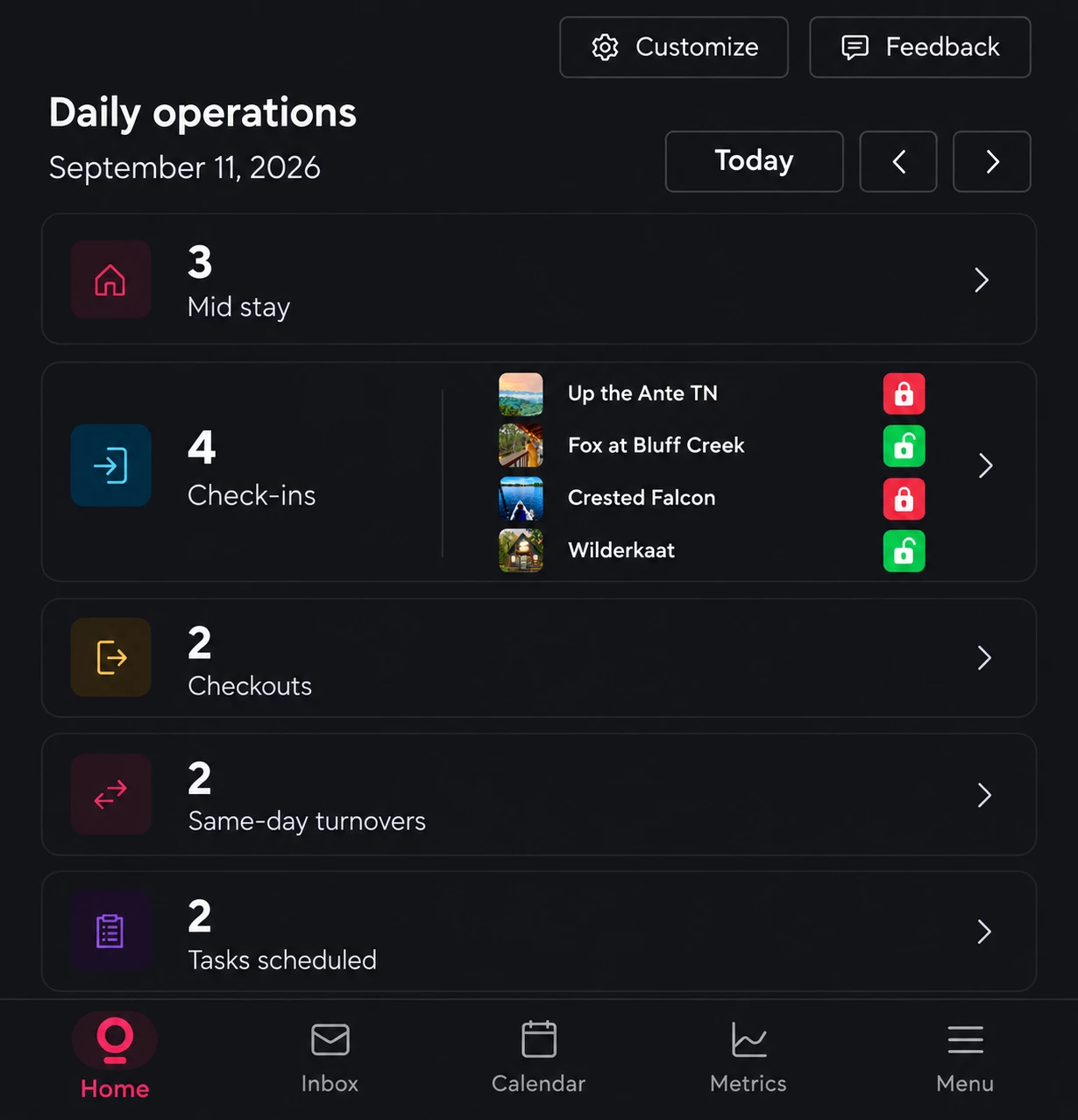
Add guest arrival status directly to the "Check-ins" widget on the Daily Operations/Home screen, using the existing smart lock arrival data.

For each property checking in that day, display:

  • Property thumbnail/fav icon
  • Property name
  • Green unlocked icon = guest has arrived and activated their smart lock code
  • Red locked icon = guest has not yet activated their smart lock code

The below mockup illustrates how this could fit within the existing Check-ins widget without requiring another section of the dashboard.

Problem

Today, there is no quick way from the Home screen to determine whether all guests scheduled to check in have actually arrived.

The information already exists within Hospitable, but confirming it requires a multi-step process:

  1. Open Inbox
  2. Filter reservations by Check-in Today
  3. Open each individual guest conversation
  4. Look for the green "Arrived" smart lock/code indicator
  5. Repeat for every arriving guest

For hosts managing multiple properties, this makes what should be a simple end-of-day check unnecessarily time-consuming.

Proposed Solution

Use the existing arrival/smart lock status to enhance the Check-ins card on the Daily Operations dashboard.

When there are check-ins today, show each property in a compact list alongside its arrival status. For example:

Up the Ante TN 🔴 Locked
Fox at Bluff Creek 🟢 Unlocked
Crested Falcon 🔴 Locked
Wilderkaat 🟢 Unlocked

The property thumbnails, names, and lock indicators can all remain within the existing Check-ins widget, as shown in the mockup, so the dashboard stays compact.

Benefit

The biggest benefit is a single-glance confirmation that today's guests have safely arrived.

This is particularly valuable when a property can be difficult to locate or access. If a guest hasn't activated their lock code by later in the evening, a host can immediately recognize that something may be wrong and proactively reach out.

Even when there is no issue, seeing every check-in turn green provides valuable peace of mind that all arriving guests are safely in their properties for the night.

It also makes better use of information Hospitable already has. Rather than requiring hosts to navigate through multiple inbox threads to find arrival status, the Daily Operations dashboard would surface that operationally important information exactly where it is most useful.

In short: the Home screen should answer one of the most important questions a host has on a check-in day: "Have all of my guests arrived?"

​@Tim Parry ​@PC Hamana 


The Orange Cabins
Known Participant
Forum|alt.badge.img

Cool idea, I have an AI monitor already that by 8pm each night alters me to how many guests haven’t checked in. 
depending on available space I would probably limit it to a more simple count due to insufficient space if you have 20 check-ins for example. 
 

Also I would just do something like:

5 of 15 not checked-in (List or Link to list)


a notification of checked-in would be great too. Maybe even shown directly in chat as well. 


clifster
Participating Frequently
Forum|alt.badge.img
  • Participating Frequently
  • September 14, 2026

​@anthonyrallo doesn’t this depend on managing one’s locks with Hospitable? I use separate, more affordable and comprehensive lock management solutions for that so Hospitable has no awareness of the status of lock code usage. 


The Orange Cabins
Known Participant
Forum|alt.badge.img

I’d love to have it exposed in API as well. 
 

good incentive for people to use hospitable lock and thermostat connections. 


micaela
Known Participant
Forum|alt.badge.img
  • Known Participant
  • September 14, 2026

I like this. I would also tie this to be able to trigger messages. Once the guests uses their code, a post message check in message can be sent. Right now it is x minutes after check in. Well it sends regardless if they have really checked in or not.


The Orange Cabins
Known Participant
Forum|alt.badge.img

Yes, and even then, what about a message at 9 PM if the guest hasn’t checked in yet to check on them and see if there’s any issues. 


anthonyrallo
Top Contributor
Forum|alt.badge.img+4
  • Top Contributor
  • September 14, 2026

​@anthonyrallo doesn’t this depend on managing one’s locks with Hospitable? I use separate, more affordable and comprehensive lock management solutions for that so Hospitable has no awareness of the status of lock code usage. 

​@clifster - it does. We are VERY satisfied with Hospitable’s lock management (it was actually the reason we came back to Hospitable and planned on only using for smartlock automation). Then we discovered how far Hospitable had come and made the FULL move to adopt the PMS again and haven’t looked back. 


Much better to have these types of systems under 1 roof IMHO.


anthonyrallo
Top Contributor
Forum|alt.badge.img+4
  • Top Contributor
  • September 14, 2026

I like this. I would also tie this to be able to trigger messages. Once the guests uses their code, a post message check in message can be sent. Right now it is x minutes after check in. Well it sends regardless if they have really checked in or not.

​@micaela 1000% anything that is recorded should have a trigger point. Why would it not? If it’s important enough to record (data point), enable a trigger! Whatya say ​@Tim Parry ?


Tom Beerley
Hospitable Hero
Forum|alt.badge.img+3
  • Hospitable Hero
  • September 14, 2026

I like the idea. I'm just wondering economically if it's worth building. What problem does it solve? Why do we care if someone's arrived or not? What are we going to do about it if they haven't? Tell them they're late? File a missing persons report? Not go to bed until everyone's accounted for? They're on their own schedule and to some extent it's none of our business.

I've hesitated to build anything that triggers off of the lock's first use. It wouldn't be hard, I would just auto-forward Hospitable's email notification to a Zap and do whatever I want with it. But it could come across as creepy, like you're monitoring them. 

I do try not to overwhelm guests with too much information and I try to follow a guideline of "the right information at the right time." Stuff like pool codes and how the A/C works can wait until they've physically arrived. If you give that to them a week in advance, they're going to ask you for it again when they check in. For now I just have it sent a few minutes after check-in time and that seems sufficient.

The case of a remote place that's hard to access or hard to find is valid. But can't you just solve this with communication? Like a message that's triggered by the completion of the cleaning: "Hey, what's your ETA? Our place is ready for you ahead of schedule. Let us know if you want to check in early." That solicits an ETA and gets the conversation going.

A lost guest will reach out to you for help as long as you've made it easy for them to do so. A couple days before check-in, I send the guest a text asking them to make sure they've got the OTA app on their phone. And I tell them to save me in their phone and to call or text if that's what they prefer. I phrase it as an optional alternative to the app. It's a compliant reason for texting them off-platform. Airbnb had some extended outages a couple weeks ago where this could have really been important.

If a dashboard like this did get built, then you'd quickly find yourself wanting more than just green or red. For the ones that aren't checked in yet, but you know that they're not even supposed to be checked in yet (because when you asked them their ETA they said 11 pm), you'd be annoyed that it's still showing as red as if something is wrong. So you'd want that to still be be green, or maybe whatever color you get when you mix red with green? Oh wait that would just be yellow LOL


anthonyrallo
Top Contributor
Forum|alt.badge.img+4
  • Top Contributor
  • September 14, 2026

​@Tom Beerley , I think the problem it solves is less "what do I do if they haven't arrived?" and more the peace of mind that comes from knowing everyone is in house.

We have two properties that are legitimately a little tricky to find, particularly after dark. We've gone pretty far trying to eliminate that problem: direct Google Maps links, two reflective signs pointing toward the driveway, explicit written instructions about what to follow and what not to follow, and even a video of the final 1/4 mile filmed around dusk. If we know someone is arriving late, we'll also turn on string lights to make the approach easier.

And despite all of that, probably once every 20 guests or so, we still get the "we can't find it" call.

So for me, seeing that green "Arrived" indicator has a surprisingly meaningful hospitality benefit. Once I know everyone is in house, there's a sense that the day's check-ins are complete. I can go to bed knowing we're unlikely to have any meaningful guest interaction until morning. It's less "Anthony is watching to see when you unlock the door" and more "Okay, everyone made it safely."

I also think that's why this belongs on the host dashboard rather than triggering some guest-facing automation. I agree that messaging a guest because they haven't opened the lock could very quickly feel creepy, and I wouldn't advocate for that. This is passive operational information for the host, using a status Hospitable already surfaces elsewhere.

Your ETA point is a good one, although I'm not sure I'd want to create another communication requirement around every check-in just to solve this. Guests' plans change, flights get delayed, people stop for dinner, etc. I don't actually care whether they arrive at 4:15 or 11:00. I just like knowing, eventually, that they got there.

And yes, yellow probably becomes inevitable. 😂 If they've told us they're arriving at 11 PM, red shouldn't necessarily imply "problem." Maybe the UI ultimately isn't even red/green in a warning sense. It could simply be neutral "Not yet arrived" and green "Arrived." The value to me is being able to glance at the dashboard at 10:30 PM and see 4 check-ins, 4 arrived, done.

Whether that benefit justifies the development cost is certainly a fair question. But since Hospitable already knows the first-use status and already displays the green "Arrived" indicator inside the individual conversation, what I'm really asking for is to surface that existing intelligence one level higher. Today I have to go to Inbox → filter Check-in Today → open each reservation individually → check for the green Arrived indicator. The dashboard feels like the natural place to aggregate it.

To me, that's the feature: not tracking when guests arrive, but giving the host a single-glance answer to "Are all of today's guests safely in?"


The Orange Cabins
Known Participant
Forum|alt.badge.img

Yes, I would say it’s obviously always gonna be management preference on this, but similarly we are in a mountainous region and it can definitely be harder to reach your property if a guest hasn’t arrived and it’s now nighttime. We have had guests that got lost or even stuck during snow season. 
 

Ultimately the system should allow host to do whatever they want with these types of events and triggers, and it should be their decision if they decide to create some kind of notification off of not being checked in by a certain time, I personally could imagine that a guest who gets a notification at night when they haven’t checked into the property after a certain time would feel like they’re being taken care of and cared for by the host. 


Tom Beerley
Hospitable Hero
Forum|alt.badge.img+3
  • Hospitable Hero
  • September 14, 2026

​@anthonyrallo ​@The Orange Cabins the easier ask (initially) might be for more robust support around smart locks in the API and MCP. Maybe ​@Kristijan Laco can shed light on what’s already being contemplated.

Right now, it only supports locking/unlocking and asking whether it’s locked or if the batteries are low. 

If it exposed usage history of the guest’s code, you'd be able to refresh a bespoke dashboard, or run a 5 pm Daily Debrief, and if there's any usage history at all, then you’d know they've arrived. 

Or, whatever backend code they've already got in place that sends the email notification on “first use” could fire a webhook for you to catch and process.

Or, that email notification could go hand-in-hand with setting a flag and/or a timestamp on the reservation itself (e.g. “checked-in-at”), which would ride with the reservation details when you call get-reservation.

One or all of these things would allow the folks that want it bad enough to vibe-code a little dashboard for themselves.


anthonyrallo
Top Contributor
Forum|alt.badge.img+4
  • Top Contributor
  • September 14, 2026

I’m of the ilk that anything in Hospitable should be accessible via MCP… (cough ​@Kristijan Laco & ​@Nik Logachev ) so this is a no brainer (again, why not)? 

As I lean into the product they ARE focusing on (Home Dashboard), I am aiming to improve functionality for all hosts with this feature request (at least all hosts that use Hospitable for lock management). 

They’ve already invested to 1. allow us to control locks automatically, 2. show us that guests have arrived by displaying it via push notification & surfaced in the message thread, so 3. the natural iteration is to have it surfaced in aggregate in a dashboard meant to be “at a glance” ​@Tim Parry 


ssd
Participating Frequently
Forum|alt.badge.img+1
  • Participating Frequently
  • September 20, 2026

Really wish first entry could be a trigger for scheduled messages!