



Metrics - Custom Views and Stats

  • November 14, 2025
  • 16 replies
  • 1011 views
Nik Logachev
Hospitable Team Member
Forum|alt.badge.img

We’d love to hear from you about two specific Metrics topics:

  1. If you could create your own dashboards/views in Metrics, how would you use this? Per owner? Set of properties? How would you personalize them? Revenue in one view, messaging in another? Imagine you can have any stats on there, not just what’s available in the current Metrics page.
  2. And related to that, what is some unique number crunching that you’re doing right now using the raw data that you export from Hospitable?

This topic has been closed for replies.

16 replies

SandyL
Participating Frequently
Forum|alt.badge.img
  • Participating Frequently
  • November 14, 2025

Oh my gosh thank you for this question I’ve been waiting for this!  I would love a customizable dashboard for quick daily views of whatever I’m interested in at that moment.  I’d like to be able to change it at a glance….  I have my own spreadsheets for long term financial models etc but I need the quick views to be more meaningful.  Comparisons to this month last year, not last month, real revenue numbers (ie without fees and pass through taxes), trends for the year by property.  With properties that are very seasonal, trends by the month don’t mean much.  


Unique number crunching is going through for each property I own and calculating monthly raw revenue, getting year on year comparisons and storing them so they’re there whenever I want to look at them, and calculating annualized rates of return based on expenses and property values.  I wouldn’t expect hospitable to do long range planning but metrics snapshots without export and manipulation seem like a necessity that has been a long time coming.  


A separate dashboard for reviews with an AI tool to find our best reviews to market best qualities, and worst to fix, would be great.  Right now I’m exporting into chat to do those analyses “manually” 


The Orange Cabins
Participating Frequently
Forum|alt.badge.img

I would love to see improvements to metrics. I’m all about it. I be written my own system to start with your exports and give me the numbers that actually matter to me. 
 

I would have the metrics per property, properly display the weekly/monthly earnings with adjustments to show i.e. actual profit. We do weekly exports of your metrics as well to track our weekly actual earnings. 


The Orange Cabins
Participating Frequently
Forum|alt.badge.img

Because of how we breakup payments we need to take gross, remove the cleaning fees (not full cleaning amount), then remove all fees, then take our % from that to determine our actual earnings. So I have to create an entire SOP for my VA’s to start with your metrics export and get the numbers I actually need. We have to do this on a weekly and monthly basis.


 I have never been able to get much useful information from the Metric view so we always have to export the data and alter it to get the actual numbers we need. It would be amazing to be able to get the correct info at a glance. 


Wendy Chatham
New Member
Forum|alt.badge.img
  • New Member
  • November 14, 2025

Thank you so much for asking about this! Reporting is the area where I need the most help, and it’s the hardest part of using Hospitable for me right now. I rely on these numbers daily — whether I’m getting ready for a VRBO meeting or answering an owner on the spot — and I can’t run quick reports without exporting and rebuilding everything myself. I would love to see this part of the platform grow.


Custom Reports I’d Use in Metrics:
I would love the ability to build saved, simplified reports that focus only on the revenue categories I actually use. Right now, the reports are unwieldy and include many fee types (linen, pet, etc.) that don’t apply to my business, and I have to expend time each week to hide or delete them from the report

What I really need is the ability to:

  • Hide / delete irrelevant columns and save the template

  • Create a clean revenue-only dashboard (lodging, discounts, cleaning fees, totals)

  • Run the same template each month without rebuilding it

  • Compare monthly, quarterly, YTD, and YOY performance

  • Run pacing reports


Number Crunching

  • Month-over-month changes

  • YOY comparisons

  • Pacing

  • Per-owner summaries

  • All commission calculations


Report Viewing / Export Limitations:
I’d love a full, scrollable, sortable, on-screen report view—similar to QuickBooks—where I can review the entire report first and export only if needed.  If a client calls and wants to know how they’re doing, I have to call them back because it takes so long to get an answer

Date Range Limitations:
The preset date options are extremely limited. QuickBooks has dozens of one-click date presets, but in Hospitable I almost always have to use custom dates.

More useful presets would include:

  • Last month / This month

  • Last year / Year-to-date

  • Same dates last year / month (for pacing)

  • Next 30/60/90 days

  • Seasonal comparisons (e.g., last summer vs this summer)

  • Please add a feature to compare any custom date range to the same dates last year


Kyle Lancaster
New Member
Forum|alt.badge.img

This is what we’d like to see:

  • Total $ commission amount (How much money a manager/cohost is making, By business/property)
  • Saved template report types
  • Booking lead time (check in date - booking date)
  • Visual graphs for revenue, ADR, etc

alai.homes
New Member
Forum|alt.badge.img
  • New Member
  • November 16, 2025


customizable pivot charts from the columnar data and forming filters on all the columns.

or if it can be a live data mart that can connect to Tableau or some google sheet pivots etc to create our own dashboards.


alai.homes
New Member
Forum|alt.badge.img
  • New Member
  • November 16, 2025


customizable pivot charts from the columnar data and forming filters on all the columns.

or if it can be a live data mart that can connect to Tableau or some google sheet pivots etc to create our own dashboards.

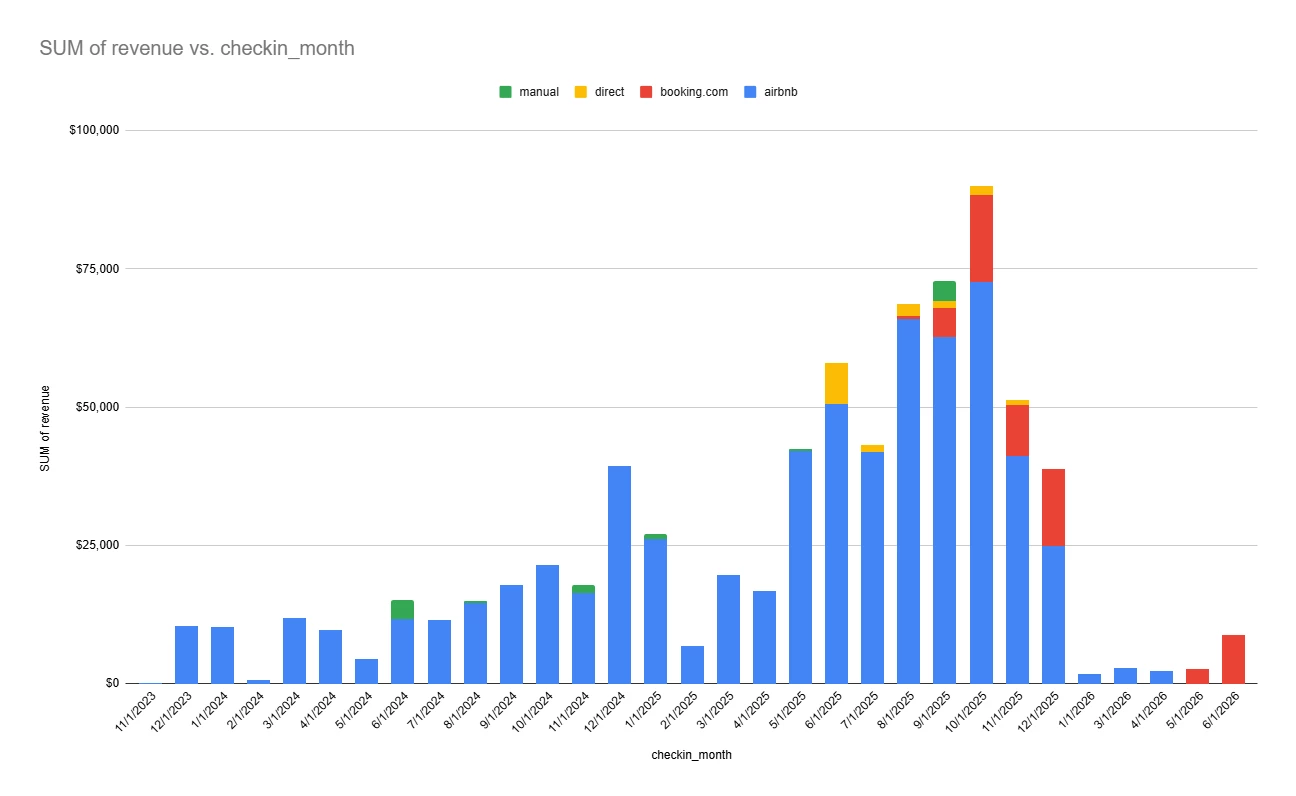
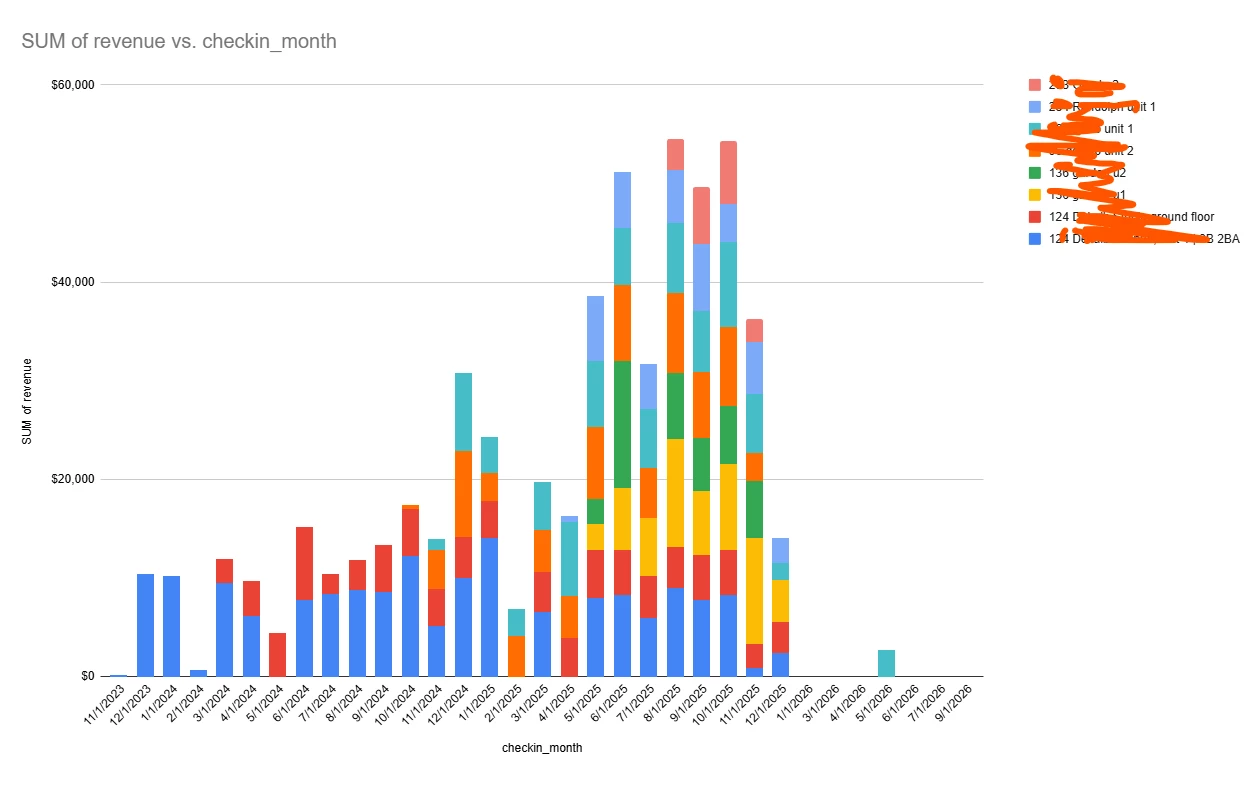
this was created from the metrics data


Andrew561
Participating Frequently
Forum|alt.badge.img
  • Participating Frequently
  • November 17, 2025

I’d love to see a “distributed revenue” metric added to Metrics / Copilot.

For tax purposes (TDT), I need revenue allocated by night within a specific calendar period, not just total reservation revenue based on check-in date. In other words, for a given month (e.g., Nov 1–30):

  • Take all accepted guest reservations that overlap that month

  • For each, calculate per-night revenue = reservation revenue ÷ total nights

  • Multiply by the number of nights that fall inside that month

  • Sum that across reservations

The output would be something like:

  • Distributed accommodation revenue for the month

  • Nights in period (under that definition)

  • Average revenue per night (distributed revenue ÷ nights)

Right now I export reservations and do this in a spreadsheet each month. Having this as a built-in metric would save a lot of manual number-crunching and make occupancy/tourist tax reporting much easier.


Forum|alt.badge.img

YES! so glad this is getting some focus! Would like for default time period to be YTD and compare to last year. or either show trailing 12 months compared to same period prior year. 

For the metrics export to Excel, please  please, allow column order changes! The fixed column order requires manual edits to the order and make it difficult to repeat next period. 


Derek Jones
Hospitable Team Member
Forum|alt.badge.img+1
  • Hospitable Team Member
  • November 18, 2025

I’d love to be able to create a dashboard and have the charts be movable around to the board. 

Also would like to set goals and have trendlines.

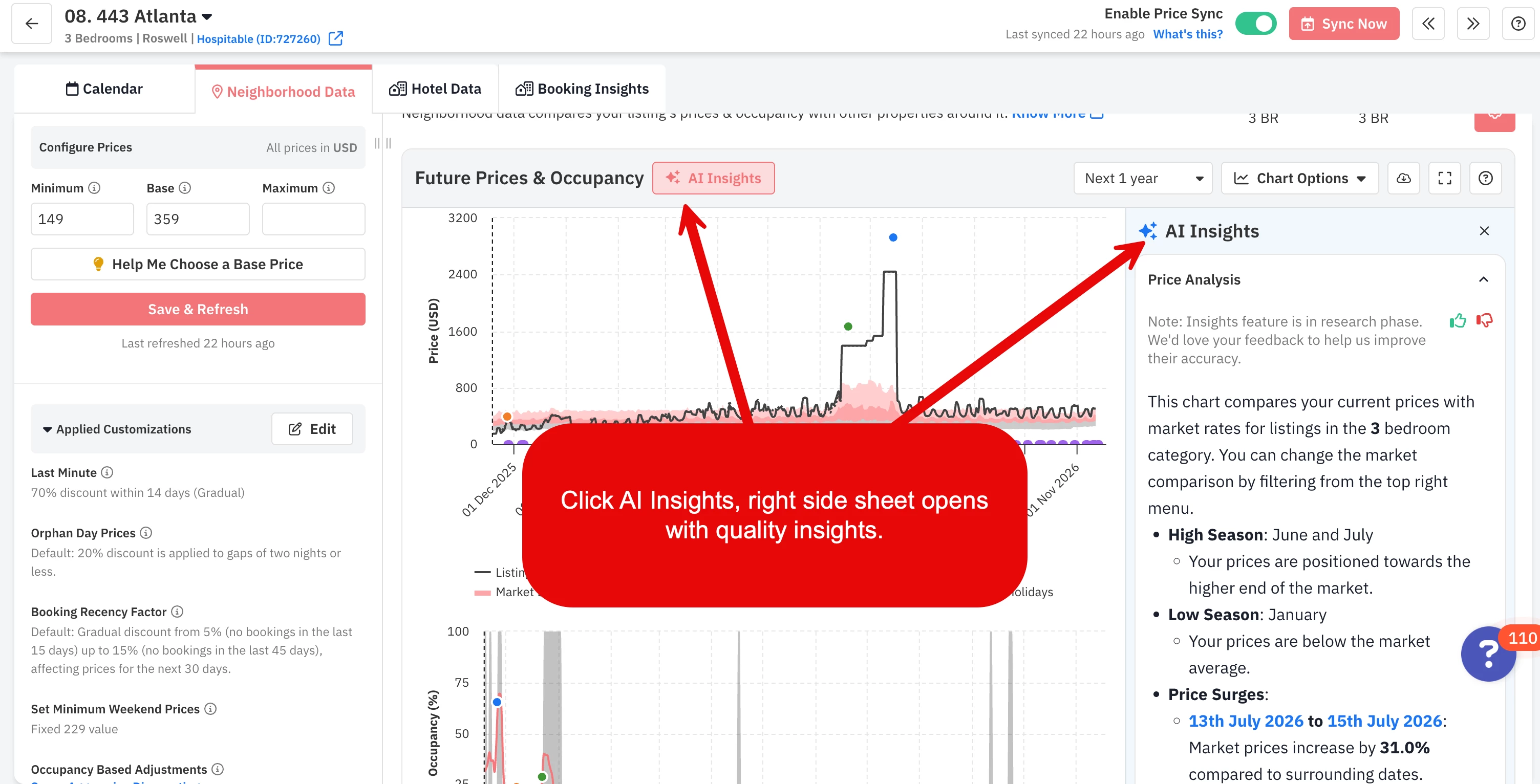
PriceLabs has done something really nice which is summarizing the data in natural language and finding insights/trends for me. This feels like a norm for BI tools moving forward.


Eli Stoughton
Participating Frequently
Forum|alt.badge.img+3
  • Participating Frequently
  • November 18, 2025

We’d love to hear from you about two specific Metrics topics:

  1. If you could create your own dashboards/views in Metrics, how would you use this? Per owner? Set of properties? How would you personalize them? Revenue in one view, messaging in another? Imagine you can have any stats on there, not just what’s available in the current Metrics page.
  2. And related to that, what is some unique number crunching that you’re doing right now using the raw data that you export from Hospitable?


If there could be views, I would want to filter either by property or by sets of properties (in the same jurisdiction for example). If I could have any stat on there, I would want to have Taxable Revenue or Taxable Proceeds (Total Revenue minus pass-through taxes). This is the one figure that I need every month to pay taxes, and I find it rather perplexing that out of the 20 or so numbers that is presented in the export that this one isn’t included. I would want that on the front page where it would be very easy to copy each month. I also think their should be “quick views” for months and years, rather than me needing to click the calendar icon then click “Last” then type in “1” and then select “Month” from the drop-down list. 


Forum|alt.badge.img

I agree with the previous comments and “Liked” the ones that are especially helpful. I’d add:

Better tax views. I’m glad you are now starting to remit sales taxes to my state, so at least I don’t have to do this every month now, but I still have to do it every quarter for occupancy taxes.

  1. Split taxes collected from Guest between Sales Taxes and Occupancy taxes since those get filed with different jurisdictions
  2. Create an easy dashboard view of pass-through taxes over the selected period, broken out according to the above (Occ Tax Collected (5%), Sales Tax Collected (5.3%)), showing the total Revenue used for the tax calculation (currently, export has a “total_price” column that includes the taxes, so I have to back out the taxes to get the revenue figure to report on tax forms).
  3. “Show Your Work” - I always have to back-calculate what went into the tax calculation (either backing out the tax from the “Total Paid,” or adding up the columns that apply), split them by jurisdiction the taxes were collected for (sales tax vs. occupancy tax). Sum them up separately by platform, reflect the tax-applicable revenue figure by-guest (local jurisdiction requires a ledger be submitted with the filing form), so I don’t have to calculate the percentages that apply for each jurisdiction.
  4. Make discounts negative! When manipulating the spreadsheet, I have to go back and multiply the whole discount column by -1 so I can get accurate totals.

    Would also be helpful to have a Federal Tax view that breaks out our earnings, splitting out Fees, Taxes, etc., that we can give to our CPA to audit our 1099 and ensure deductions are properly applied.


Eli Stoughton
Participating Frequently
Forum|alt.badge.img+3
  • Participating Frequently
  • November 19, 2025

“Show Your Work” - I always have to back-calculate what went into the tax calculation (either backing out the tax from the “Total Paid,” or adding up the columns that apply), split them by jurisdiction the taxes were collected for (sales tax vs. occupancy tax). Sum them up separately by platform, reflect the tax-applicable revenue figure by-guest (local jurisdiction requires a ledger be submitted with the filing form), so I don’t have to calculate the percentages that apply for each jurisdiction.

​​​


I definitely agree here. The way we must pay occupancy taxes isn’t that we simply tell the government how much we owe. Rather, we need to report the taxable proceeds and that is what the calculations are based on. But Hospitable’s Metrics doesn’t give us this number (we need to calculate it ourselves).


seatowncohost
Participating Frequently
Forum|alt.badge.img
  • Participating Frequently
  • November 20, 2025

@Nik Logachev not so much a specific metric but the metrics in the owner dashboard need to be for each individual property rather than the “portfolio”.


If these metrics aren’t separated/for individual properties they don’t mean anything. 


Randall Barrett
New Participant
Forum|alt.badge.img

Even if the metrics layout changes, nothing would stop me from just downloading the reservations .csv and using that data in my Google Sheets I’ve set up with pivots, filters, etc. Outside of the obvious ones (occupancy, adr, revenue, etc)

 - I look at our Booking Lead Time

- Track when bookings are made by month, year

- average ​​​​​​​number of guests

- ​​​​​​​percentage of stays that leave a review

- Average nights stayed


Tinkara Končan
Hospitable Team Member
  • Hospitable Team Member
  • November 28, 2025

Thanks so much for all the great ideas and examples you’ve shared in this thread — it’s been incredibly helpful for us while rethinking Metrics.

We just rolled out a big update to the Metrics experience (announced in this week’s Town Hall).

You can check out everything new here, and use this new post for feedback:

We’re actively expanding the widget library, and your suggestions are a big part of how we prioritize what gets added next. If there’s something you feel is still missing, feel free to add it here — it really helps us understand what matters most.