


Looking for a more affordable way to screen guests? December 19, 2025

  • December 20, 2025
  • 9 replies
  • 382 views
Alan Sincich
Hospitable Team Member
Forum|alt.badge.img

We’re excited to help you protect your property with a more affordable price than ever! We also have some great updates to make sure you can report all your additional revenue and make it easier for guests to check-in. 


Guest Verification

More affordable guest vetting for you 🪪

  • Our updated ID verification is now $2 and a full check including ID, sex offender search, and risk factors costs $5, down from $10
  • The UI is simplified to select either ID or full verification
  • Sex offender checks are no longer available as a standalone option and must be part of the full verification package

Financial Services

All transactions now included in earning reports 📑

  • Every transaction type is included in your Payment and Payouts settings, including upsells, security deposits, and owner payouts
  • This data collection will form the foundation for both host-accessible earning reports and 1099-K tax forms to be generated early next year

Enhanced payout visibility for upsells and trip insurance 🧾

  • You can now see payout amounts for upsell purchases directly in the Inbox through the upsells details popup, including trip insurance payouts which vary from guest payment amounts
  • These changes give you an easier way to track your earnings from upsells and trip insurance without needing to calculate it yourself

Smart Devices

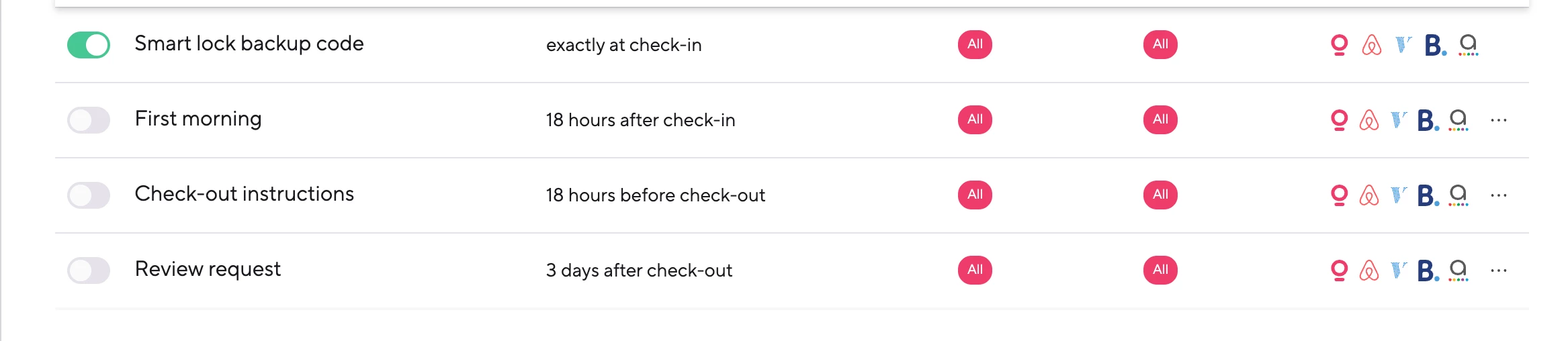
Customize your backup code messages🚪

  • You can now fully customize backup code messages or turn them off completely,
  • Those not yet migrated will only notice the missing code communication section from the device dashboard settings page

Metrics

Enhanced financial reporting and new widgets 📊

  • Taxable Revenue has been replaced with Gross Revenue (Excluding Pass-through Taxes), representing total revenue before taxes used for tax reporting, excluding generally non-taxable pass-through taxes
  • Gross Revenue now includes all guest and host fees, adjustments, and pass-through taxes, and uses reservation financials instead of owner statements
  • Revenue has been renamed to Net Revenue, calculated as actual earnings after guest and host fees, discounts, refunds, and adjustments, including pass-through taxes but excluding channel service fees
  • New widgets have been added including Reservation Financials Breakdown, Guest Additional Fees, and Host Service Fees

Booking.com

Seamless Booking.com account integration for new listings 🔗

  • We now support using existing Booking.com accounts when creating new listings, eliminating the need to create separate accounts
  • When an email is detected as belonging to an existing legal entity, you’ll now automatically be routed to the appropriate stage of the creation flow

Owner’s Portal

Payout history in the portal 🧾

  • We're now showing a history of your payouts to the owners.
  • The list will show a row for each record and each row contains a list of statements that are part of that payment for the owner


9 replies

Tom Beerley
Top Contributor
Forum|alt.badge.img+3
  • Top Contributor
  • December 21, 2025


  • You can now fully customize backup code messages or turn them off completely,
  • Those not yet migrated will only notice the missing code communication section from the device dashboard settings page

I have beta features enabled, but I’m not seeing this under Devices / Settings Smart Locks. What does “those not yet migrated” mean?  


Alan Sincich
Hospitable Team Member
Forum|alt.badge.img
  • Author
  • Hospitable Team Member
  • December 22, 2025


  • You can now fully customize backup code messages or turn them off completely,
  • Those not yet migrated will only notice the missing code communication section from the device dashboard settings page

I have beta features enabled, but I’m not seeing this under Devices / Settings Smart Locks. What does “those not yet migrated” mean?  

Hi Tom - hope you are well and happy holidays! So this was released in a few batches. I was told that all will be finished by end of day today, so stay tuned! If you’re still not seeing it on your end by tomorrow, please let us know! Appreciate your patience. 


Kristijan Laco
Hospitable Team Member
Forum|alt.badge.img+3
  • Hospitable Team Member
  • December 22, 2025

Hi ​@Tom Beerley ,

You won’t find this under smart lock settings anymore.


We’ve moved it to a new ruleset in Guest Experience called Smart lock backup code, and it’s already enabled for your account.


Feel free to customize the message 🎉


Tom Beerley
Top Contributor
Forum|alt.badge.img+3
  • Top Contributor
  • December 23, 2025

@Kristijan Laco Thanks! I see it. As for the message that gets sent when there’s NOT any problem setting the keypad code, but check-time occurs and the code hasn’t been sent via any prior messages -- the wording of that one is still hard-coded, I take it?


Kristijan Laco
Hospitable Team Member
Forum|alt.badge.img+3
  • Hospitable Team Member
  • December 23, 2025

@Kristijan Laco Thanks! I see it. As for the message that gets sent when there’s NOT any problem setting the keypad code, but check-time occurs and the code hasn’t been sent via any prior messages -- the wording of that one is still hard-coded, I take it?

@Tom Beerley The same message is always sent, but it can be customized or completely disabled. In the scenario described above, we would reuse the text from the existing ruleset, but we would include the normally provisioned smart lock code (the backup code would not be used).

It’s also worth noting that this situation typically occurs when users haven’t set up their rules correctly in the first place, so this serves mainly as a safeguard to ensure codes are sent. If there’s a clear need or strong demand in the future, we can add more customization options or introduce a separate ruleset specifically for cases where a code wasn’t delivered. For now, we’ve chosen to keep the implementation simple.


Tom Beerley
Top Contributor
Forum|alt.badge.img+3
  • Top Contributor
  • December 23, 2025

@Kristijan Laco OK, that’s important to know… and if I’m understanding it correctly, it forces me and possibly others to take action, to avoid misleading/confusing messages from being sent to guests.

I don’t EXPLICITLY send the keypad code to guests through Hospitable messaging. I didn’t consciously disable or remove it from the suggested message flow, but I haven’t gone out of my way to work it into the messaging sequence either. In numerous other places (OTA check-in instructions, welcome guides, etc.) guests are told that the code is the last 4 digits of their phone number. But I don’t explicitly say, “Your code is 1234”. 

Until now, right at check-in time, I’ve noticed Hospitable has been sending a message that looks like: “Hello Jerome, Please note that your entry code is 5239.” There’s been no harm in that… it’s the same as what I’ve already told them through other means.

But now my understanding (with the default text of the new “Smart lock backup code” messaging rule) is that the guest will instead receive a message saying, “There was a problem setting your keypad code… Your backup code is XYZ”. Which 99% of the time is not true. So I will definitely need to change the text of that messaging rule, to make it clear that everything is OK and normal.

So the messaging rule that’s called “Smart lock backup code” seems to be a misnomer… it’s really the “Smart lock code failsafe message”, because the criteria for sending it is not whether a backup code needed to be issued, but rather whether the (normal) code has been communicated already through previous messages.

Hope I understand all that correctly, please let me know if not :-) 

And FWIW the “Smart lock backup code” messaging rule that was there for me last night, is now missing as of this morning. I don’t recall deleting it. So I’ll open a support chat for that.


Tom Beerley
Top Contributor
Forum|alt.badge.img+3
  • Top Contributor
  • December 25, 2025

@Kristijan Laco I’m still pretty confused about how this works. Based on what you said above, the SAME message template is used for BOTH of these situations:

  • A.) The keypad code was successfully set to the “desired” value (e.g. last 4 digits of guest phone), but the code has not yet been communicated to the guest by check-in time.
  • B.) There was a technical problem attempting to set the keypad code to the “desired” value, and one of the “backup” codes needs to be used instead (i.e. one of the random backup codes that was created on the lock some time ago, to be used in situations like this). 

It’s pretty obvious that the same wording cannot be used for both of these situations. And since the new messaging rule is hard-coded to REQUIRE the %smartlock_backup_code% be included in the message, it seems like thiswould cause the WRONG code to be communicated to the guest in scenario A.


Kristijan Laco
Hospitable Team Member
Forum|alt.badge.img+3
  • Hospitable Team Member
  • January 2, 2026

@Kristijan Laco I’m still pretty confused about how this works. Based on what you said above, the SAME message template is used for BOTH of these situations:

  • A.) The keypad code was successfully set to the “desired” value (e.g. last 4 digits of guest phone), but the code has not yet been communicated to the guest by check-in time.
  • B.) There was a technical problem attempting to set the keypad code to the “desired” value, and one of the “backup” codes needs to be used instead (i.e. one of the random backup codes that was created on the lock some time ago, to be used in situations like this). 

It’s pretty obvious that the same wording cannot be used for both of these situations. And since the new messaging rule is hard-coded to REQUIRE the %smartlock_backup_code% be included in the message, it seems like thiswould cause the WRONG code to be communicated to the guest in scenario A.

@Tom Beerley We’re always communicating the correct code. Application will decide if it needs to pull a backup code or simply share a normal code. Unfortunately, we cannot overwrite your actual customized message. Like I said in a different thread, best path forward would be an entirely new ruleset just for that scenario.


Tom Beerley
Top Contributor
Forum|alt.badge.img+3
  • Top Contributor
  • January 2, 2026

@Kristijan Laco I’ve since confirmed / observed that the %smartlock_backup_code% DOES resolve to the “normal” code in the everyday normal situation (where the desired code gets set with no technical issue). I was concerned that placing the “backup” code in a guest message might always resolve to an actual backup code, but I see now that this isn’t the case. So in most normal cases %smartlock_code% and %smartlock_backup_code% actually yield the same value.