


Static Guest Portal & Upsell Links

  • October 28, 2025
  • 47 replies
  • 1427 views
Aryeh Raber
Hospitable Team Member
Forum|alt.badge.img+2

Hey everyone! 👋

We’ve heard several requests for Static Guest Portal Links — shareable URLs or QR codes that let guests access upsells without needing their unique guest portal link.

We love the idea! 💡 Hosts have told us they’d use this for guidebooks, signage, or on-site QR codes for things like firepit fees, equipment rentals, or minibar purchases.

The challenge? Every upsell is tied to a specific reservation — that’s how we check calendar availability, manage upsell timing windows, and trigger post-purchase automations. To make static links possible, we’ll need a step where guests enter their reservation code so we can connect them to the right booking.

We’d love your feedback:

  • How would this fit into your guest experience?
  • How are you currently handling upsell purchases and linking them back to bookings?

Drop your thoughts below — and upvote the feature request to stay updated:
🔗 https://feedback.hospitable.com/p/static-upsell-url-for-guest-payments


47 replies

Megan
Participating Frequently
Forum|alt.badge.img
  • Participating Frequently
  • October 30, 2025

By having the guests have to locate their reservation ID it just adds a barrier or an extra step in the pipeline. I would say the best option is to stick with providing a unique URL that already drives them directly to their reservation specific upsells without requiring any login or locating a reservation number


mrotman
Known Participant
Forum|alt.badge.img+2
  • Known Participant
  • October 30, 2025

I would say a link that takes them directly to being able to book it makes the most sense.


The issue I'm having with upsells is there's no list of pending upsells that I can look at to make sure I'm hitting all of them. Right now if somebody buy something on an upsell it just shows up in there messaging. I have 30 renter's hooking upsells, the requested renter message goes to the bottom of my inbox within an hour and then I don't realize they've requested the upsell. So I am not able to use upsell through hospitable until there's some kind of upsell notification sidebar that I can click, see who still needs to be approved. Also I would like to see a stats page  that tells me how much each cabin makes on their upsells each month or whatever time period I pick. Right now hospitable doesn't have anything close to that either.


But in terms of this, it should have its own length they click on it and they just pay. Make it as easy as possible.


Shawn-luxanto
New Participant
Forum|alt.badge.img
  • New Participant
  • October 30, 2025

Wouldn’t really help much. Far more urgent is to fix the huge hole in the upsell process - we don’t know when guests have actually purchased one easily.

We get an email but how does that help if its an upsell for weeks or months in the future.  

The guests should be flagged “Upsell purchased”, there should be an auto task when an upsell is purchased AND there should be a list of upsells on the dashboard. This is such an obvious thing I think just got forgotten when this was developed. I have to rely on us not forgetting about upsells.  

Also upgrade the quality of the guest portal in general is a more important upgrade. It's very rudimentary and doesn’t look polished or branded.  We should be able to include the property’s guest guide book or helpful videos or photos, instructions on every guest’s portal.


mrotman
Known Participant
Forum|alt.badge.img+2
  • Known Participant
  • October 30, 2025

Exactly all of the above! Upsells can't be used on hospitable til those changes are added. 


Aryeh Raber
Hospitable Team Member
Forum|alt.badge.img+2
  • Author
  • Hospitable Team Member
  • October 30, 2025

Thanks so much for all the thoughtful feedback, everyone! 🙏

@Megan  Completely agree — we’re definitely not removing the unique guest portal links. What we’re exploring is simply an additional way for guests to reach their own portal in cases where they don’t have their link handy (for example, via a QR code posted inside the property or a static link in a digital guidebook).

@mrotman  ​@Shawn-luxanto  You raise excellent points around visibility and tracking of upsells. We’ve actually just merged a couple of improvements to address that:

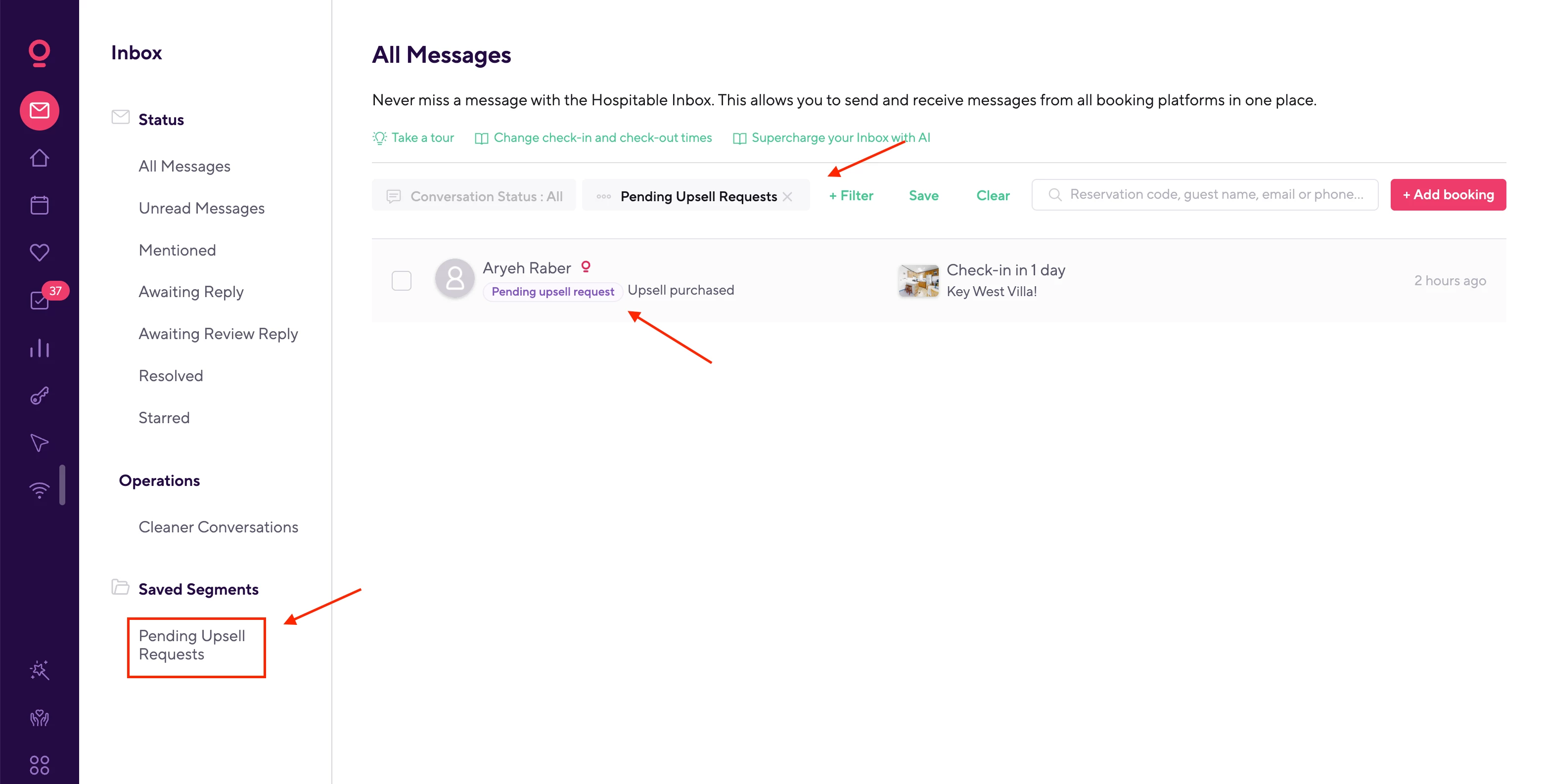
  •  A new Inbox filter that lets you view only pending upsell requests (you can save it as a segment for one-click access).
  • Threads with pending upsells now show a badge in the Inbox so they’re easier to spot.
    • We’ll also look at adding a permanent badge that remains there when an upsell is purchased.

We also hear you on the need for an upsell overview dashboard and better integration with tasks, notifications, and reminders — these are on our roadmap, and we’re exploring how to make it a more central, actionable overview for hosts.

(Quick aside: we’re in the final stages of testing a new check-in/checkout time change team notification, based on ​@mrotman‘s earlier feedback, so we hope to roll that out very soon!)

Thanks again for sharing such thoughtful input — it really helps us shape these features in the right direction! 💪


mrotman
Known Participant
Forum|alt.badge.img+2
  • Known Participant
  • October 30, 2025

Oh wow! Check in check out time. Change notification would seal it for me. Amazing how fast you guys work! Looking forward to switching all my upsells to hospitable once that goes live. 


Aryeh Raber
Hospitable Team Member
Forum|alt.badge.img+2
  • Author
  • Hospitable Team Member
  • October 30, 2025

@mrotman That’s great to hear 🙌


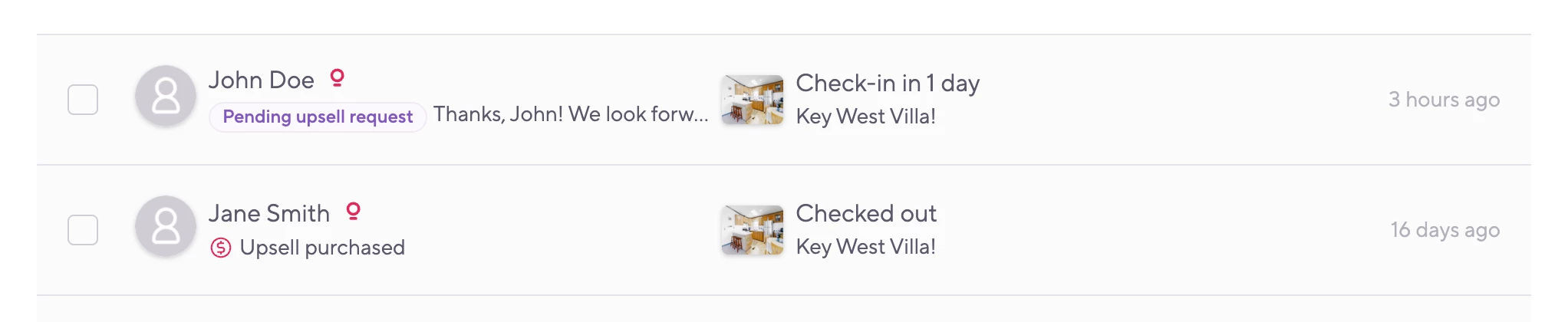
Another quick follow-up regarding purchased upsell visibility; we’ve just rolled out a small $ icon indicator under the guest’s name when a reservation includes one or more purchased upsells.

I know there’s more improvements on the wish-list, but hopefully today’s changes already make a difference! 


mrotman
Known Participant
Forum|alt.badge.img+2
  • Known Participant
  • October 30, 2025

Amazing! I'll add this today as a secondary way to purchase an upsl and see how it works! We tried 2 weeks ago but was impossible to keep track of sales. Hoping you can also eventually add a stats page with filters for date ranges  and homes purchased for.  


Michelle O
New Participant
Forum|alt.badge.img
  • New Participant
  • October 30, 2025

I don’t currently use upsells or the guest portal, but I have a lot of ideas in mind for upsells that I’d love to offer if they were easy for guests to purchase. If there was an option of printing a QR code to hang in the house for upsells, that would make it much easier for me to get going with it. (I’d like to sell my lavender farm products, rent out golf carts and watersport equipment with a required liability waiver, and offer late checkout and mid-stay cleaning.) In regards to the question of adding a step where guests enter their reservation code so you can connect them to the right booking - I don’t think it’s that big of a deal. If hosts are using printed QR codes, then they should schedule an automated message that goes out at check-in time, notifying guests of the upsell options and what the guest’s unique identifier is. Maybe it could be the last 4 digits of their phone number, or the last 4 of their reservation code, or their first initial + last name. Even if it HAS to be the entire reservation code, it wouldn’t be the end of the world - the automated message could provide that code, and suggest that guests copy the code before scanning the QR, so they can easily paste it in. Hope this perspective from someone not currently using upsells is helpful!


anthonyrallo
Inspiring
Forum|alt.badge.img+2
  • Inspiring
  • October 30, 2025

Hey everyone! 👋

We’ve heard several requests for Static Guest Portal Links — shareable URLs or QR codes that let guests access upsells without needing their unique guest portal link.

We love the idea! 💡 Hosts have told us they’d use this for guidebooks, signage, or on-site QR codes for things like firepit fees, equipment rentals, or minibar purchases.

The challenge? Every upsell is tied to a specific reservation — that’s how we check calendar availability, manage upsell timing windows, and trigger post-purchase automations. To make static links possible, we’ll need a step where guests enter their reservation code so we can connect them to the right booking.

We’d love your feedback:

  • How would this fit into your guest experience?
  • How are you currently handling upsell purchases and linking them back to bookings?

Drop your thoughts below — and upvote the feature request to stay updated:
🔗 https://feedback.hospitable.com/p/static-upsell-url-for-guest-payments

Thank you for bringing this to the community for enhanced feedback.


Today we use HostCo for such upsells - with a static link per property/per upsell. How does it work with them (successfully)? 

Simple: The guest hits the link/qr code and depending on the enters in specific information. Don’t request a reservation code - make it SIMPLE. 

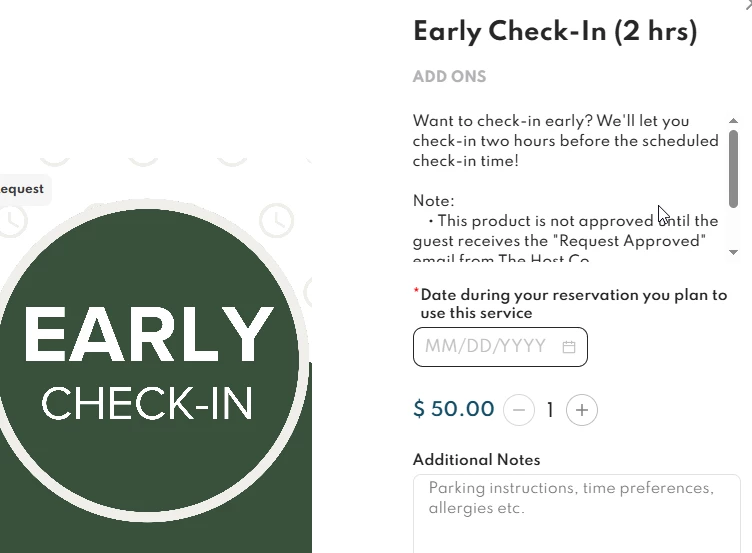
  • Early checkins, Late Checkouts, add-ons: the date during their reservation (since you won’t have more than 1 reservation for that property at the same time. 


Seems easy enough! What do you think ​@Aryeh Raber ​@mrotman ​@Megan ​@Shawn-luxanto ​@Petra Podobnik 


ashley
Participating Frequently
Forum|alt.badge.img
  • Participating Frequently
  • October 30, 2025

Has the challenge for the upsell payout to be associated with the correct property payout been resolved? 


mrotman
Known Participant
Forum|alt.badge.img+2
  • Known Participant
  • October 30, 2025

Yes I currently use Hostco as well and each property has their own “Store”/ URL that doesn’t change.  We send that to the guest they clock on it and book. And then I can go to my “orders” and see all the orders. Even better- I can see all stores and see how much each store/ cabin made. VERY IMPORTANT marketing info can’t do in Hospitable. 


The most important thing neither does- automate messages to my cleaners with changes. 


Greg G
New Participant
Forum|alt.badge.img
  • New Participant
  • October 31, 2025

Id just like to be able to put in static links into guest portal that are non-upsell

For example, Viator links show local curated events in the area, if a user clicks on the link, I get credit and 7% of the sale. So just some fields that are custom we can link to events or other URLs would be useful. This would be applicable and not changeable by reservation since its the same for everyone.

I also would like to put a link to a static guidebook. Ideally you could build the guidebook functionality directly in the portal as well, that way you have a one stop destination for guidebook/ upsell, etc.

One very cool thing that Happy Guest does is to have a QR code that goes into every unit. The cleaner can scan the QR code when the home is cleaned, and the guest gets messaged that they can check in early, with the upsell. This would be a nice to have.


anthonyrallo
Inspiring
Forum|alt.badge.img+2
  • Inspiring
  • October 31, 2025

@Greg G i think this is a worthy idea too. We use them (after connecting via StayFi) and it would be nice. We already have them in our guidebook but redundancy is key. 


The Docs
New Participant
Forum|alt.badge.img
  • New Participant
  • October 31, 2025

I have my own website. Better for me, would be ways to contain the upsell in some sort of widget similar to booking widget so the guest doesnt have so many different websites to go to


Devin Thomas
Participating Frequently
Forum|alt.badge.img
  • Participating Frequently
  • November 2, 2025

Like others have mentioned we have used The HostCo for upsells and then used our store link within stayfi landing page. 
 

A benefit to the way you’re doing things is great because it takes the manual alteration (for early check in for example) out of the picture. The downside is I can’t use it with other services I’m using like StayFi. 


Shawn-luxanto
New Participant
Forum|alt.badge.img
  • New Participant
  • November 3, 2025

Thanks so much for all the thoughtful feedback, everyone! 🙏

@Megan  Completely agree — we’re definitely not removing the unique guest portal links. What we’re exploring is simply an additional way for guests to reach their own portal in cases where they don’t have their link handy (for example, via a QR code posted inside the property or a static link in a digital guidebook).

@mrotman  ​@Shawn-luxanto  You raise excellent points around visibility and tracking of upsells. We’ve actually just merged a couple of improvements to address that:

  •  A new Inbox filter that lets you view only pending upsell requests (you can save it as a segment for one-click access).
  • Threads with pending upsells now show a badge in the Inbox so they’re easier to spot.
    • We’ll also look at adding a permanent badge that remains there when an upsell is purchased.

We also hear you on the need for an upsell overview dashboard and better integration with tasks, notifications, and reminders — these are on our roadmap, and we’re exploring how to make it a more central, actionable overview for hosts.

(Quick aside: we’re in the final stages of testing a new check-in/checkout time change team notification, based on ​@mrotman‘s earlier feedback, so we hope to roll that out very soon!)

Thanks again for sharing such thoughtful input — it really helps us shape these features in the right direction! 💪

thanks for fast work on this but its still missing a key element - the ability to know who has paid an upsell.  I want to see either on the dashboard, inbox or calendar all guests who have purchased an upsell today, this week, etc. so we can make sure we have provided what they paid for.  Right now the only way to do it is to manually go through every single guest and see if they paid for an upsell. Not great for larger managers.

  Next up is just general overall improvement on the Guest Portal for me. Guests should be able to get all the basic details of their stay and a guest guide on there so I don’t have to use a third party app or website. Thanks!


anthonyrallo
Inspiring
Forum|alt.badge.img+2
  • Inspiring
  • November 4, 2025

I have my own website. Better for me, would be ways to contain the upsell in some sort of widget similar to booking widget so the guest doesnt have so many different websites to go to

Widget is an interesting idea. Though the Hospitable booking widget is VERY lacking. This is a major upgrade opportunity ​@The Docs 


anthonyrallo
Inspiring
Forum|alt.badge.img+2
  • Inspiring
  • November 4, 2025

Like others have mentioned we have used The HostCo for upsells and then used our store link within stayfi landing page. 
 

A benefit to the way you’re doing things is great because it takes the manual alteration (for early check in for example) out of the picture. The downside is I can’t use it with other services I’m using like StayFi. 

@Devin Thomas  I 100% agree. The benefit of time changes etc within HSPTB is ideal. The lack of portability is less than. Static URLs will solve this. 


Aryeh Raber
Hospitable Team Member
Forum|alt.badge.img+2
  • Author
  • Hospitable Team Member
  • November 4, 2025

Simple: The guest hits the link/qr code and depending on the enters in specific information. Don’t request a reservation code - make it SIMPLE. 

@anthonyrallo  We hear you on the "make it SIMPLE" front 🙌 We want to make the entire end-to-end experience, for both guests and hosts, as seamless as possible. This includes all the automatic workflows that kick off post-purchase, like adjusting CICO times, updating smart lock schedules, and  more we have planned for the future — so knowing the exact reservation and having the guest “confirm” they are who they say they are by entering a reservation code, would allow us to keep these great features (a simple date picker will likely not suffice). Having said that, we're taking in all the feedback and will do our best to come up with something great!


Aryeh Raber
Hospitable Team Member
Forum|alt.badge.img+2
  • Author
  • Hospitable Team Member
  • November 4, 2025

Has the challenge for the upsell payout to be associated with the correct property payout been resolved? 

@ashley Yes, we have and apologies if you were one of the unlucky few that got caught out by this bug. Unfortunately, we are still dealing with some purchases that took place at the time of the bug, so we're keeping a close eye on a small number of failed payouts, to correct them without hosts needing to reach out.


Aryeh Raber
Hospitable Team Member
Forum|alt.badge.img+2
  • Author
  • Hospitable Team Member
  • November 4, 2025

I want to see either on the dashboard, inbox or calendar all guests who have purchased an upsell today, this week, etc. so we can make sure we have provided what they paid for.  Right now the only way to do it is to manually go through every single guest and see if they paid for an upsell. Not great for larger managers.

@Shawn-luxanto  Fair enough, thanks for the great follow-up feedback! Would an additional Inbox Filter for just "Purchased Upsells" solve this for now? We are planning dashboard improvements in the hopefully not so distant future, but for now I'd like to solve this issue for teams like yours.


anthonyrallo
Inspiring
Forum|alt.badge.img+2
  • Inspiring
  • November 4, 2025

Simple: The guest hits the link/qr code and depending on the enters in specific information. Don’t request a reservation code - make it SIMPLE. 

@anthonyrallo  We hear you on the "make it SIMPLE" front 🙌 We want to make the entire end-to-end experience, for both guests and hosts, as seamless as possible. This includes all the automatic workflows that kick off post-purchase, like adjusting CICO times, updating smart lock schedules, and  more we have planned for the future — so knowing the exact reservation and having the guest “confirm” they are who they say they are by entering a reservation code, would allow us to keep these great features (a simple date picker will likely not suffice). Having said that, we're taking in all the feedback and will do our best to come up with something great!

@Aryeh Raber - Can you walk me through why a date picker won’t be sufficient (especially since it works today with Hostco)? 


Guest Selects Upsell -→ Guest enters date-→ Date can only be 1 guest (unless a double booking)-→ Automatically bind to reservation code for trigger-→ allow CICO adjustment. Right?


Aryeh Raber
Hospitable Team Member
Forum|alt.badge.img+2
  • Author
  • Hospitable Team Member
  • November 4, 2025

@Aryeh Raber - Can you walk me through why a date picker won’t be sufficient (especially since it works today with Hostco)? 


Guest Selects Upsell -→ Guest enters date-→ Date can only be 1 guest (unless a double booking)-→ Automatically bind to reservation code for trigger-→ allow CICO adjustment. Right?

Thanks for the follow-up, ​@anthonyrallo!

While it’s probably not a common scenario, my main concern with using only a date picker is the potential for error — for example, if a guest accidentally selects the wrong date. This could trigger automations like CICO adjustments, guest and team messaging, smart lock rescheduling, external webhooks, and probably more in the future. That could create a confusing/bad experience for both the buyer of the upsell and the actual guest staying on that date. We want to make sure the experience is foolproof and that no one can unintentionally affect another guest’s booking.

By requiring the reservation code, we can be confident the upsell ties to the correct, intended booking. That said, something lighter like check-in date + last name could be an alternative worth exploring — it just needs more internal discussion.

Another consideration is how we scope and time upsells today. In the Guest Portal, we control exactly when upsells are available based on booking context — such as timing relative to check-in/out and platform-scoping rules. Without that booking context, we can’t accurately show or restrict certain products. Requiring the reservation code ensures the right products appear for the right guest, at the right time.

I really appreciate the feedback and completely understand the call for simplicity — our goal is to find the right balance between simplicity and precision, especially given the existing Guest Portal behaviour that hosts are expecting (like only showing available upsells) and all the post-purchase automations involved.


anthonyrallo
Inspiring
Forum|alt.badge.img+2
  • Inspiring
  • November 4, 2025

@Aryeh Raber - Can you walk me through why a date picker won’t be sufficient (especially since it works today with Hostco)? 


Guest Selects Upsell -→ Guest enters date-→ Date can only be 1 guest (unless a double booking)-→ Automatically bind to reservation code for trigger-→ allow CICO adjustment. Right?

Thanks for the follow-up, ​@anthonyrallo!

While it’s probably not a common scenario, my main concern with using only a date picker is the potential for error — for example, if a guest accidentally selects the wrong date. This could trigger automations like CICO adjustments, guest and team messaging, smart lock rescheduling, external webhooks, and probably more in the future. That could create a confusing/bad experience for both the buyer of the upsell and the actual guest staying on that date. We want to make sure the experience is foolproof and that no one can unintentionally affect another guest’s booking.

By requiring the reservation code, we can be confident the upsell ties to the correct, intended booking. That said, something lighter like check-in date + last name could be an alternative worth exploring — it just needs more internal discussion.

Another consideration is how we scope and time upsells today. In the Guest Portal, we control exactly when upsells are available based on booking context — such as timing relative to check-in/out and platform-scoping rules. Without that booking context, we can’t accurately show or restrict certain products. Requiring the reservation code ensures the right products appear for the right guest, at the right time.

I really appreciate the feedback and completely understand the call for simplicity — our goal is to find the right balance between simplicity and precision, especially given the existing Guest Portal behaviour that hosts are expecting (like only showing available upsells) and all the post-purchase automations involved.

I appreciate the concern ​@Aryeh Raber - however, I’d imagine there’s a higher likelihood of entering in the WRONG reservation code TBH. Plus, the friction associated will be a significant deterrent. 

Date + Last name will allow for a pretty definitive proper mapping. That ultimately will tie back to the ever-powerful reservation code (but without the TAX of making the guest figure out what that is etc). 

It tracks in line with the same reason most hosts use the guests last 4 as the code for a door lock - they know it and can recall it easily. 


If we were to make it even EASIER on the guest, it would only require their NAME and would prepopulate their available upsells. That’s where doing this in HSPTB (vs HostCo) has another significant advantage - you have the guest details! Now let’s use the power you are afforded by that to make the upsell a no-brainer :-)