




Do you use doorbell/exterior cameras?

  • January 15, 2026
  • 30 replies
  • 1313 views
Show first post

30 replies

Minut_Alicja
Hospitable Partner
  • Hospitable Partner
  • January 20, 2026

Absolutely we do!  We use doorbell cams AND garage door video keypads in any property that has an accessible garage.  Historically we’ve used Wyze cams and Ring, but recently we’ve moved to MyQ for Garage Doors and would be open to moving to MyQ doorbell cams if an integration happened there.


@Will.Fraser thanks for sharing! Any particular reason you’re thinking of switching from Ring/Wyze cameras to MyQ? How are you primarily using the cameras at the moment?

For sure!  MyQ is the single best interface I’ve found for generating unique PIN codes to operate the garage door (and match them to the front door codes) and bringing all of our tech under fewer roofs (or apps) lightens our load substantially, which is why MyQ is what we’re anchored to for now and they are mroe than adequate so far in the camera department IMO

That makes perfect sense! Thanks for explaining


Minut_Alicja
Hospitable Partner
  • Hospitable Partner
  • January 20, 2026

@Minut_Alicja  ​@Petra Podobnik 


We find cameras to be critical to the overall remote management part of our business. 


We haven’t come upon a standard for cameras, but find it can be helpful to have REDUDANT systems in place should one go down. 


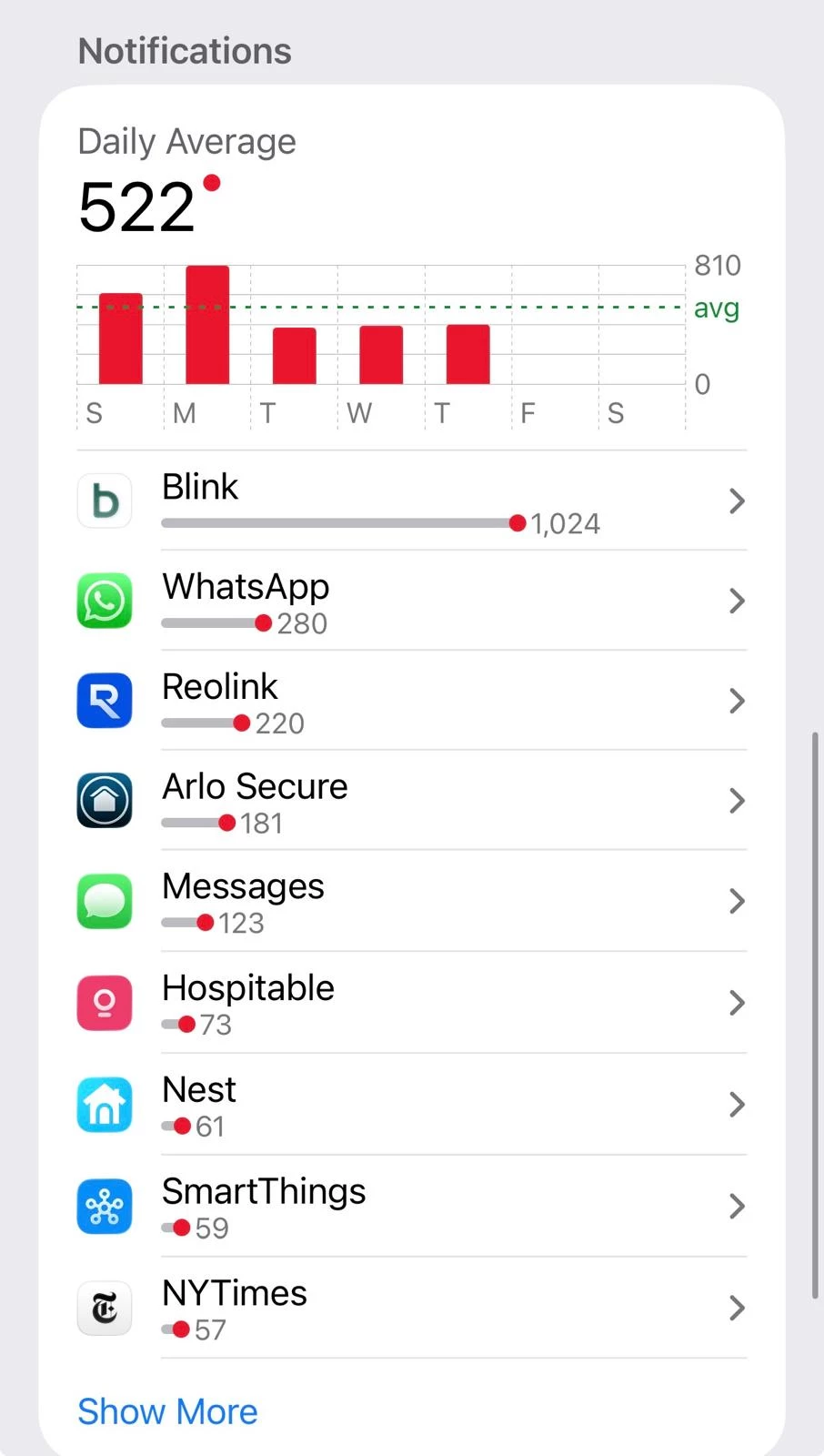
In place: Arlo, Ring, Blink, ReoLink (removed most Nest cameras as Google stopped playing nicely with other IoT).


Cameras work well for: 

  • Knowing when cleaning/maintenance teams arrive & depart
  • Odd activity during non-standard hours
  • Headcount to ensure maximum occupancy is not violated
  • Checking total snowfall for contractors agreements to commence
  • Hyper-localized temperature readings
  • Monitoring garbage areas for animal entry
  • Asset monitoring when no guests are expected
  • Verifying damage to vehicles that are in line of sight (animal entry for cleaners)

Cameras could be improved by:

  • More granular controls on notifications by specific device/time-of-day/multiple notifications/sound/vibration changes (though this is likely mobile device/OS dependent) 
  • Battery life improvements/standardized solar options
  • Making all cameras POE as an option
  • Easier review of non-standard events (since many cameras record SOOO much)
  • Continued AI for specific camera notifications (animal, package delivered, etc)


We do NOT give guests camera access, but have had requests to share footage from bear encounters. 

This is such a great list, thank you ​@anthonyrallo! Could you tell me more about more granular controls? Is this because different team members are on call at different hours or because you get too many irrelevant alerts? Or maybe another reason?


anthonyrallo
Inspiring
Forum|alt.badge.img+1
  • Inspiring
  • January 20, 2026

@Minut_Alicja - You’re welcome. 


Happy to elaborate:

  1. controls by camera (not just entire app notification)
  2. controls to notify during specific time windows only
  3. controls that allow for notifications tied to booking (different alerts prior to booking, vs while “in-house” and after)

These requests are to help TRIAGE notifications that need attention vs. the NOISE of constant motion detection. Important notifications need to be identified and non-important suppressed. 


Does that help? 


Minut_Alicja
Hospitable Partner
  • Hospitable Partner
  • January 21, 2026

@anthonyrallo yes, thank you! Super helpful. Totally understand what you mean now, it must be really time-consuming to screen all the general motion alerts


anthonyrallo
Inspiring
Forum|alt.badge.img+1
  • Inspiring
  • January 22, 2026

@anthonyrallo yes, thank you! Super helpful. Totally understand what you mean now, it must be really time-consuming to screen all the general motion alerts

@Minut_Alicja - Here you go...