




Power-Up Workshop: Mastering Upsells and Reviews

  • November 27, 2025
  • 4 replies
  • 87 views
Petra Podobnik
Hospitable Team Member
Forum|alt.badge.img

Join the Hospitable team on Wednesday, December 3 at 9am PT | 12pm ET | 6pm CET for a live Power-Up Workshop on Mastering Upsells and Reviews.

In this hands-on session, you’ll learn:

  • Reviews - When and how to ask for them, how to strategically delay them, and how Hospitable’s AI can write (or not write) your reviews for you. We’ll also cover best practices for crafting thoughtful replies that boost your reputation and ranking.
  • Upsells – Discover how to set up new upsell configurations inside Hospitable, which upsells resonate best with guests, and how to turn every booking into an opportunity to increase your revenue—without increasing your workload.

Whether you’re a solo host or managing multiple properties, you’ll walk away knowing how to leverage automation and AI to create a 5-star guest experience that drives repeat stays and higher earnings.

Feel free to drop your questions here ahead of time and we’ll do our best to cover them during the workshop. After the session, come back for a recap, resources, and follow-up conversation. 💜

--

Overview of all upcoming Hospitable events: https://community.hospitable.com/events

4 replies

Miles Hobson
Hospitable Team Member
Forum|alt.badge.img+2
  • Hospitable Team Member
  • December 3, 2025

In our latest Power-up Workshop, ​@Brian Seelos showed how to use Hospitable’s Guest Portal, Upsells, and Review automations to boost guest satisfaction, collect more 5-star reviews, and add extra revenue on every stay. If you couldn’t join live, here’s a quick recap of what you can set up today—and why it’s worth watching the full session for the live walkthrough and Q&A.

Watch the full “Upsells & Reviews” Power-Up Workshop replay


The one minute recap

  • Turn the Guest Portal into a revenue + satisfaction engine

    • Use the Guest Portal to centralize rental agreements, ID verification, security deposits, reservation details and upsells.

    • Brand it with your logo, colors, and custom domain so it feels like your own mini guest app.

  • Set up simple, high-impact Upsells that run on autopilot

    • Start with easy wins guests already ask for all the time: early check-in, late checkout, pet fees, baby gear, parking, pool/hot tub heat, airport transfers, etc.

    • Brian shared that even a handful of these brought in a few hundred dollars in extra revenue since summer—without extra work.

  • Make upsells smart, safe, and operationally clean

    • Control when Upsells appear (e.g. only the day before arrival), how long before check-in/checkout they can be purchased, and whether they require your approval.

    • Hospitable automatically adjusts reservation check-in/checkout times when upsells are purchased, which can then update your messaging, smart locks, tasks, and connected tools like Turno.

  • Promote Upsells naturally in your guest messaging

    • Mention the Guest Portal and Upsell options in your booking confirmation, check-in instructions, and checkout message so guests actually see what’s available.

    • Brian showed his real message examples and how he links directly to the portal at key moments.

  • Build a review system that maximizes 5-star ratings

    • Use review request rules to send a friendly nudge 2 hours after checkout, then follow-ups at 3 days and 7 days—only if the guest hasn’t reviewed yet.

    • Explain why 5-star ratings matter to your business and invite guests to share private feedback with you instead of posting a low public rating.

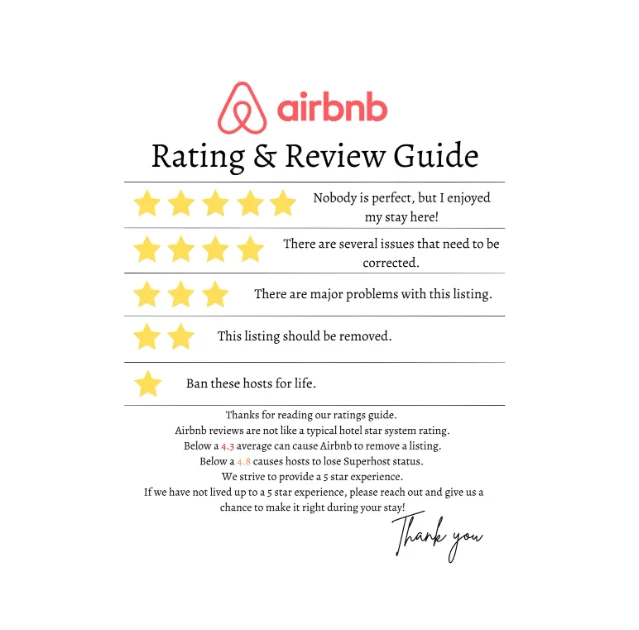
    • Brian also shared a simple “what 5 stars really means” graphic he sends to set expectations for newer Airbnb guests.

  • Automate host reviews and AI-powered replies

    • Create multiple host review templates so Hospitable can automatically rotate through them when you review guests.

    • Let Hospitable’s AI draft tailored replies to guest reviews; you just skim, tweak if needed (especially for 3–4★ reviews), and click send.

  • Customize per channel, including direct bookings

    • Use slightly different review request messages for Airbnb, Vrbo, Booking.com, and direct bookings.

    • For direct stays, you can either send guests to review on your Hospitable direct site or link out to platforms like Google Reviews or Facebook.


Brian Seelos
Hospitable Team Member
  • Hospitable Team Member
  • December 3, 2025


anthonyrallo
Known Participant
Forum|alt.badge.img+1
  • Known Participant
  • December 4, 2025

This was a great Power up! Thanks ​@Brian Seelos - While we have a strong review game, we hadn’t considered adding in a full 3 reminders. Off topic slightly, but it’d be good to see a review ratio in metrics (meaning how many stays DIDN’T leave reviews. Possible ​@Andrew Schorr ?


Petra Podobnik
Hospitable Team Member
Forum|alt.badge.img
  • Author
  • Hospitable Team Member
  • December 8, 2025

Hi ​@anthonyrallo!

The team working on Metrics is actively collecting suggestions right here in this feature request, so feel free to add your idea there too: https://feedback.hospitable.com/p/additional-widget-requesets-for-the-new-metrics-dashboards