



Trip Insurance is now live for U.S. beta users

  • December 15, 2025
  • 25 replies
  • 596 views
Tim Parry
Hospitable Team Member
Forum|alt.badge.img+1

We’re excited to share that we’ve launched trip insurance for a select group of users with beta features enabled in the U.S. who have previously sold upsells through Hospitable. 🎉

This new upsell is provided by RentalGuardian and can be automatically offered to eligible guests inside their Guest Portal, giving them an easy way to protect their trip - and earning you commission on each purchase.

We’ll auto-enable the Trip Insurance Upsell for you, and there’s nothing you need to do. It will be automatically available in the guest portal, and you can switch it off anytime under Guest Experience → Upsells if you prefer.

We’ll be rolling Trip Insurance out to more beta users over the coming days, and then to a broader audience throughout the week.

If you’d like to learn more, you can view our help article here

25 replies

mrotman
Known Participant
Forum|alt.badge.img+1
  • Known Participant
  • December 15, 2025

I just saw this! Is there a FAQ or info you have so we can answer renters which one to take, AirBnB or this one?


The Orange Cabins
Participating Frequently
Forum|alt.badge.img

How does this work with Airbnb bookings?


Tim Parry
Hospitable Team Member
Forum|alt.badge.img+1
  • Author
  • Hospitable Team Member
  • December 16, 2025

How does this work with Airbnb bookings?


Hi Alex, guest can still purchase / be offered trip insurance in the guest portal for Airbnb bookings. If they’ve already purchased trip insurance via Airbnb they can simply ignore it / you can disable TI for Airbnb only,

If they’ve not purchased the insurance via Airbnb this essentially acts as a second chance to purchase it in the run up to check-in, vs at booking only for Airbnb


Tim Parry
Hospitable Team Member
Forum|alt.badge.img+1
  • Author
  • Hospitable Team Member
  • December 16, 2025

I just saw this! Is there a FAQ or info you have so we can answer renters which one to take, AirBnB or this one?


This is a good question - I can put something together here that compares coverages. Trip insurance is a pretty standard product so they should be similar policies.


mrotman
Known Participant
Forum|alt.badge.img+1
  • Known Participant
  • December 17, 2025

Where do I see what I made for insurance upsell? Someone just purchased- did I make this or is this what he paid and I make something else?


Tim Parry
Hospitable Team Member
Forum|alt.badge.img+1
  • Author
  • Hospitable Team Member
  • December 17, 2025

Where do I see what I made for insurance upsell? Someone just purchased- did I make this or is this what he paid and I make something else?


Great to see! This is the amount the guest paid, your commission here is $13.51. We will be adding your share and the payout amount to the purchased upsell section moving forward very soon!


Stay Salty
Known Participant
Forum|alt.badge.img
  • Known Participant
  • December 17, 2025

Interesting, so we could just put something in our booking message that they could click on to purchase this insurance?


Tim Parry
Hospitable Team Member
Forum|alt.badge.img+1
  • Author
  • Hospitable Team Member
  • December 17, 2025

Interesting, so we could just put something in our booking message that they could click on to purchase this insurance?


@Stay Salty Exactly that - Typically adding the %guest_portal% shortcode to your new reservation messaging rule and specifying they can purchase trip insurance and/or other upsells (Or rental agreements + security deposits if you use those) is what we expect will work best here. The %guest_portal% shortcode will automatically provide a URL to the guest. 


Will.Fraser
Known Participant
Forum|alt.badge.img
  • Known Participant
  • December 17, 2025

Great value add here, Hospitable team! 


@hosts . . . does Airbnb offer a bona-fide trip insurance product that would keep the host’s payout intact AND insure the traveler against illness or other non-lodging related trip issues?


Will.Fraser
Known Participant
Forum|alt.badge.img
  • Known Participant
  • December 17, 2025

Any tips on how to become a Beta Boss ​@Tim Parry ?


Tim Parry
Hospitable Team Member
Forum|alt.badge.img+1
  • Author
  • Hospitable Team Member
  • December 17, 2025

Any tips on how to become a Beta Boss ​@Tim Parry ?


@Will.Fraser - We’ve just enabled this on your account! You should be good to boss-away!


Will.Fraser
Known Participant
Forum|alt.badge.img
  • Known Participant
  • December 17, 2025

Any tips on how to become a Beta Boss ​@Tim Parry ?


@Will.Fraser - We’ve just enabled this on your account! You should be good to boss-away!

Amazing!  Thanks for supporting a baby boss like me :) 


Aryeh Raber
Hospitable Team Member
Forum|alt.badge.img+1
  • Hospitable Team Member
  • December 17, 2025

Where do I see what I made for insurance upsell? Someone just purchased- did I make this or is this what he paid and I make something else?

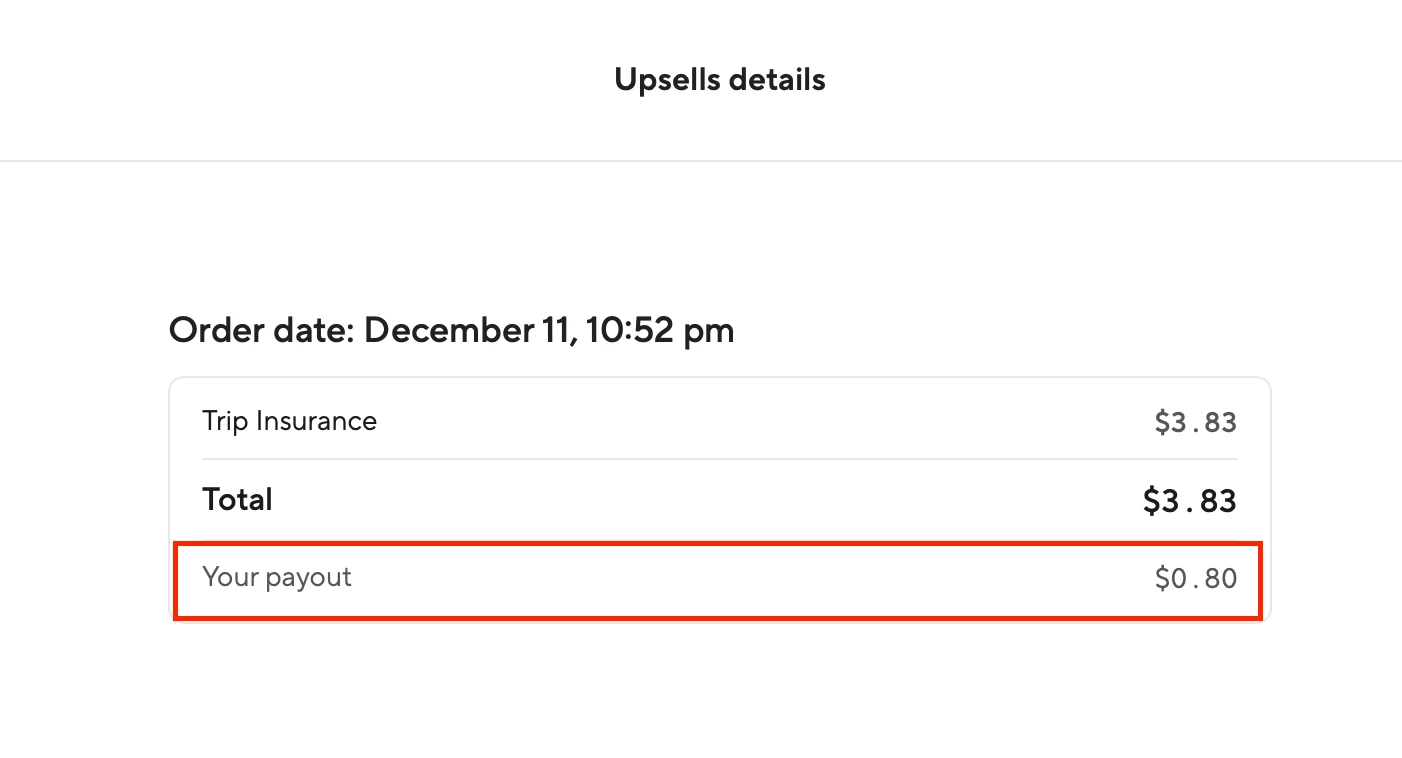
@mrotman Thanks for bringing this up! We’ve now pushed a change to the Upsells Details order overview that shows your payout amount. In fact, that payout amount is shown for all upsell purchases, so it’s easy to see what the guest paid, and what your payout will be, right from the inbox.


mrotman
Known Participant
Forum|alt.badge.img+1
  • Known Participant
  • December 17, 2025

Thank you. So far my inbox I don't see a change just says upsell purchased and we actually had a panic today because somebody purchased the insurance and my assistant thought they purchased the late checkout which we can't have because I'm just checking in. And there's really no way to tell what upsell they purchase but you're selling that has changed now? Will that only show future upsell purchases or it should show ones that already existed in the past as well?


Aryeh Raber
Hospitable Team Member
Forum|alt.badge.img+1
  • Hospitable Team Member
  • December 17, 2025

@mrotman We’ve been showing a list of all the purchased upsells by name in the thread sidebar since we launched upsells — are you not able to see this? It doesn’t list them in the conversation itself.

The payout-related change I’m talking about is in the Upsell Details popup, right under the “Total” from the screenshot you shared earlier.


mrotman
Known Participant
Forum|alt.badge.img+1
  • Known Participant
  • December 17, 2025

In the message thread, I see upsell purchase it doesn't tell me what the upsell is. When I open the message it also says upsell purchase but doesn't tell me what the upsell was.


Aryeh Raber
Hospitable Team Member
Forum|alt.badge.img+1
  • Hospitable Team Member
  • December 17, 2025

@mrotman In the thread sidebar:


Additionally, if you then click that “View upsells details” button, a popup should open (like your screenshot earlier) which now displays the payout amount:


mrotman
Known Participant
Forum|alt.badge.img+1
  • Known Participant
  • December 17, 2025

Thanks! I do see that now! Very helpful and already lots of guests purchasing. But would like a little FAQ to put into our knowledge base in case the renter does ask what is covered and what isn’t- as I honestly have no idea. 


So if there is a bad snow storm- renters don’t get money back from us unless all 3 roads are closed- with insurance could they get that money back? or if power goes out - very common in our area- renters don’t get money back unless it’s out for a certain amount of time- would this insurance give them money back?


Aryeh Raber
Hospitable Team Member
Forum|alt.badge.img+1
  • Hospitable Team Member
  • December 18, 2025

@mrotman Great, glad you can see it now 👍


I believe ​@Tim Parry will look into creating an overview of some kind regarding the different insurance policies.


mrotman
Known Participant
Forum|alt.badge.img+1
  • Known Participant
  • December 18, 2025

Looks like they have a certain amount of days to buy it before their stay. Would love to see an automated message reminding them of their last day to purchase.


So far lots of renters have bought the insurance. 


Homelike.ca
Known Participant
Forum|alt.badge.img
  • Known Participant
  • December 19, 2025

I can't wait to have this in Canada. Does it protect against fire and such, or only if the guest steals or breaks something? 


Knotty Retreats
Known Participant
Forum|alt.badge.img

@Tim Parry if you’re using RentalGuardian for trip insurance what is stopping the switch to them for insurance for hosts? We know how bad Truvi/Superhog is and RentalGuardian has an excellent reputation!! 


Petra Podobnik
Hospitable Team Member
Forum|alt.badge.img
  • Hospitable Team Member
  • December 22, 2025

Tim is taking some time off over the holidays, but he’ll get back to you all once he’s back. 💜


mrotman
Known Participant
Forum|alt.badge.img+1
  • Known Participant
  • December 22, 2025

I just found a huge flaw in this travel insurance. You can only book it 30 days or more before your stay otherwise it doesn't even show up in your portal. We have very few people who book that far in advance in our area. So they would never see this travel insurance. I tell them to purchase it through us but now they've booked and they can't purchase. So that's a huge issue


Aryeh Raber
Hospitable Team Member
Forum|alt.badge.img+1
  • Hospitable Team Member
  • December 22, 2025

Thanks for the feedback ​@mrotman — totally valid concern. We actually raised this exact issue with RentalGuardian already. They’ve acknowledged it and indicated they’re exploring ways to make the booking window more flexible, specifically allowing purchases closer to check-in.

We don’t have a confirmed timeline yet, but once their API supports a shorter window, we’ll be able to update our backend very quickly. We’ll definitely keep you posted as soon as we hear more from them!