I have recently starting using booking.com, however I have 2 different listings. hospitable created one instead of syncing with the one I created on the site. I am only getting bookings through my non-hospitable one.
How do you collect your cleaning fees and taxes? it says it’s not included in the price for the booker but I have no way of collecting this otherwise.
Best answer by Mahmodul
Hi @NelsonGetaways
Considering both of your listings are on Hospitable, for the Hospitable pushed booking.com listing, please check if that has been pushed to Booking.com by Hospitable. Make sure that listing is "Open/Bookable". If it is, that means the listing is live and guests can book it.
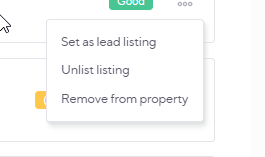
If the status shows "Closed" instead, you'll need to make it live from Hospitable. There is a button (on the right side of the listing, under the three-dot menu) that allows you to make the listing live—just like in the screenshot below.
In this case(where you pushed your listing from hospitable) , you do not need to configure the cleaning fees manually, as Hospitable will automatically sync them for you in booking.com. Please see the note below regarding taxes.
For the listing not connected to Hospitable: You’ll need to manually configure the cleaning fee in Booking.com. To do this:
Log in to the Extranet.
Go to Property > Policies.
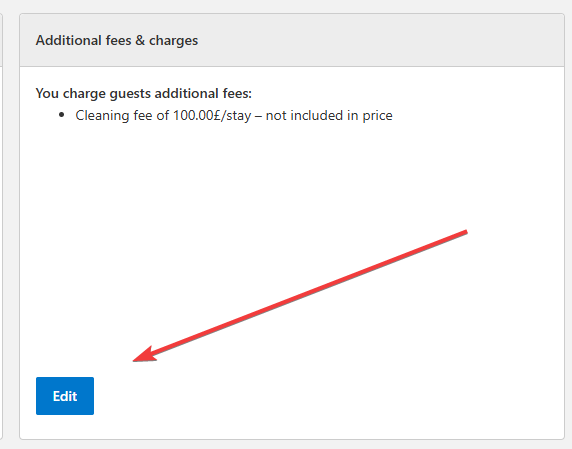
Scroll down to Additional fees & charges under "Other policies" and click Edit.
To add a fee:
Click Add another fee
Select the fee type
Indicate whether it’s included in the rate
Choose a payment type
Enter the amount
Click Save
To edit or remove a fee, simply update or delete the entry and click Save.
Note: If a fee is listed as “not included in price”, that means you're collecting it as an inline item. If your listing reflects that, you're all set.
Regarding Taxes: Booking.com usually sets a default tax amount based on your listing’s location and what other hosts in the area typically use. To check click Property > VAT/Tax/Charge.
If changes are needed, you’ll need to contact Booking.com support, as this section cannot be edited manually.
Considering both of your listings are on Hospitable, for the Hospitable pushed booking.com listing, please check if that has been pushed to Booking.com by Hospitable. Make sure that listing is "Open/Bookable". If it is, that means the listing is live and guests can book it.
If the status shows "Closed" instead, you'll need to make it live from Hospitable. There is a button (on the right side of the listing, under the three-dot menu) that allows you to make the listing live—just like in the screenshot below.
In this case(where you pushed your listing from hospitable) , you do not need to configure the cleaning fees manually, as Hospitable will automatically sync them for you in booking.com. Please see the note below regarding taxes.
For the listing not connected to Hospitable: You’ll need to manually configure the cleaning fee in Booking.com. To do this:
Log in to the Extranet.
Go to Property > Policies.
Scroll down to Additional fees & charges under "Other policies" and click Edit.
To add a fee:
Click Add another fee
Select the fee type
Indicate whether it’s included in the rate
Choose a payment type
Enter the amount
Click Save
To edit or remove a fee, simply update or delete the entry and click Save.
Note: If a fee is listed as “not included in price”, that means you're collecting it as an inline item. If your listing reflects that, you're all set.
Regarding Taxes: Booking.com usually sets a default tax amount based on your listing’s location and what other hosts in the area typically use. To check click Property > VAT/Tax/Charge.
If changes are needed, you’ll need to contact Booking.com support, as this section cannot be edited manually.
To edit or remove a fee, simply update or delete the entry and click Save.
Note: If a fee is listed as “not included in price”, that means you're collecting it as an inline item. If your listing reflects that, you're all set.
This is what my listing that is not on Hospitable currently shows. So they will still charge it and pay me for it? It does not seem to be included in the payout rate at all but I cannot see a breakdown of what’s being charged to confirm. Or do I have to collect this another way?
“Not included in price” means it’s not part of the nightly rate.
So the cleaning fee will be added on top of the calendar rates. For example, for a 2-night stay with $100/night rate and $50 cleaning fee, your guest would be charged $250 ($100 x 2 nights + $50).
If it was “included in price” instead, the fee would’ve simply been a representation and wouldn’t change anything in the final booking cost.