

Elevating my STRs with next level AI and Automation

  • December 23, 2025
  • 12 replies
  • 233 views

Charles Island
Participating Frequently
Forum|alt.badge.img+1

When a guest enters one of my listings, the property literally springs to life. They are welcomed by name by an AI Avatar on the TV, rolling out a digital 'red carpet' immediately. Within seconds, guests can tell the smart home their ideal temperature, or even mention they're hungry—prompting the microwave to fire up and start popping popcorn.

But my favorite automation solves the classic 'Group Amnesia' problem. We've all had bookings where the lead guest knows the rules, but the rest of the group is totally clueless, right? To fix this, I have a motion-triggered announcement that plays the night before departure. It ensures the whole group hears the checkout time and procedures, so no one is left guessing. Or if I need a vehicle moved or the trash to be taken out, I use my mobile smart remote to both program the message and set the motion trigger.

When it's time to leave, guests simply load the dishwasher and hit a physical 'Checkout' button on their way out. That single press adjusts the thermostat, kills the lights, locks the door, and notifies my housekeeping team—it even cues up a customized welcome for the cleaners when they arrive. It’s a five-star experience on autopilot!

Recently, a fellow host stayed at one of my listings, they were impressed by my set up and asked that I set their place up with my smart home magic. I’m curious, do you use smart home tech in your listings, and if so, what do you use and what problems have you solved or experiences have you created? 


Thank you Hospitable for all the integrations, API, WEBHOOKS, etc. So much of what I create rides on your tools. 

12 replies

Petra Podobnik
Hospitable Team Member
Forum|alt.badge.img+4
  • Hospitable Team Member
  • December 23, 2025

Thank you ​@Charles Island for sharing this with fellow Hospitable hosts! I remember you mentioned your automations and AI in your introduction too. It’s a really impressive setup, and I’m curious whether other hosts here are working toward something similar. 💜


Charles Island
Participating Frequently
Forum|alt.badge.img+1
  • Author
  • Participating Frequently
  • December 23, 2025

My pleasure ​@Petra Podobnik 

My setup goes beyond just creating a magical atmosphere; it is a robust tool for risk mitigation. I have developed a comprehensive control system for 10 listings that automates everything from lighting to motion-activated communication and end-to-end guest routines. I am incredibly close to achieving total business automation that remains personalized, a milestone I couldn't have reached without the power of Hospitable.


sunsetdreamsretreat
New Participant
Forum|alt.badge.img

hi @Charles Island I am curious what programs and gadgets you use to achieve all of this? It sounds very robust. How do you motion sensor the tv to come on to your video?


Tom Beerley
Hospitable Hero
Forum|alt.badge.img+3
  • Hospitable Hero
  • December 30, 2025

This would make a really cool YouTube video! I too am curious what kind of product brands are involved. One risk to mitigate if you haven't done so already, is that I've heard of listings getting shut down for having an Amazon Alexa device in them. People have legitimate concerns about them being used for listening in on conversations, which is illegal in a lot of states and is against Airbnb policy in all cases.


Charles Island
Participating Frequently
Forum|alt.badge.img+1
  • Author
  • Participating Frequently
  • January 24, 2026

One risk to mitigate if you haven't done so already, is that I've heard of listings getting shut down for having an Amazon Alexa device in them. People have legitimate concerns about them being used for listening in on conversations, which is illegal in a lot of states and is against Airbnb policy in all cases.

1. The Official Policy: They are Allowed

Airbnb explicitly permits "smart home devices" (like Amazon Alexa and Google Nest) in listings. They are not banned like indoor security cameras.

  • The Rule: You are allowed to have them in common areas.

  • The Condition: You must disclose their presence in your listing description.


Tom Beerley
Hospitable Hero
Forum|alt.badge.img+3
  • Hospitable Hero
  • January 24, 2026

Thank you for finding that. So it boils down to what Airbnb defines as a common area. If someone is renting an entire home, is the living room a common area? As opposed to the bedrooms? Or by common area do they mean like exterior hallways, or spaces that are shared with other guests? It might boil down to the expectation of privacy. But even when you're in policy, on Airbnb all it takes is for a guest to say "I think there's a microphone listening in on us" and you will get suspended while they investigate. I've even heard of it happening because of guests who are too dumb to know what a smoke alarm is and report that they have cameras watching them.


Charles Island
Participating Frequently
Forum|alt.badge.img+1
  • Author
  • Participating Frequently
  • January 24, 2026

Thank you for finding that. So it boils down to what Airbnb defines as a common area. If someone is renting an entire home, is the living room a common area? As opposed to the bedrooms? Or by common area do they mean like exterior hallways, or spaces that are shared with other guests? It might boil down to the expectation of privacy. But even when you're in policy, on Airbnb all it takes is for a guest to say "I think there's a microphone listening in on us" and you will get suspended while they investigate. I've even heard of it happening because of guests who are too dumb to know what a smoke alarm is and report that they have cameras watching them.


​@Tom Beerley You raise a valid point about the expectation of privacy. In many of my listings, I do place devices in bedrooms, but I go the extra mile to mitigate any concerns. I explicitly disclose their presence in the listing description and reiterate in the House Rules that guests are welcome to mute or unplug them at any time for a completely private experience.

To show you how this works in practice, I am heading to my most advanced smart home today. I will record a quick demo video—using your name for the arrival sequence—so you can see the personalized experience firsthand. I should have that uploaded in a few hours. Stay tuned! ​@sunsetdreamsretreat 


Tom Beerley
Hospitable Hero
Forum|alt.badge.img+3
  • Hospitable Hero
  • January 24, 2026

​@Charles Island Beautiful, I would love to see that! Standing by :-)


Homelike.ca
Known Participant
Forum|alt.badge.img+1
  • Known Participant
  • January 26, 2026

Waiting for the video drop ​@Charles Island 


flinty
New Participant
  • New Participant
  • October 9, 2026

Hi Charles, great thread. A lot of this overlaps with what I’ve built for our Airbnb in the UK, which I manage from Florida, 3,000 miles away.

It started as a chatbot connected to Hospitable to answer guest questions using our house guide and property documents. It’s gradually grown into three connected parts:

  • Home Assistant runs the house controls, automations, dashboards and sensors.

  • Winnie is my chatbot for guest messaging through Hospitable.

  • Winston is the AI assistant guests interact with on the guest tablet.

All three communicate with each other, connecting the guest’s booking, the house information and what’s happening in the property.

Guest tablet and Winston

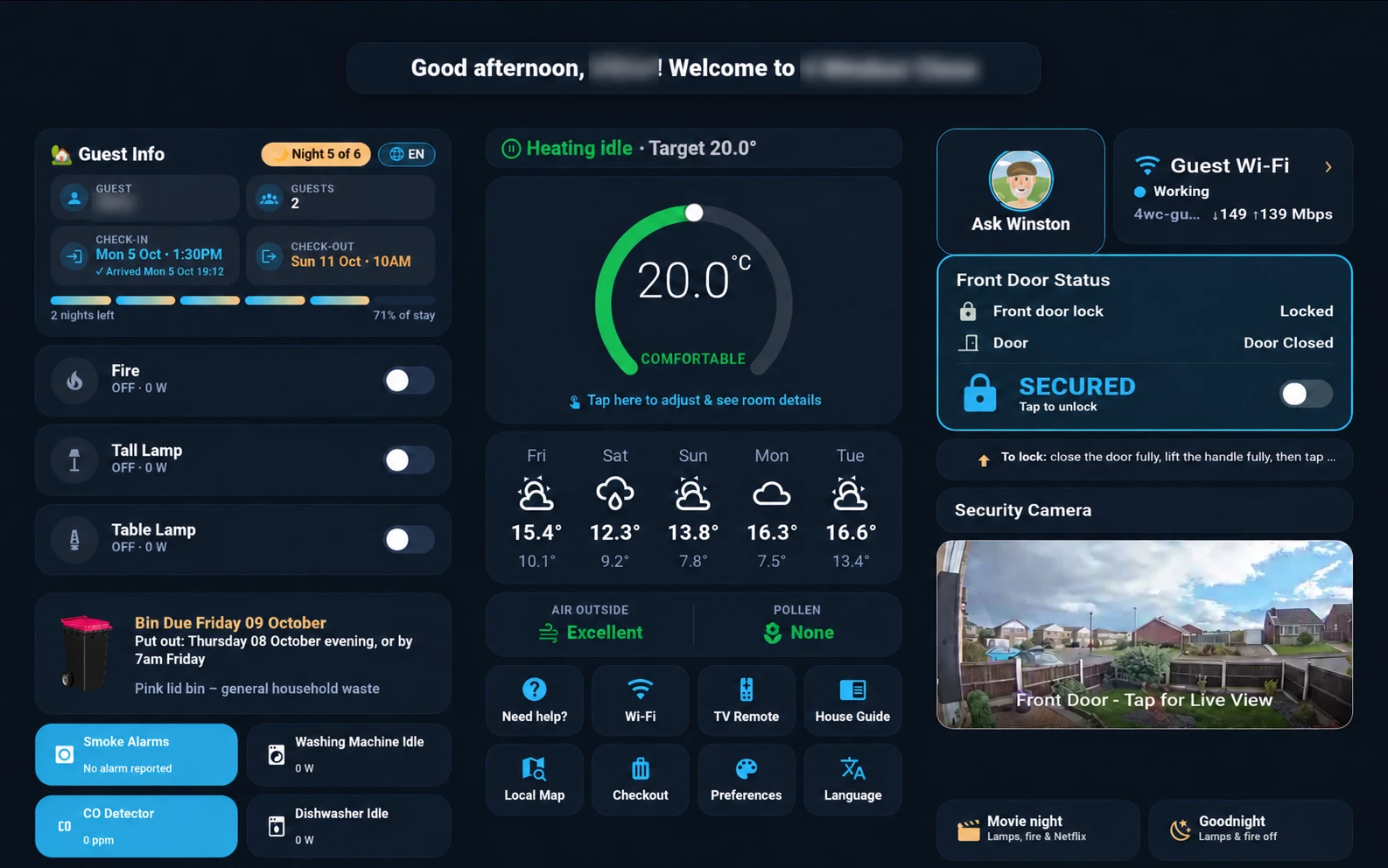
The locked-down guest tablet gives guests access to heating, lights, Wi-Fi, their stay details, the house guide, local information, weather and a live view of the exterior doorbell camera.

Guests can press buttons to control most things directly, or ask Winston a question by typing or pressing the microphone button. Winston uses the property information, appliance instructions and manuals, alongside relevant booking and Home Assistant data.

The tablet supports English, German, Spanish, French and Chinese. The language is set from the Hospitable booking on check-in day, and guests can change it whenever they like.

Guest and admin information are kept separate. Guests get information relevant to their own stay and the house; my admin view includes temperatures, heating and boiler activity, energy consumption, device batteries and connectivity.

From tablet help to a conversation

If a guest has an issue, they can alert me through the tablet. That triggers a notification to me and an automated message to them through Hospitable, delivered via their booking platform. We can then continue the conversation there, keeping it in the same place as their other booking messages.

Guests can also request airport transfers, late checkout or a mid-stay clean from the tablet, with approval and payment handled by me.

Fixing “group amnesia”

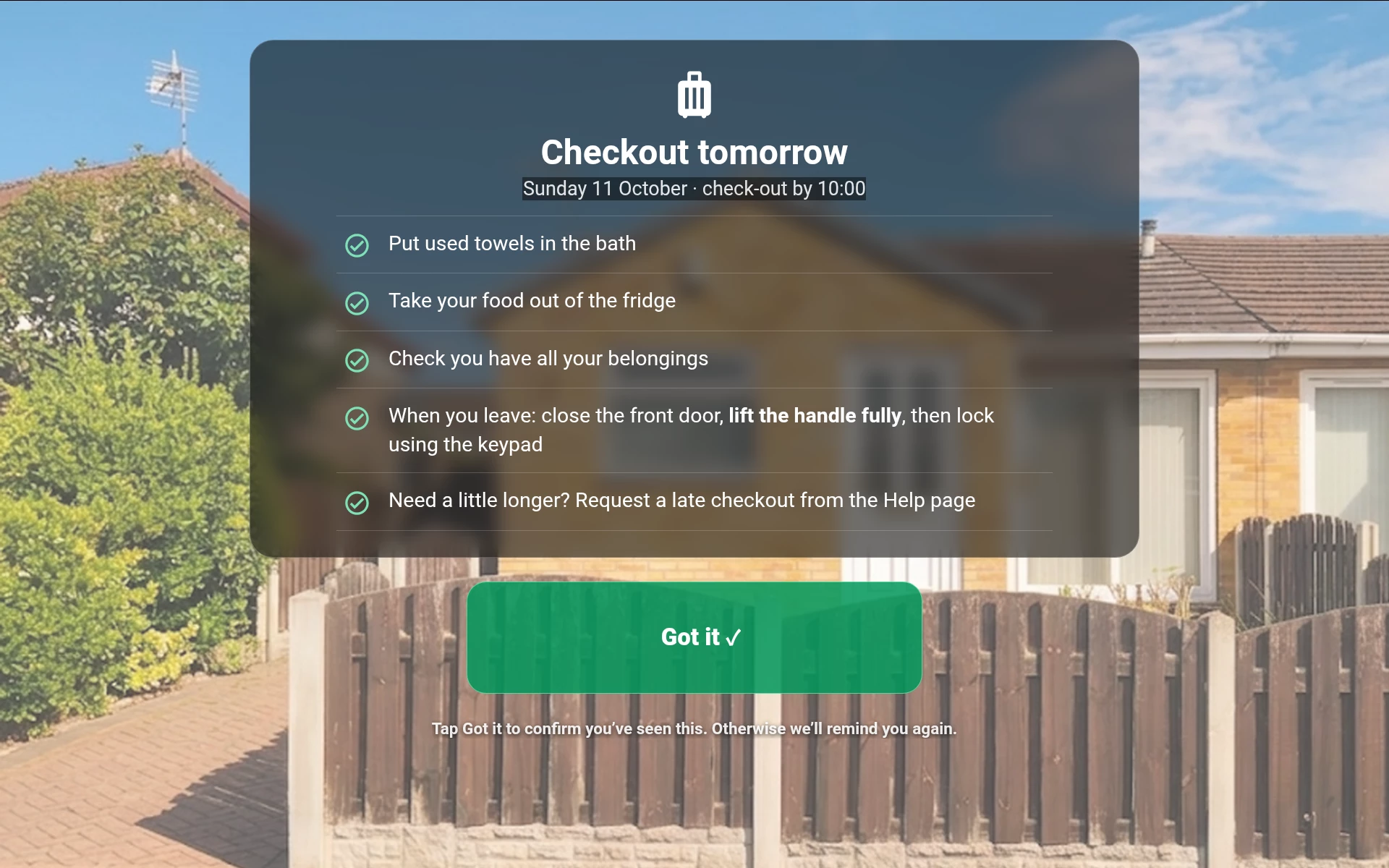
Your announcement idea inspired the tablet reminders. It’s easy for checkout details to get missed, especially when only the lead guest has read the messages.

The tablet displays full-screen pop-up notifications and speaks in the guest’s selected language. If they change language, the voice changes too.

  • Welcome: the first use of the guest’s Nuki code triggers the arrival routine. Once the door has been shut for five minutes, the tablet welcomes them by name and shows the essentials.

  • Checkout: reminders the evening before departure and a short final reminder on checkout morning.

  • Bin night: which bin needs putting out and when.

  • Front door: instructions if it has been left open or unlocked, including lifting the handle before locking—a common stumbling block with our door.

Guests tap “Got it” to acknowledge a reminder. Repeats are limited, I receive push notifications for unacknowledged checkout and bin reminders, and old reminders clear after checkout. The next booking brings its own guest name and language. Routine door announcements are silent overnight.

Connected safety alerts

If a smoke alarm or the carbon monoxide detector triggers, Home Assistant sends an alert to the tablet with spoken guidance in the guest’s language. The connected messaging system also sends the guest a message through Hospitable via their booking platform, and I receive an alert too.

The dedicated smoke alarms and CO detector remain the primary warning. The tablet and messages provide additional guidance and help me respond remotely.

Privacy

On ​@Tom Beerley’s

point, I’ve made the tablet’s privacy controls explicit. Its built-in camera is disabled and physically covered. The microphone stays disabled unless a guest presses the button to ask Winston a question—there’s no always-on listening or wake word. Guests can simply type instead.

The spoken announcements don’t activate the microphone; they’re audio output only. The doorbell camera shown on the tablet is outside the property.

Free community version of Winnie

I’ve also published a free, self-hosted community version for chat only, aimed at hosts who don’t have Mogul and want an alternative for AI-assisted guest messaging.

You can download it and find the setup instructions here:
https://github.com/flinty1970/hospitable-ai-toolkit

It uses each property’s own documents to draft replies, includes a review workflow, and supports optional auto-replies, which are off by default. Access requests, booking changes, payments and problems are flagged for human review.

The community version covers guest messaging. Winston, the Home Assistant integration, tablet controls and spoken pop-ups are part of my custom Windsor setup.

Hospitable’s API and webhooks have made a huge amount of this possible. What began as a messaging chatbot has grown into a connected system for helping guests and managing the house remotely.

​@Charles Island  I’m particularly interested in the physical checkout button you mentioned. Which brand or device are you using? Does it require a long press or confirmation to prevent accidental activation, and do you have a fallback checkout routine if guests leave without pressing it?


Guest Check out reminder
Guest Dashboard on tablet


Homelike.ca
Known Participant
Forum|alt.badge.img+1
  • Known Participant
  • October 9, 2026

Hi Charles, great thread. A lot of this overlaps with what I’ve built for our Airbnb in the UK, which I manage from Florida, 3,000 miles away.

It started as a chatbot connected to Hospitable to answer guest questions using our house guide and property documents. It’s gradually grown into three connected parts:

  • Home Assistant runs the house controls, automations, dashboards and sensors.

  • Winnie is my chatbot for guest messaging through Hospitable.

  • Winston is the AI assistant guests interact with on the guest tablet.

All three communicate with each other, connecting the guest’s booking, the house information and what’s happening in the property.

Guest tablet and Winston

The locked-down guest tablet gives guests access to heating, lights, Wi-Fi, their stay details, the house guide, local information, weather and a live view of the exterior doorbell camera.

Guests can press buttons to control most things directly, or ask Winston a question by typing or pressing the microphone button. Winston uses the property information, appliance instructions and manuals, alongside relevant booking and Home Assistant data.

The tablet supports English, German, Spanish, French and Chinese. The language is set from the Hospitable booking on check-in day, and guests can change it whenever they like.

Guest and admin information are kept separate. Guests get information relevant to their own stay and the house; my admin view includes temperatures, heating and boiler activity, energy consumption, device batteries and connectivity.

From tablet help to a conversation

If a guest has an issue, they can alert me through the tablet. That triggers a notification to me and an automated message to them through Hospitable, delivered via their booking platform. We can then continue the conversation there, keeping it in the same place as their other booking messages.

Guests can also request airport transfers, late checkout or a mid-stay clean from the tablet, with approval and payment handled by me.

Fixing “group amnesia”

Your announcement idea inspired the tablet reminders. It’s easy for checkout details to get missed, especially when only the lead guest has read the messages.

The tablet displays full-screen pop-up notifications and speaks in the guest’s selected language. If they change language, the voice changes too.

  • Welcome: the first use of the guest’s Nuki code triggers the arrival routine. Once the door has been shut for five minutes, the tablet welcomes them by name and shows the essentials.

  • Checkout: reminders the evening before departure and a short final reminder on checkout morning.

  • Bin night: which bin needs putting out and when.

  • Front door: instructions if it has been left open or unlocked, including lifting the handle before locking—a common stumbling block with our door.

Guests tap “Got it” to acknowledge a reminder. Repeats are limited, I receive push notifications for unacknowledged checkout and bin reminders, and old reminders clear after checkout. The next booking brings its own guest name and language. Routine door announcements are silent overnight.

Connected safety alerts

If a smoke alarm or the carbon monoxide detector triggers, Home Assistant sends an alert to the tablet with spoken guidance in the guest’s language. The connected messaging system also sends the guest a message through Hospitable via their booking platform, and I receive an alert too.

The dedicated smoke alarms and CO detector remain the primary warning. The tablet and messages provide additional guidance and help me respond remotely.

Privacy

On ​@Tom Beerley’s

point, I’ve made the tablet’s privacy controls explicit. Its built-in camera is disabled and physically covered. The microphone stays disabled unless a guest presses the button to ask Winston a question—there’s no always-on listening or wake word. Guests can simply type instead.

The spoken announcements don’t activate the microphone; they’re audio output only. The doorbell camera shown on the tablet is outside the property.

Free community version of Winnie

I’ve also published a free, self-hosted community version for chat only, aimed at hosts who don’t have Mogul and want an alternative for AI-assisted guest messaging.

You can download it and find the setup instructions here:
https://github.com/flinty1970/hospitable-ai-toolkit

It uses each property’s own documents to draft replies, includes a review workflow, and supports optional auto-replies, which are off by default. Access requests, booking changes, payments and problems are flagged for human review.

The community version covers guest messaging. Winston, the Home Assistant integration, tablet controls and spoken pop-ups are part of my custom Windsor setup.

Hospitable’s API and webhooks have made a huge amount of this possible. What began as a messaging chatbot has grown into a connected system for helping guests and managing the house remotely.

​@Charles Island  I’m particularly interested in the physical checkout button you mentioned. Which brand or device are you using? Does it require a long press or confirmation to prevent accidental activation, and do you have a fallback checkout routine if guests leave without pressing it?


Guest Check out reminder
Guest Dashboard on tablet


very cool automatizations… and if you can see all this in 1 tablet, i think thats amazin. Good job. Wondering how much time it took you to set all this up. 


flinty
New Participant
  • New Participant
  • October 9, 2026

Thank you! Having everything together on one tablet makes managing the property from 3,000 miles away much easier.


The basic Home Assistant setup came together in about a day, but the complete system has evolved over time as I’ve added features, tested them and refined things based on guest questions.


I started with Home Assistant and fairly straightforward hardware: smart switches and plugs, Bluetooth temperature/humidity sensors, a Hive thermostat, a Nuki lock, and connected smoke and CO detectors.


Then I added Winnie, my chatbot for guest messaging through Hospitable. More recently, I added Winston, the AI assistant on the guest tablet. All three communicate with each other.


I now manage all code updates through AI, including changes to Winnie, Winston and the Home Assistant automations. HA-MCP lets the AI work directly with Home Assistant, which makes development and troubleshooting much quicker. I describe the behaviour I want, then review and test the changes.


The heating follows the booking: it returns to the normal heating schedule within 24 hours of check-in, responds to same-day bookings, and drops to a setback temperature when the property is empty.


Winston brings together the house guide, appliance manuals, relevant booking details and live house data. Guests can use the tablet’s buttons, type a question or press a button to speak.


The tablet’s language is determined automatically from guest data pulled from Hospitable. It supports English, German, Spanish, French and Chinese, and guests can change it at any time. The pop-up reminders and spoken announcements follow that selected language too.


Guests can also report a problem through the tablet. I’m notified, and an automated message opens the conversation through Hospitable. Smoke and CO alerts reach the tablet with audio, the guest’s booking platform and me.


Getting the basics working was quick; most of the time has gone into making the different parts work reliably together and keeping the guest experience simple.