


Customize your backup code messages🚪

  • December 23, 2025
  • 3 replies
  • 270 views
Kristijan Laco
Hospitable Team Member
Forum|alt.badge.img+2

We’ve added more control over backup code messages so you can decide exactly how (or if) they’re sent.

You can now:

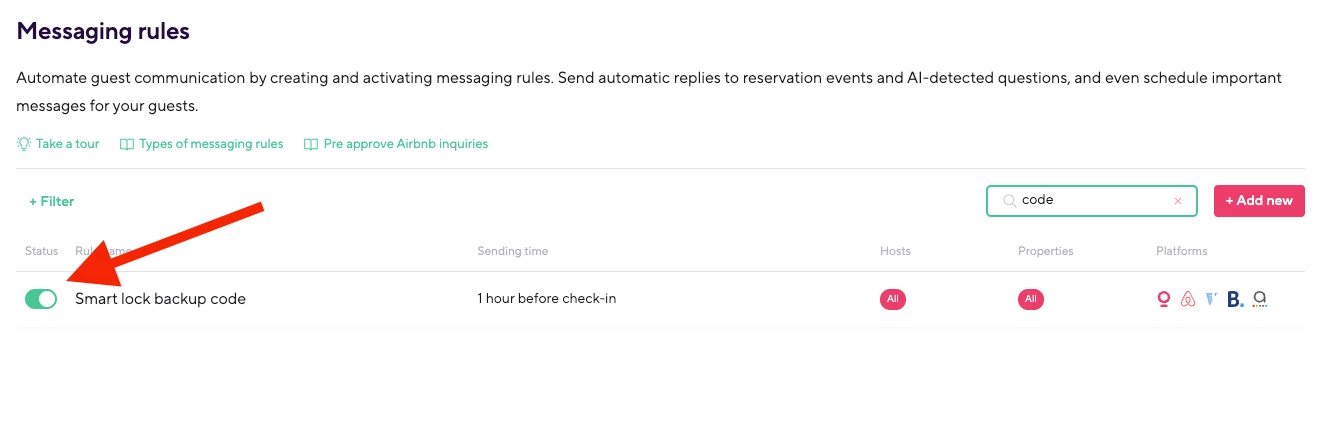
  • Fully customize the message guests receive with their backup code

  • Turn backup code messages off entirely if you don’t need them

This gives you more flexibility to match your communication style and avoid sending messages you don’t find useful.

We’ve updated our Help Center with all the details and examples so you can decide what works best for your setup. 👉 https://help.hospitable.com/en/articles/7172908-how-does-smart-lock-code-communication-and-backup-codes-work
 

As always, let us know what you think, your feedback helps shape what we build next.

đź’ś The Smart Devices Team

3 replies

Homelike.ca
Known Participant
Forum|alt.badge.img
  • Known Participant
  • December 28, 2025

This is a great addition. 

The guide does not show how to turn the backup code on entirely. How would one do that? 


foreal dough
New Participant
Forum|alt.badge.img+1
  • New Participant
  • December 28, 2025

Can we turn off the backup codes!


Tom Beerley
Known Participant
Forum|alt.badge.img
  • Known Participant
  • December 28, 2025

There are a few unanswered questions about this (from me LOL) on this thread:

https://community.hospitable.com/hospitable-changelog-3/looking-for-a-more-affordable-way-to-screen-guests-december-19-2025-958

But this thread here is a clearer / more appropriate place for the concerns.

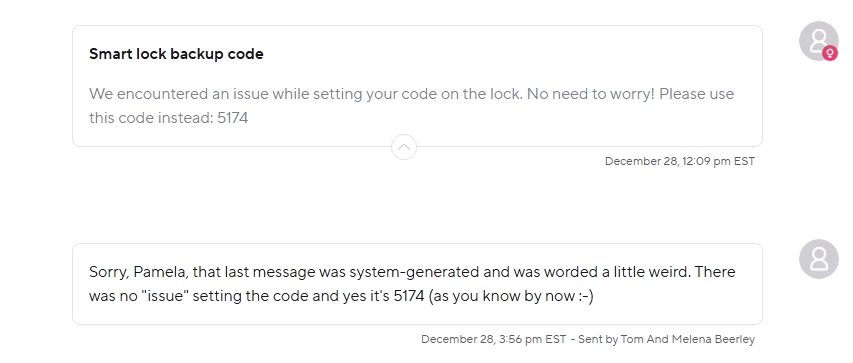
I’ve confirmed with my last couple bookings that the “backup code” message is being used in BOTH these situations: 

  • A.) The keypad code was successfully set to the “desired” value (e.g. last 4 digits of guest phone), but the code has not yet been communicated to the guest by check-in time.
  • B.) There was a technical problem attempting to set the keypad code to the “desired” value, and one of the “backup” codes needs to be used instead (i.e. one of the random backup codes that was created on the lock some time ago, to be used in situations like this).

The problem with using the SAME message template for both of these situations, is that it causes guests to receive messages that look like this, even when NOTHING has technically gone wrong:

In other words, for situation A, the default wording that’s been enabled for all Hospitable customers, is misleading and confusing for guests. And since situation A is probably much more common/prevalent than situation B, we ALL now need to edit the default/suggested text to something that makes sense in both situations (A as well as B).

I’m going with this for now:

Hi %guest_first_name%, this is a system message to re-confirm your keypad access code for check-in: %smartlock_backup_code%. This should be the last 4 digits of the phone number that was used to book your stay. If you'd like us to use a different code, let us know.